Search
Thermo Scientific Multiskan SkyHigh Microplate Spectrophotometer
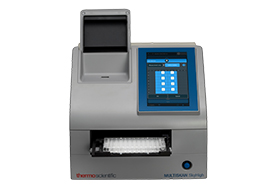
Multiskan SkyHigh instrument software download, version 1.0.76.0
Keep your Multiskan SkyHigh instrument functioning with the latest improvements and features by downloading the most recent instrument software.
Overview
Instrument software package v1.0.76.0 (including firmware v2.0.47) is compatible with Multiskan SkyHigh instrument models that are equipped with a touchscreen. Models without a touchscreen shall be updated via the latest SkanIt software.
Software updates
Added benefits with the software update v1.0.76.0 for the Multiskan SkyHigh instrument include:
- Latest built-in Operation System (Windows) security updates
- Instrument internal timer fix to guarantee correct kinetic timing
This update is recommended to all users.
Multiskan SkyHigh software download instructions
Review the installation instructions before updating the software.
Software upgrade
The software upgrade to Multiskan SkyHigh Microplate Spectrophotometer can be executed using the method described below. Please note that the upgrade process will take approximately 60 minutes to complete. Please note that all user defined settings and protocols will stay the same and will not be modified by the upgrade.
IMPORTANT! Disconnect the instrument from SkanIt Software and remove all external equipment from the USB before installing software update.
IMPORTANT! Do not switch the instrument off during the software installation. The installation time depends on the software update. During the installation, the instrument may re-boot several times. The installation is complete when the Home screen re-opens.
In case there is an issue encountered during the upgrade process, please try again and if the issue persists, please contact service.
- Download the “0AB6_060E_1.0.76.0_45.update” file to USB drive:
- Insert a fresh USB drive with at least 700 MB available space
- Navigate to the Microplate Readers section on the website
- Right-click the “Download” link for Software Update
- Select “Save Link as”
- Select the USB Drive and press “Save”
- Wait for the download to finish
- Insert USB drive into the Multiskan SkyHigh USB port
- There will be a prompt asking if you want to start upgrade, select “yes”
- Upgrade should start automatically
- Wait for the upgrade to be completed (upgrade should take about 40 minutes. Please do not interrupt the process. The system restarts when the upgrade is ready
- Check that SW version is 1.0.76.0 after upgrade
Multiskan SkyHigh Release Notes 1.0.76.0
Looking for the powerful, intuitive software for Thermo Scientific Microplate Reader analyses?
Download latest version of SkanIt Software
仅供科研使用,不可用于诊断目的。