Search


引用和文献 (4396)
Applied Biosystems™
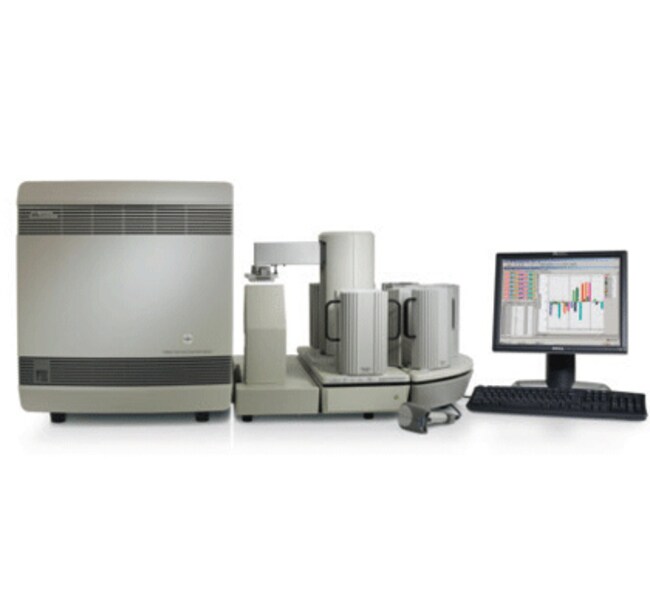
带有 384 孔区块模块的 7900HT Fast 实时荧光定量 PCR 系统
7900HT Fast 实时荧光定量 PCR 系统是一种实时定量 PCR 系统,它将 96 和 384了解更多信息
| 货号 | 数量 |
|---|---|
| 4329001 | 1 instrument |
货号 4329001
价格(CNY)
-
数量:
1 instrument
7900HT Fast 实时荧光定量 PCR 系统是一种实时定量 PCR 系统,它将 96 和 384 孔板的兼容性和 TaqMan™ 低密度阵列与全自动机械臂上样功能相结合,现在还提供选配的 Fast 实时荧光定量 PCR 功能。
•Fast PCR 选项可将标准 96 孔规格中的运行时间缩短至约 35 分钟,或将 384 孔板中的运行时间缩短至约 55 分钟。
• 500-660 nm 的连续波长检测允许在单次反应中使用多个荧光基团
• 测量基因表达水平,检测和定量测定病原体,进行等位基因分型(SNP 基因分型)分析,以及对基因序列的存在进行评分
• 96 或 384 孔板兼容性(包括 TaqMan™ 低密度阵列)
• 选配的企业版软件提供支持 21 CFR 第 11 部分指南中数据完整性和安全性相关规定的数据分析工具
• 免手动操作板加载和卸载可提供真正无人值守的自动化,使您可以提高实验室的工作效率
• 经证实的检测开发指南可节省时间和资金
高通量
7900HT 系统是一种检测和定量测定核酸序列的高通量实时荧光定量 PCR 系统。选配的自动化配件(未随附)与 384 孔板功能相结合,使 7900HT 系统非常适合满足当今药物发明过程的高通量要求。主要应用包括基因表达定量测定和使用荧光 5' 核酸酶试验检测单核苷酸多态性 (SNP)。
灵活性
7900HT 系统是一个通用研究工具,可以满足任何实时荧光定量 PCR 需求。用户可互换的热循环模块规格可使您选择适合您项目的规格,使用行业标准 96 和 384 孔规格以及新型 384 孔 TaqMan™ 低密度阵列和新 Fast 96 孔模块,将运行时间从 2 小时缩短至约 30 分钟。简单的自动化升级路径允许您添加功能以满足通量需求。Fast PCR 选项可将运行时间从 2 小时缩短至约 30 分钟。
功能强大的软件
使用两种自动化软件工具(板实用程序和自动化控制器),大多数基因表达和 SNP 基因分型工作流程对于高通量应用程序是完全自动化的,并且仅需很少的用户干预。您现在可以处理 5,000 个 384 孔板(384 个标志),相当于 192 万个基因型。使用相对定量测定 (RQ) 管理器,您还可以处理 200 个 384 孔板(每个多通路内源性对照具有一式四份数据点的 96 个检测器),相当于 153,600 个数据点。SNP Manager 和 RQ Manager 完全集成到一个完整的企业版系统中,通过同时分析更多的平板,突破了高通量 SNP 和基因表达研究中的数据分析瓶颈。这可减少手动操作分析时间并简化数据分析工作流程。
仅供研究使用。不适用于诊断用途。
•Fast PCR 选项可将标准 96 孔规格中的运行时间缩短至约 35 分钟,或将 384 孔板中的运行时间缩短至约 55 分钟。
• 500-660 nm 的连续波长检测允许在单次反应中使用多个荧光基团
• 测量基因表达水平,检测和定量测定病原体,进行等位基因分型(SNP 基因分型)分析,以及对基因序列的存在进行评分
• 96 或 384 孔板兼容性(包括 TaqMan™ 低密度阵列)
• 选配的企业版软件提供支持 21 CFR 第 11 部分指南中数据完整性和安全性相关规定的数据分析工具
• 免手动操作板加载和卸载可提供真正无人值守的自动化,使您可以提高实验室的工作效率
• 经证实的检测开发指南可节省时间和资金
高通量
7900HT 系统是一种检测和定量测定核酸序列的高通量实时荧光定量 PCR 系统。选配的自动化配件(未随附)与 384 孔板功能相结合,使 7900HT 系统非常适合满足当今药物发明过程的高通量要求。主要应用包括基因表达定量测定和使用荧光 5' 核酸酶试验检测单核苷酸多态性 (SNP)。
灵活性
7900HT 系统是一个通用研究工具,可以满足任何实时荧光定量 PCR 需求。用户可互换的热循环模块规格可使您选择适合您项目的规格,使用行业标准 96 和 384 孔规格以及新型 384 孔 TaqMan™ 低密度阵列和新 Fast 96 孔模块,将运行时间从 2 小时缩短至约 30 分钟。简单的自动化升级路径允许您添加功能以满足通量需求。Fast PCR 选项可将运行时间从 2 小时缩短至约 30 分钟。
功能强大的软件
使用两种自动化软件工具(板实用程序和自动化控制器),大多数基因表达和 SNP 基因分型工作流程对于高通量应用程序是完全自动化的,并且仅需很少的用户干预。您现在可以处理 5,000 个 384 孔板(384 个标志),相当于 192 万个基因型。使用相对定量测定 (RQ) 管理器,您还可以处理 200 个 384 孔板(每个多通路内源性对照具有一式四份数据点的 96 个检测器),相当于 153,600 个数据点。SNP Manager 和 RQ Manager 完全集成到一个完整的企业版系统中,通过同时分析更多的平板,突破了高通量 SNP 和基因表达研究中的数据分析瓶颈。这可减少手动操作分析时间并简化数据分析工作流程。
仅供研究使用。不适用于诊断用途。
仅供科研使用。不可用于诊断程序。
规格
已校准染料SYBR™ Green I、ROX™、NED™、JOE™、TAMRA™、VIC™、FAM™、TET™
检测方法SYBR,引物探针检测
尺寸72 cm (W) x 84 cm (D) x 64 cm (H)(抽屉打开时)
动态范围高达9个对数级线性动态范围
适用于(设备)7900HT Fast 系统、AB 7900 HT 384 孔系统
产品规格384 孔板
高通量能力兼容高通量应用,多通路(技术)
光学延长寿命 488 nm 氩离子激光激发源,无滤光片(CCD 用作光谱仪,连续检测 500-650 nm)
参比荧光染料ROX(单独管)、无 ROX、其他惰性参比染料、ROX(预混合)
数量1 instrument
反应速度快速
反应体积范围5-20 µl
运行时间52分钟(384孔,快速模式),<2 小时(384孔,标准模式)
样品变温速率快速模式:± 2.2°C⁄s,标准模式:± 1.6°C⁄s
灵敏度低至10拷贝
温度范围(公制)4 至 100°C
热量准确度显示温度 ± 0.25°C
热循环系统基于 Peltier 的系统
热量均匀性±0.5°C
通量每天 ≥5,000 次实时 PCR 反应(384孔模块和自动化配件),每小时 ≥10,000 次终点 PCR 反应(384孔模块和自动化配件)
重量114 kg(带自动化配件),82 kg(不带自动化配件)
模块规格可互换
容量多达84个384孔板,带有选配的自动化配件
Unit SizeEach
内容与储存
1台带有384孔区块模块的仪器
常见问题解答 (FAQ)
What is the threshold on the Applied Biosystems real-time PCR instruments and how do I set it?
Is the Applied Biosystems 7900HT SDS Automation Controller software and Zymark Twister Instrument compatible with MicroAmp Fast Optical 96-Well Reaction Plates with Barcode (P/N 4346906)?
Why is my Applied Biosystems 7900HT SDS run file “read only” protected after the run has completed when using the SDS Automation Controller software and the Zymark Twister Instrument?
What is the default user name and password for logging into the SDS 2.3 software?
Where can I find a protocol to perform Fast TaqMan Real-Time PCR using the 384-well block on the Applied Biosystems 7900HT?
引用和文献 (4396)
引用和文献
Abstract
Increased hepatobiliary clearance of unconjugated thyroxine determines DMP 904-induced alterations in thyroid hormone homeostasis in rats.
Journal:Toxicological Sciences : An Official Journal of the Society of Toxicology
PubMed ID:
4-(3-pentylamino)-2,7-dimethyl-8-(2-methyl-4-methoxyphenyl)-pyrazolo-[1,5-a]-pyrimidine (DMP 904) is a potent and selective antagonist of corticotropin releasing factor receptor-1 (CRF1 receptor) with an efficacious anxiolytic profile in preclinical animal models. In subchronic toxicity studies in Sprague-Dawley rats, DMP 904 produced thyroid follicular cell hypertrophy and hyperplasia, and a low incidence of follicular cell adenoma. The
RAGE ligand upregulation of VEGF secretion in ARPE-19 cells.
Journal:Investigative Ophthalmology & Visual Science
PubMed ID:
PURPOSE: The importance of VEGF in stimulating neovascular age-related macular degeneration (AMD) is well-recognized, but the initiating factors that induce local upregulation of VEGF remain unclear. The current study was conducted to test the hypothesis that activation of RAGE (receptor for advanced glycation end products [AGEs]) by its ligands, including
SEROTONIN POLYMORPHISMS AND POSTTRAUMATIC STRESS DISORDER IN A TRAUMA EXPOSED AFRICAN AMERICAN POPULATION
Journal:DEPRESSION AND ANXIETY
PubMed ID:
Background: Genetic polymorphisms that influence serotonin (5-hydroxytryptamine, 5HT) neurotransmission are candidates for contributing to susceptibility to posttraumatic stress disorder (PTSD). The objective of our study was to determine if a variable length polymorphism for the promoter regions of the 5HT transporter (5HTTLPR), and/or a substitution polymorphism. in the promoter region
Cognitive Flexibility is Associated with KIBRA Variant and Modulated by Recent Tobacco Use
Journal:NEUROPSYCHOPHARMACOLOGY
PubMed ID:
The kidney and brain expressed protein gene (KIBRA) and the calsyntenin 2 gene (CLSTN2) are reportedly involved in synaptic plasticity. Single nucleotide polymorphisms (SNPs) rs17070145 (KIBRA) and rs6439886 (CLSTN2) have been found to affect memory performance measures. This study examined the association of KIBRA SNP rs17070145 and CLSTN2 SNPs rs6439886
Phenomic determinants of genomic variation in autism spectrum disorders
Journal:Journal of Medical Genetics
PubMed ID:
Background: Autism spectrum disorders (ASDs) are common, heritable neurobiologic conditions of unknown aetiology confounded by significant clinical and genetic heterogeneity. Methods: This study evaluated a broad categorisation of phenotypic traits (or phenome) for 100 subjects with Autism Diagnostic Interview-Revised/Autism Diagnostic Observation Schedule-Generic (ADI-R/ADOS-G) confirmed idiopathic ASD undergoing 1 Mb