Search

Applied Biosystems™
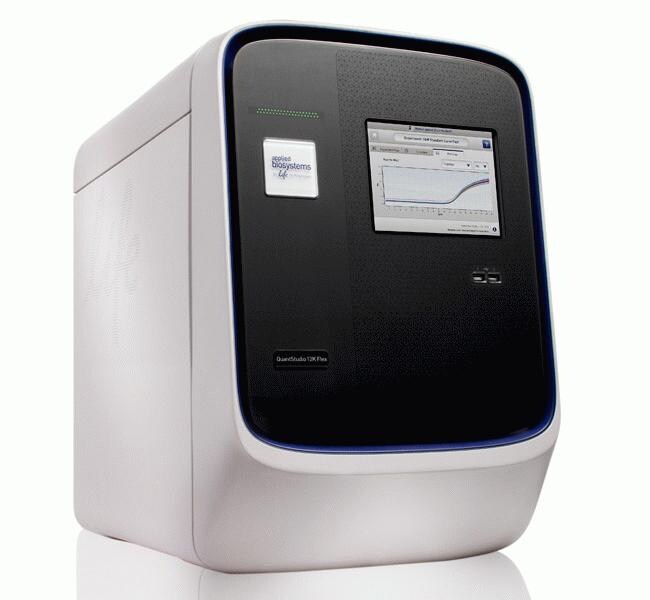
QuantStudio™ 12K Flex Real-Time PCR System, 96-well block, laptop
The QuantStudio™ 12K Flex system is a highly flexible, comprehensive real-time PCR platform that leverages the best of Applied Biosystems™Read more
| Catalog Number | Quantity |
|---|---|
| 4471050 | 1 system |
Catalog number 4471050
Price (CNY)
-
Quantity:
1 system
The QuantStudio™ 12K Flex system is a highly flexible, comprehensive real-time PCR platform that leverages the best of Applied Biosystems™ real-time technology in a single instrument. The QuantStudio 12K Flex Real-Time PCR System includes easy-to-change blocks that can accommodate OpenArray™ plates, TaqMan™ array cards, 384-well, 96-well, and FAST 96-well plates allowing you to select the format that is right for your project whether it's now or in the future, for maximum flexibility and consistency in your research.
Thermo Fisher Cloud
Thermo Fisher Cloud provides scientists with a secure place to store, analyze, and share data. Applied Biosystems qPCR Analysis Modules within the Thermo Fisher Cloud are web browser-based software tools that are flexible, fast and easy to use. These software tools are compatible with Mac or PC as well as most Applied Biosystems instrument file types.
The QuantStudio 12K Flex System's intuitive software, easy touch screen setup, automation integration, effortless block exchange, and easy-to- use OpenArray components are designed to let you get started right away and reduce hands on time. Plan for the future and save time, money, and space in your lab with the only all-in-one qPCR instrument enabling a broad range of applications with maximum throughput.
Flexibility & Scalability
• Includes five interchangeable blocks: The QuantStudio 12K Flex blocks accomodate 96-well, FAST 96-well, 384-well, TaqMan array cards, and OpenArray plates, for effortless scaling from 1 to 12,000 data points in a single run. Increase throughput as you dive deeper into your research, using just one instrument. As you begin your project, start with 96-well format experiments and then scale up to a higher throughput to get the statistically significant answers you need. Additionally, you can easily validate and screen your targets of interest with a selected panel of genes using novel formats such as the TaqMan array cards and OpenArray plates.
• Compatible with a full range of TaqMan assays: The QuantStudio 12K Flex System is optimized to enable clear, clean data for all TaqMan assays that might be used across a broad range of applications, including gene expression, microRNA and small noncoding RNAs, SNP genotyping, protein analysis, protein thermal shift, high resolution melt, copy number variation, and pathogen detection.
• Provides a seamless switch from qPCR to digital PCR: Increase the precision and sensitivity of your nucleic acid experiment by switching from qPCR to digital PCR mode using QuantStudio Digital PCR kits and DigitalSuite™ Software with the QuantStudio OpenArray block.
• Delivers peace of mind: Leave early on a Friday and monitor runs from home, knowing that the system can safely store over 100 runs.
Maximum Throughput
• Enhanced OptiFlex™ System: Building upon Applied Biosystems technology, the Enhanced OptiFlex System provides enhanced fluorescence detection for the accurate and sensitive data analysis necessary to collect 12,000 data points in a single run.
• Unprecedented coverage and sample throughput: The OpenArray format accelerates genomic validation and screening, driving over 150,000 data points per work day, enabling most projects to be completed in days instead of weeks.
• Simple OpenArray workflow: QuantStudio Open Array plates arrive in a case to facilitate ease of handling and ensure optimal data quality upon loading of samples using the Accufill™ System. Easily load four arrays into the QuantStudio 12K Flex instrument to achieve over 12,000 data points. Integrated sample tracking software lets you easily track your samples throughout the course of your project.
• Integrated analysis and quality systems: New intuitive touch-screen interface and integrated calendar feature allows for scheduling time of use on the instrument. Additional analysis software such as DigitalSuite v1.0, ExpressionSuite v1.0, and Genotyper v1.1 is available to help you analyze hundreds of targets and samples and achieve the statistical power you need.
QuantStudio 12K Flex Software
• Intuitive interface and innovative design for novice and experienced users
• Convenient walk-away operation
• Improved data analysis across block types
• Fully compatible with high-throughput environments
Expandable Software Architecture
Optional add-ons are available to upgrade the existing software:
• 21 CFR Part 11 compliance: This optional SAE module assists with Security, Auditing, and Electronic signature of records for full data traceability.
• High Resolution Melt (HRM): Using the built-in MeltDoctor™ protocols and calibrations, you can spend less time optimizing the run and more time customizing your results. Define the number of variants you want to see by quickly changing analysis settings.
• DigitalSuite Software v1.0: For OpenArray block users needing sensitivity for rare targets and precision to measure small differences in target abundance.
• ExpressionSuite Software v1.0: Stand-alone gene expression software with enhanced analysis tools that can analyze over 200 384-well plates or 10 OpenArray plates.
Learn more about available financing options and programs ›
Thermo Fisher Cloud
Thermo Fisher Cloud provides scientists with a secure place to store, analyze, and share data. Applied Biosystems qPCR Analysis Modules within the Thermo Fisher Cloud are web browser-based software tools that are flexible, fast and easy to use. These software tools are compatible with Mac or PC as well as most Applied Biosystems instrument file types.
The QuantStudio 12K Flex System's intuitive software, easy touch screen setup, automation integration, effortless block exchange, and easy-to- use OpenArray components are designed to let you get started right away and reduce hands on time. Plan for the future and save time, money, and space in your lab with the only all-in-one qPCR instrument enabling a broad range of applications with maximum throughput.
Flexibility & Scalability
• Includes five interchangeable blocks: The QuantStudio 12K Flex blocks accomodate 96-well, FAST 96-well, 384-well, TaqMan array cards, and OpenArray plates, for effortless scaling from 1 to 12,000 data points in a single run. Increase throughput as you dive deeper into your research, using just one instrument. As you begin your project, start with 96-well format experiments and then scale up to a higher throughput to get the statistically significant answers you need. Additionally, you can easily validate and screen your targets of interest with a selected panel of genes using novel formats such as the TaqMan array cards and OpenArray plates.
• Compatible with a full range of TaqMan assays: The QuantStudio 12K Flex System is optimized to enable clear, clean data for all TaqMan assays that might be used across a broad range of applications, including gene expression, microRNA and small noncoding RNAs, SNP genotyping, protein analysis, protein thermal shift, high resolution melt, copy number variation, and pathogen detection.
• Provides a seamless switch from qPCR to digital PCR: Increase the precision and sensitivity of your nucleic acid experiment by switching from qPCR to digital PCR mode using QuantStudio Digital PCR kits and DigitalSuite™ Software with the QuantStudio OpenArray block.
• Delivers peace of mind: Leave early on a Friday and monitor runs from home, knowing that the system can safely store over 100 runs.
Maximum Throughput
• Enhanced OptiFlex™ System: Building upon Applied Biosystems technology, the Enhanced OptiFlex System provides enhanced fluorescence detection for the accurate and sensitive data analysis necessary to collect 12,000 data points in a single run.
• Unprecedented coverage and sample throughput: The OpenArray format accelerates genomic validation and screening, driving over 150,000 data points per work day, enabling most projects to be completed in days instead of weeks.
• Simple OpenArray workflow: QuantStudio Open Array plates arrive in a case to facilitate ease of handling and ensure optimal data quality upon loading of samples using the Accufill™ System. Easily load four arrays into the QuantStudio 12K Flex instrument to achieve over 12,000 data points. Integrated sample tracking software lets you easily track your samples throughout the course of your project.
• Integrated analysis and quality systems: New intuitive touch-screen interface and integrated calendar feature allows for scheduling time of use on the instrument. Additional analysis software such as DigitalSuite v1.0, ExpressionSuite v1.0, and Genotyper v1.1 is available to help you analyze hundreds of targets and samples and achieve the statistical power you need.
QuantStudio 12K Flex Software
• Intuitive interface and innovative design for novice and experienced users
• Convenient walk-away operation
• Improved data analysis across block types
• Fully compatible with high-throughput environments
Expandable Software Architecture
Optional add-ons are available to upgrade the existing software:
• 21 CFR Part 11 compliance: This optional SAE module assists with Security, Auditing, and Electronic signature of records for full data traceability.
• High Resolution Melt (HRM): Using the built-in MeltDoctor™ protocols and calibrations, you can spend less time optimizing the run and more time customizing your results. Define the number of variants you want to see by quickly changing analysis settings.
• DigitalSuite Software v1.0: For OpenArray block users needing sensitivity for rare targets and precision to measure small differences in target abundance.
• ExpressionSuite Software v1.0: Stand-alone gene expression software with enhanced analysis tools that can analyze over 200 384-well plates or 10 OpenArray plates.
Learn more about available financing options and programs ›
For Research Use Only. Not for use in diagnostic procedures.
Specifications
Display TypeTouchscreen
For Use With (Equipment)QuantStudio™
FormatIndividual
Product LineQuantStudio
Quantity1 system
Shipping ConditionRoom Temperature
Block FormatInterchangeable
Unit SizeEach
Contents & Storage
96-well Block, Laptop