Search

Applied Biosystems™
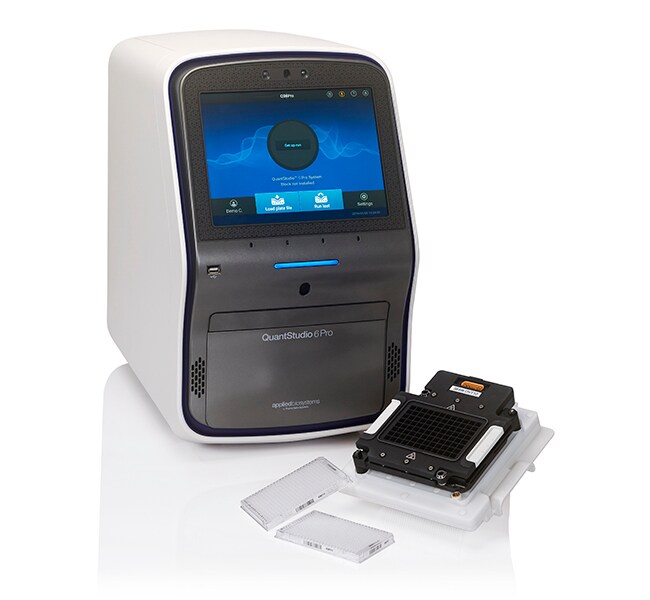
QuantStudio™ 6 Pro Real-Time PCR System, 384-well
The Applied Biosystems QuantStudio 6 Pro Real-Time PCR System adds innovative smart features to the real-time PCR (qPCR) workflow, allRead more
| Catalog Number | Quantity |
|---|---|
| A43161 | 1 System |
Catalog number A43161
Price (CNY)
-
Quantity:
1 System
The Applied Biosystems QuantStudio 6 Pro Real-Time PCR System adds innovative smart features to the real-time PCR (qPCR) workflow, all in a compact footprint. With facial authentication, voice commands, Smart Help, multiplex capability, motorized interchangeable blocks, simplified workflow, intuitive software, and large capacitive touch-screen interface, the QuantStudio 6 Pro system offers exceptional reproducibility with minimal well-to-well and instrument-to-instrument variation. Designed for ultimate ease-of-use, the system offers high quality, excellent reliability, and an optimal user experience for researchers who want to work smarter in the lab.
Features of the QuantStudio 6 Pro Real-Time PCR System include:
• Easy and convenient hands-free operation with facial authentication and voice commands
• Reduced errors and manual entries with smart qPCR workflow and TaqMan Array Plates with RFID
• Space savings with small footprint and true standalone operation; set-up, start, monitor, and analyze directly on the touchscreen
• Peace of mind with Smart Help; contact Technical Support directly from the touchscreen
• Reduced downtime with Smart Remote Support; show issues to Technical Support for speedy resolution
• Application versatility with easily changed blocks and three different block types
• Access, analyze, and share data anytime, anywhere with our Connect cloud-based platform for real-time information access, secure data storage, and online results sharing
• Remotely monitor experiments using the Instrument Connect monitoring app
• Design and Analysis software compatible with PC and Mac operating systems
• Compatible with over 8 million TaqMan Assays for gene expression, genetic variation, gene regulation, or protein expression experiments
Easy and convenient hands-free operation
The QuantStudio 6 Pro system was designed for a simple and powerful qPCR experience. Hands-free operation with facial authentication and voice commands enables users to quickly and easily access their personal profiles and settings without even removing their gloves.
Smart qPCR for ultimate ease of use
With embedded RFID readers, the QuantStudio 6 Pro system has the capability to run TaqMan Array Plates with RFID tags. These RFID tags simplify data tracking (with embedded lot number, expiration date, etc.) and reduce the need for manual data entry with preloaded assay layout, dye information, and thermal protocol. Automating this data transfer allows users to simply load the plate and start the run—no data entry needed.
Learn more about the TaqMan Array Plates with RFID ›
Peace of mind with Smart service
Minimize downtime with premium service offerings for the QuantStudio 6 Pro system. Smart Help allows users to contact Technical Support directly from the touchscreen, without the need to download files or spend time on the phone. Experienced technicians will analyze the request and respond according to the user’s preference (phone or email) and resolve the issue as quickly as possible.
Smart Remote Support is an immersive collaboration tool that allows customers to quickly and efficiently show issues to Technical Support for resolution, helping reduce instrument downtime compared to on-site repair and helping minimize the need for on-site visits.
Connect
The Connect platform provides scientists with a secure place to store, analyze, and share data. Applied Biosystems qPCR Analysis Modules within the platform are web browser-based software tools that are flexible, fast, and easy to use. These software tools support a variety of analyses including relative quantitation, standard curve, high resolution melt (HRM), genotyping, and presence/absence. They are compatible with Mac or PC as well as most Applied Biosystems instrument file types.
Format flexibility
The QuantStudio 6 Pro system accommodates the interchange of 96-well (0.2 mL), 96-well (0.1 mL), and 384-well blocks. The system is delivered with one block type; other block types may be purchased separately. For a system that also supports TaqMan array cards (TAC), as well as automation, please see our QuantStudio 7 Pro Real-Time PCR System. The QuantStudio 6 Pro system can also be upgraded to a QuantStudio 7 Pro system at a later date, as your needs change. And for the ultimate in flexibility, consider the QuantStudio 12K Flex Real-Time PCR System, which also accommodates TaqMan OpenArray plates.
Upgrade capabilities when you need them
The QuantStudio 6 Pro system can be seamlessly upgraded to a QuantStudio 7 Pro system by a field service engineer to give you additional automation, throughput, and multiplexing capabilities.
High application versatility
Simple workflows, reliable assays and reagents, multiple formats, and intuitive software are available for a broad range of applications, including gene expression, genetic variation, and gene regulation.
Results you can trust
Improved well-to-well and instrument-to-instrument data accuracy is achieved with the OptiFlex system, which features five coupled excitation and emission filter channels.
Sensitive data analysis
Detect changes in target quantity as small as 1.5-fold in single-plex reactions and obtain 10 logs of linear dynamic range.
Features of the QuantStudio 6 Pro Real-Time PCR System include:
• Easy and convenient hands-free operation with facial authentication and voice commands
• Reduced errors and manual entries with smart qPCR workflow and TaqMan Array Plates with RFID
• Space savings with small footprint and true standalone operation; set-up, start, monitor, and analyze directly on the touchscreen
• Peace of mind with Smart Help; contact Technical Support directly from the touchscreen
• Reduced downtime with Smart Remote Support; show issues to Technical Support for speedy resolution
• Application versatility with easily changed blocks and three different block types
• Access, analyze, and share data anytime, anywhere with our Connect cloud-based platform for real-time information access, secure data storage, and online results sharing
• Remotely monitor experiments using the Instrument Connect monitoring app
• Design and Analysis software compatible with PC and Mac operating systems
• Compatible with over 8 million TaqMan Assays for gene expression, genetic variation, gene regulation, or protein expression experiments
Easy and convenient hands-free operation
The QuantStudio 6 Pro system was designed for a simple and powerful qPCR experience. Hands-free operation with facial authentication and voice commands enables users to quickly and easily access their personal profiles and settings without even removing their gloves.
Smart qPCR for ultimate ease of use
With embedded RFID readers, the QuantStudio 6 Pro system has the capability to run TaqMan Array Plates with RFID tags. These RFID tags simplify data tracking (with embedded lot number, expiration date, etc.) and reduce the need for manual data entry with preloaded assay layout, dye information, and thermal protocol. Automating this data transfer allows users to simply load the plate and start the run—no data entry needed.
Learn more about the TaqMan Array Plates with RFID ›
Peace of mind with Smart service
Minimize downtime with premium service offerings for the QuantStudio 6 Pro system. Smart Help allows users to contact Technical Support directly from the touchscreen, without the need to download files or spend time on the phone. Experienced technicians will analyze the request and respond according to the user’s preference (phone or email) and resolve the issue as quickly as possible.
Smart Remote Support is an immersive collaboration tool that allows customers to quickly and efficiently show issues to Technical Support for resolution, helping reduce instrument downtime compared to on-site repair and helping minimize the need for on-site visits.
Connect
The Connect platform provides scientists with a secure place to store, analyze, and share data. Applied Biosystems qPCR Analysis Modules within the platform are web browser-based software tools that are flexible, fast, and easy to use. These software tools support a variety of analyses including relative quantitation, standard curve, high resolution melt (HRM), genotyping, and presence/absence. They are compatible with Mac or PC as well as most Applied Biosystems instrument file types.
Format flexibility
The QuantStudio 6 Pro system accommodates the interchange of 96-well (0.2 mL), 96-well (0.1 mL), and 384-well blocks. The system is delivered with one block type; other block types may be purchased separately. For a system that also supports TaqMan array cards (TAC), as well as automation, please see our QuantStudio 7 Pro Real-Time PCR System. The QuantStudio 6 Pro system can also be upgraded to a QuantStudio 7 Pro system at a later date, as your needs change. And for the ultimate in flexibility, consider the QuantStudio 12K Flex Real-Time PCR System, which also accommodates TaqMan OpenArray plates.
Upgrade capabilities when you need them
The QuantStudio 6 Pro system can be seamlessly upgraded to a QuantStudio 7 Pro system by a field service engineer to give you additional automation, throughput, and multiplexing capabilities.
High application versatility
Simple workflows, reliable assays and reagents, multiple formats, and intuitive software are available for a broad range of applications, including gene expression, genetic variation, and gene regulation.
Results you can trust
Improved well-to-well and instrument-to-instrument data accuracy is achieved with the OptiFlex system, which features five coupled excitation and emission filter channels.
Sensitive data analysis
Detect changes in target quantity as small as 1.5-fold in single-plex reactions and obtain 10 logs of linear dynamic range.
For Research Use Only. Not for use in diagnostic procedures.
Specifications
Display Type12 in. Color Touchscreen
For Use With (Equipment)QuantStudio™
Format384-well Plate
Product LineQuantStudio
Quantity1 System
Shipping ConditionRoom Temperature
Block FormatInterchangeable
Unit SizeEach
Contents & Storage
QuantStudio 6 Pro Real Time PCR System with 384-well block