Search


Citations & References (51)
Applied Biosystems™
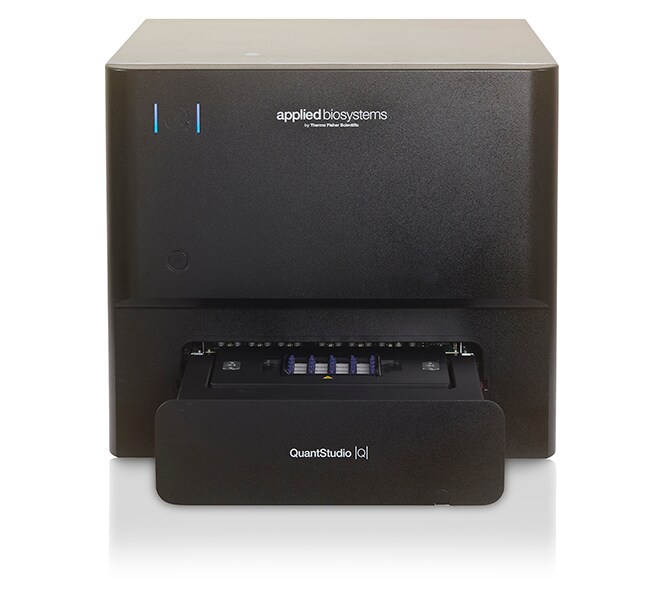
QuantStudio™ Absolute Q™ Digital PCR System, desktop
The Applied Biosystems QuantStudio Absolute Q Digital PCR System combines the power of digital PCR (dPCR) absolute quantification with theRead more
| Catalog Number | Quantity |
|---|---|
| A52864 | 1 system |
Catalog number A52864
Price (CNY)
-
Quantity:
1 system
The Applied Biosystems QuantStudio Absolute Q Digital PCR System combines the power of digital PCR (dPCR) absolute quantification with the simplicity of a qPCR workflow. With a single hands-on step that takes five minutes to complete, dPCR is now easier than ever. The QuantStudio Absolute Q system provides a high quality, consistent, and easy-to-use solution for researchers who want to join the quantification revolution.
Features of the QuantStudio Absolute Q system include:
• Easy and convenient qPCR-like workflow with only five minutes of hands-on time
• Reduced errors and manual inputs with all functions integrated into a single instrument
• Increased productivity with results in as little as 90 minutes
• Reduced downtime with Smart Remote Support; show issues to Technical Support for speedy resolution
• QuantStudio Absolute Q Digital PCR software enables intuitive setup, monitoring, and analysis
- Security, auditing, and e-signature features for 21CFR part 11-compliance support
• Compatible with Absolute Q Liquid Biopsy Digital PCR assays for oncology applications, as well as our portfolio of TaqMan assays for gene expression, genetic variation, gene regulation, and other quantification experiments
Easy and convenient workflow
The QuantStudio Absolute Q system was designed for a simple and powerful dPCR experience. All the necessary steps for dPCR—compartmentalization, thermal cycling, and data acquisition—are integrated into a single instrument. The simple qPCR-like workflow can be completed with under 5 minutes of hands-on time.
Accomplish more, faster
The QuantStudio Absolute Q system can complete a run in less than 90 minutes.
Results you can trust
Consumable plates with patented microfluidic array technology allow for over 95% of the sample to be analyzed across over 20,000 consistently generated microchambers for optimal quantification of even rare targets.
Application versatility
With the ability to multiplex using up to four optical channels, the QuantStudio Absolute Q system enables more targets to be measured per sample, saving time and reagents. The Absolute Q dPCR platform is an ideal solution for any application requiring high sensitivity, precision, and accuracy.
More information (including application notes) >
QuantStudio Absolute Q assays >
Powerful and intuitive software
Absolute Q dPCR software is designed to complement our intuitive workflow to save time and effort. Parameters such as plate format, optical channels, and thermal conditions can be easily modified to start generating data quickly.
The clean and powerful data analysis interface provides a range of options for processing data. Whether visualizing multiplexed data or calculating concentrations across replicates, results can be exported for downstream analysis or compiled into an easy-to-read report in just a few clicks.
Included security, auditing and e-signature software features support compliance with 21CFR part 11 for regulated environments.
Peace of mind with Smart service
Minimize downtime with premium service offerings for the QuantStudio Absolute Q Digital PCR System. Smart Remote Support is an immersive collaboration tool that allows customers to quickly and efficiently show issues to Technical Support for resolution, helping reduce instrument downtime compared to on-site repair and helping minimize the need for on-site visits.
Learn more about available financing options and programs ›
Features of the QuantStudio Absolute Q system include:
• Easy and convenient qPCR-like workflow with only five minutes of hands-on time
• Reduced errors and manual inputs with all functions integrated into a single instrument
• Increased productivity with results in as little as 90 minutes
• Reduced downtime with Smart Remote Support; show issues to Technical Support for speedy resolution
• QuantStudio Absolute Q Digital PCR software enables intuitive setup, monitoring, and analysis
- Security, auditing, and e-signature features for 21CFR part 11-compliance support
• Compatible with Absolute Q Liquid Biopsy Digital PCR assays for oncology applications, as well as our portfolio of TaqMan assays for gene expression, genetic variation, gene regulation, and other quantification experiments
Easy and convenient workflow
The QuantStudio Absolute Q system was designed for a simple and powerful dPCR experience. All the necessary steps for dPCR—compartmentalization, thermal cycling, and data acquisition—are integrated into a single instrument. The simple qPCR-like workflow can be completed with under 5 minutes of hands-on time.
Accomplish more, faster
The QuantStudio Absolute Q system can complete a run in less than 90 minutes.
Results you can trust
Consumable plates with patented microfluidic array technology allow for over 95% of the sample to be analyzed across over 20,000 consistently generated microchambers for optimal quantification of even rare targets.
Application versatility
With the ability to multiplex using up to four optical channels, the QuantStudio Absolute Q system enables more targets to be measured per sample, saving time and reagents. The Absolute Q dPCR platform is an ideal solution for any application requiring high sensitivity, precision, and accuracy.
More information (including application notes) >
QuantStudio Absolute Q assays >
Powerful and intuitive software
Absolute Q dPCR software is designed to complement our intuitive workflow to save time and effort. Parameters such as plate format, optical channels, and thermal conditions can be easily modified to start generating data quickly.
The clean and powerful data analysis interface provides a range of options for processing data. Whether visualizing multiplexed data or calculating concentrations across replicates, results can be exported for downstream analysis or compiled into an easy-to-read report in just a few clicks.
Included security, auditing and e-signature software features support compliance with 21CFR part 11 for regulated environments.
Peace of mind with Smart service
Minimize downtime with premium service offerings for the QuantStudio Absolute Q Digital PCR System. Smart Remote Support is an immersive collaboration tool that allows customers to quickly and efficiently show issues to Technical Support for resolution, helping reduce instrument downtime compared to on-site repair and helping minimize the need for on-site visits.
Learn more about available financing options and programs ›
For Research Use Only. Not for use in diagnostic procedures
Specifications
For Use With (Application)Digital PCR
For Use With (Equipment)QuantStudio Absolute Q MAP16 Plate
Product LineQuantStudio
Quantity1 system
Shipping ConditionRoom Temperature
Block FormatNon-interchangeable
Unit SizeEach
Contents & Storage
QuantStudio Absolute Q Digital PCR System, Desktop
Frequently asked questions (FAQs)
What is the difference between continuous melt curves and step and hold melt curves on the Applied Biosystems Real-Time PCR Instruments?
What is the limit of detection for the QuantStudio Absolute Q Digital PCR System (Cat. No. A52864)?
What optical dyes does QuantStudio Absolute Q Digital PCR System (Cat. No. A52864) support?
I finished running my experiment on the QuantStudio Absolute Q Digital PCR instrument but just realized that I had selected the wrong dyes during setup. Can I change the dyes that were used after the run?
I ran my experiment using the QuantStudio Absolute Q Digital PCR System but did not actually use dyes in all the channels. Is there a way to only see those dye channels that were used?
Citations & References (51)
Citations & References
Abstract
A digital PCR-based protocol to detect and quantify RNA editing events at hotspots.
Journal:STAR protocols
PubMed ID:35284835
APOBEC3A, CRISPR programmable RNA base editors, or other enzymes can edit RNA transcripts at specific locations or hotspots. Precise quantification of these RNA-editing events is crucial to determine the activity and efficiency of these enzymes in cells. We have developed a quick method to quantify RNA-editing activity using digital PCR,
Evaluation of four human-associated fecal biomarkers in wastewater in Southern Ontario.
Journal:The Science of the total environment
PubMed ID:37660819
Regulating Oral Biofilm from Cariogenic State to Non-Cariogenic State via Novel Combination of Bioactive Therapeutic Composite and Gene-Knockout.
Journal:Microorganisms
PubMed ID:32933157
The objectives were to investigate a novel combination of gene-knockout with antimicrobial dimethylaminohexadecyl methacrylate (DMAHDM) composite in regulating oral biofilm from a cariogenic state toward a non-cariogenic state. A tri-species biofilm model included cariogenic Streptococcus mutans (S. mutans), and non-cariogenic Streptococcus sanguinis (S. sanguinis) and Streptococcus gordonii (S. gordonii). Biofilm
Optimization and validation of sample preparation for metagenomic sequencing of viruses in clinical samples.
Journal:Microbiome
PubMed ID:28789678
BACKGROUND: Sequence-specific PCR is the most common approach for virus identification in diagnostic laboratories. However, as specific PCR only detects pre-defined targets, novel virus strains or viruses not included in routine test panels will be missed. Recently, advances in high-throughput sequencing allow for virus-sequence-independent identification of entire virus populations in
A combined ANXA2-NDRG1-STAT1 gene signature predicts response to chemoradiotherapy in cervical cancer.
Journal:Journal of experimental & clinical cancer research : CR
PubMed ID:31242951
BACKGROUND: A better understanding of locally advanced cervical cancer (LACC) is mandatory for further improving the rates of disease control, since a significant proportion of patients still fail to respond or undergo relapse after concurrent chemoradiation treatment (CRT), and survival for these patients has generally remained poor. METHODS: To identify