适用于 iBright 成像系统的热敏打印机

适用于 iBright 成像系统的热敏打印机

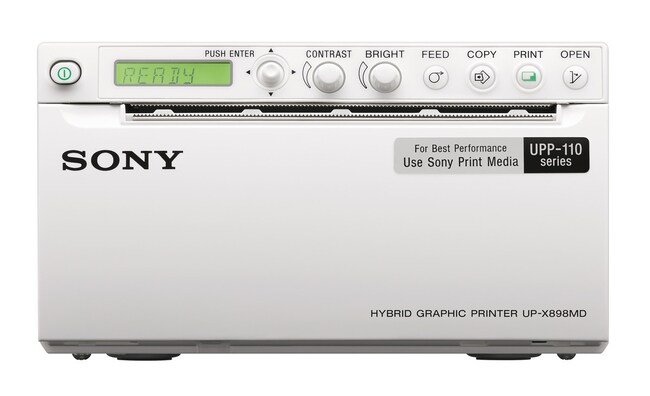
Sony UP-X898MD 数字图形打印机是一款热敏打印机,支持从 iBright 成像系统直接打印。这款高速、紧凑型打印机即插即用,通过任一可用的 USB 端口直接连接 iBright了解更多信息
Have Questions?
货号数量
A452351 printer
货号 A45235
价格(CNY)
-
数量:
1 printer
Sony UP-X898MD 数字图形打印机是一款热敏打印机,支持从 iBright 成像系统直接打印。这款高速、紧凑型打印机即插即用,通过任一可用的 USB 端口直接连接 iBright 成像系统,可在不到两秒内完成高质量黑、白打印。几秒钟便可打印高质量图像,无需网络连接。通过 iBright 视图端口打印图像,显示当前缩放级别并保留分析注释。

数字图形打印机的特点包括:
• 高速打印 — 在大约两秒内打印 320 mm x 100 mm 图像
• 紧凑型、节省空间的设计(88 mm x 154 mm x 240 mm [高x宽x深])
• 高密度 325 dpi 打印(1280 x 500 像素)
• 256级灰阶
• USB 2.0 接口

仅供科研使用。不可用于诊断程序。
规格
容量多达254个
尺寸3.46 x 6.06 x 9.45 in (88 x 154 x 240 mm)
适用于(设备)iBright 成像系统
数量1 printer
分辨率325 DPI
运输条件室温
重量5.5 lbs (2.5 kg)
适用于(应用)化学发光 Western 印迹成像、DNA 凝胶成像、蛋白凝胶成像
产品线iBright
产品类型成像系统
Unit SizeEach

常见问题解答 (FAQ)

How are images on an iBright Imaging System printed on a thermal printer?

Once communication is established between the IBright imager and the thermal printer, a print button will become available on the main screen near the image display. Pressing this button will initiate printing of the image currently shown on the instrument screen. This is a separate workflow from the print settings available through the system menu, which are used for printing image reports on a standard network printer.

For more information on iBright features and capabilities, visit this page.

Find additional tips, troubleshooting help, and resources within our Protein Electrophoresis and Western Blotting Support Center.

How does the Thermal Printer for iBright Imaging Systems (Cat. No. A45235) interface with the iBright Imaging Systems?

To establish communication between the Thermal Printer and the iBright imager, first the communication channel on the printer needs to be updated. This can be done by accessing the printer menu, navigating from Digital to Driver and then using the up down toggle to set the printer to channel 897. Once that is complete, the thermal printer can then be connected directly to one of the iBright imager rear USB ports via A to B type USB cable. After installation, the thermal printer can be controlled directly with the iBright onboard software via the on-screen print functionality.

Find additional tips, troubleshooting help, and resources within our Protein Electrophoresis and Western Blotting Support Center.

What is the power consumption of the Thermal Printer for iBright Imaging Systems?

In stand-by mode, the power consumption of the Thermal Printer for iBright Imaging Systems is 10 Watts, and during the printing process, it is 115 Watts.

Find additional tips, troubleshooting help, and resources within our Protein Electrophoresis and Western Blotting Support Center.

What type of paper do you recommend for the Thermal Printer for iBright Imaging Systems?

We recommend using UVP High Gloss Thermal Printer Paper (Fisher Cat. No. UVP89017401). It is 110 mm wide, with 220 to 245 prints per roll.

Find additional tips, troubleshooting help, and resources within our Protein Electrophoresis and Western Blotting Support Center.