Search

Applied Biosystems™
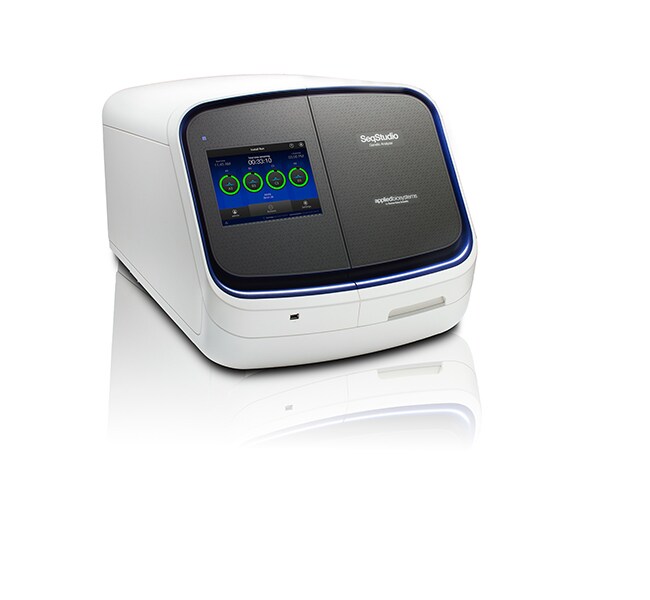
用于 HID 的 SeqStudio™ 基因分析仪,笔记本电脑,附带培训和 1 年额外保修
用于 HID 分析的 Applied Biosystems SeqStudio 基因分析仪是一款低通量、简便易用的台式系统,仅需一次简单的点击,即可进行金标准片段分析或 Sanger 测序了解更多信息
| 货号 | 数量 |
|---|---|
| A46367 | 1 instrument package |
货号 A46367
价格(CNY)
-
数量:
1 instrument package
用于 HID 分析的 Applied Biosystems SeqStudio 基因分析仪是一款低通量、简便易用的台式系统,仅需一次简单的点击,即可进行金标准片段分析或 Sanger 测序。它经过了广泛的 HID 法医学试剂盒验证,可为您提供可靠的结果。SeqStudio 基因分析仪采用了较新的触摸屏技术,而且其提供的数据质量、可靠性和支持可满足您对 Applied Biosystems 仪器的期望。
用于 HID 的 SeqStudio 基因分析仪具有以下功能:
•通用一体式卡盒—集成了 POP-1 聚合物、阳极缓冲液、聚合物输送系统、4 毛细管阵列,可极大限度地缩短仪器设置和维护时间;机载试剂的寿命可长达六个月,并且可实现 250 次进样(1000 份样品)
•可靠的结果—优化的数据采集软件 (SeqStudio DCS v1.2) 以及可与许多 Applied Biosystems STR 试剂盒配合使用的验证证书
•SAE 软件—安全、审查和电子签名功能可提供保护和可追溯性
•紧凑型设计—可使用便携式计算机或台式计算机进行配置;占用空间比我们其他的基因分析仪系统更小
•易于操作—通过 RFID 技术跟踪耗材使用情况,实现自动校准,并采用交互式触摸屏控件,可简化工作流程
•顶级培训和支持—每台用于 HID 的 SeqStudio 分析仪都包括一日培训,由我们的法医 FAS 团队提供,旨在让您快速上手并运行;后续支持则由我们遍布全球的 > 2800 名现场服务工程师和技术支持科学家提供
SeqStudio 基因分析仪采用卡盒式系统,使用和维护都很方便。一体式卡夹包含毛细管阵列、胶泵系统和阳极缓冲液。卡夹采用了可同时兼容 Sanger 测序和片段分析的通用聚合物(POP-1 聚合物),允许试剂在仪器上储存六个月之久。SeqStudio 分析仪与标准 96 孔板或 8 孔联管兼容,每次运行可在 40 分钟内生成结果。
验证
经 DNA 分析方法科学工作组(SWGDAM,2016 年 12 月)验证,用于 HID 的 SeqStudio 基因分析仪和 DCS v1.2 软件可与下列试剂盒一起使用:GlobalFiler、GlobalFiler Express、VeriFiler Plus、VeriFiler Express、Huaxia Platinum、Identifiler Plus、MiniFiler、NGMSelect、NGM Detect、YFiler、YFiler Plus PCR 扩增试剂盒。研究的详细信息和数据,包括大小分析的精确度和准确性、基因分型一致性、分辨率、灵敏度和动态范围、最低检测阈值以及污染和混合物研究,请参阅 SeqStudio 验证用户手册。在应用新技术之前,每个实验室都应执行内部验证研究,以建立适当的指南、实验方案和规程。
培训
所含的培训由 HID 现场应用科学家提供,在客户的场所进行。一日培训包括课堂教学,以及仪器和用户界面的手动操作审查。或者,也可安排一个湿实验室部分,对运行设置和实际进样操作进行演练。
保修
所含的延长保修计划在现有制造商有限保修的基础上增加了额外的覆盖范围。延长保修包括计划性维护访问。如果您的仪器需要维修,延长保修服务会包揽零部件、人工和差旅费用,您无需额外付费。此外,您还将获得:
•保证 2 天现场响应时间*
• 安排现场计划维护
• 优先联络远程服务工程师
某些除外条款适用。有关详细信息,请联系您的服务和支持代表:service.sales@thermofisher.com。
注:
• SeqStudio HID 安装套件(货号 A46190 或 A46182)、SeqStudio 卡夹 (A41328)、GeneMapper IDx 软件、[延长保修期、]以及其他系统耗材和试剂单独销售。
• 使用 SAE 软件运行用于 HID 分析的 SeqStudio 分析仪需要一台计算机,因此,对于新安装,我们建议购买软件包 A46228 或 A46229。有关多次购买 SeqStudio 分析仪或其他安装配置,请咨询当地销售代表。
*仅在部分地理区域内提供。
用于 HID 的 SeqStudio 基因分析仪具有以下功能:
•通用一体式卡盒—集成了 POP-1 聚合物、阳极缓冲液、聚合物输送系统、4 毛细管阵列,可极大限度地缩短仪器设置和维护时间;机载试剂的寿命可长达六个月,并且可实现 250 次进样(1000 份样品)
•可靠的结果—优化的数据采集软件 (SeqStudio DCS v1.2) 以及可与许多 Applied Biosystems STR 试剂盒配合使用的验证证书
•SAE 软件—安全、审查和电子签名功能可提供保护和可追溯性
•紧凑型设计—可使用便携式计算机或台式计算机进行配置;占用空间比我们其他的基因分析仪系统更小
•易于操作—通过 RFID 技术跟踪耗材使用情况,实现自动校准,并采用交互式触摸屏控件,可简化工作流程
•顶级培训和支持—每台用于 HID 的 SeqStudio 分析仪都包括一日培训,由我们的法医 FAS 团队提供,旨在让您快速上手并运行;后续支持则由我们遍布全球的 > 2800 名现场服务工程师和技术支持科学家提供
SeqStudio 基因分析仪采用卡盒式系统,使用和维护都很方便。一体式卡夹包含毛细管阵列、胶泵系统和阳极缓冲液。卡夹采用了可同时兼容 Sanger 测序和片段分析的通用聚合物(POP-1 聚合物),允许试剂在仪器上储存六个月之久。SeqStudio 分析仪与标准 96 孔板或 8 孔联管兼容,每次运行可在 40 分钟内生成结果。
验证
经 DNA 分析方法科学工作组(SWGDAM,2016 年 12 月)验证,用于 HID 的 SeqStudio 基因分析仪和 DCS v1.2 软件可与下列试剂盒一起使用:GlobalFiler、GlobalFiler Express、VeriFiler Plus、VeriFiler Express、Huaxia Platinum、Identifiler Plus、MiniFiler、NGMSelect、NGM Detect、YFiler、YFiler Plus PCR 扩增试剂盒。研究的详细信息和数据,包括大小分析的精确度和准确性、基因分型一致性、分辨率、灵敏度和动态范围、最低检测阈值以及污染和混合物研究,请参阅 SeqStudio 验证用户手册。在应用新技术之前,每个实验室都应执行内部验证研究,以建立适当的指南、实验方案和规程。
培训
所含的培训由 HID 现场应用科学家提供,在客户的场所进行。一日培训包括课堂教学,以及仪器和用户界面的手动操作审查。或者,也可安排一个湿实验室部分,对运行设置和实际进样操作进行演练。
保修
所含的延长保修计划在现有制造商有限保修的基础上增加了额外的覆盖范围。延长保修包括计划性维护访问。如果您的仪器需要维修,延长保修服务会包揽零部件、人工和差旅费用,您无需额外付费。此外,您还将获得:
•保证 2 天现场响应时间*
• 安排现场计划维护
• 优先联络远程服务工程师
某些除外条款适用。有关详细信息,请联系您的服务和支持代表:service.sales@thermofisher.com。
注:
• SeqStudio HID 安装套件(货号 A46190 或 A46182)、SeqStudio 卡夹 (A41328)、GeneMapper IDx 软件、[延长保修期、]以及其他系统耗材和试剂单独销售。
• 使用 SAE 软件运行用于 HID 分析的 SeqStudio 分析仪需要一台计算机,因此,对于新安装,我们建议购买软件包 A46228 或 A46229。有关多次购买 SeqStudio 分析仪或其他安装配置,请咨询当地销售代表。
*仅在部分地理区域内提供。
规格
适用于(设备)测序仪器(基于毛细管电泳)
产品规格96 孔板、8 联排管
数量1 instrument package
运输条件室温
产品线SeqStudio
软件类型数据采集软件
Unit SizeEach
套装组件
A36187
货号
A36187
单位规格
数量
1
A46208
货号
A46208
单位规格
数量
1
A34273
货号
A34273
单位规格
数量
1
ZG61SCSEQSTUDIO
货号
ZG61SCSEQSTUDIO
单位规格
数量
1