Search

Applied Biosystems™
SeqStudio™ Flex 基因分析仪24毛细管阵列
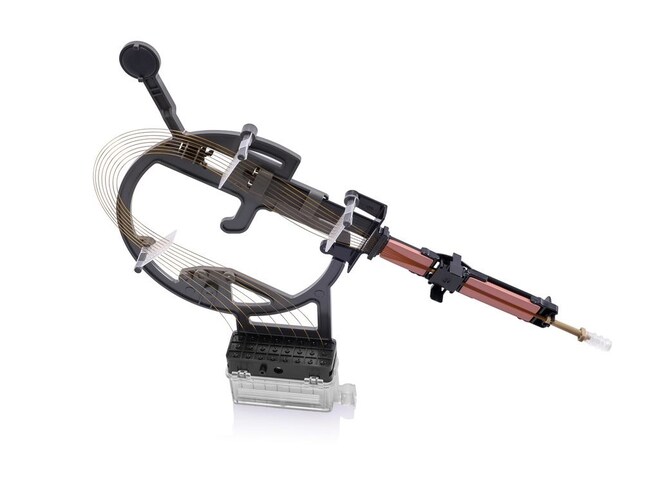
一种内部未包被阵列,可与 SeqStudio 24 Flex 基因分析仪配合使用,用于片段分析、测序和蛋白质质量分析应用。在此阵列中,毛细管长度为36或 50 cm,以预组装形式提供,每个阵列含有24条毛细管,且配有内置框架以便安装。
Have Questions?
更改视图

| 货号 | 毛细管长度 |
|---|---|
| A49105 | 36 cm |
| A49107 | 50 cm |
货号 A49105
价格(CNY)
34,325.00
Each
毛细管长度:
36 cm
价格(CNY)
34,325.00
Each
此阵列是一种内部未包被阵列,应与 SeqStudio 24 Flex 基因分析仪配合使用,用于片段分析、测序和蛋白质量分析应用。在此阵列中,毛细管长度为36或 50 cm,以预组装形式提供,每个阵列含有24条毛细管,且配有内置框架以便安装。
此阵列是一种内部未包被阵列,应与 SeqStudio 24 Flex 基因分析仪配合使用,用于片段分析、测序和蛋白质量分析应用。在此阵列中,毛细管长度为36或 50 cm,以预组装形式提供,每个阵列含有24条毛细管,且配有内置框架以便安装。
SeqStudio Flex 毛细管阵列采用经过改进的设计,与3500系统毛细管阵列相比,安装过程更容易,更能避免出错。改进的毛细管框架可尽量降低毛细管损坏和放置错误的风险,进而改善了用户体验(见下图)。
SeqStudio Flex 50-cm 阵列已针对多种应用进行了优化,适合与 POP-7、POP-6 和 POP-4 聚合物运行模块配合使用。这样用户就能灵活选择理想的运行时间和读长。有关运行模块、聚合物和阵列长度最佳配置的更多详细信息,请参阅下图。
与3500系统阵列一样,SeqStudio Flex 毛细管阵列也在标签上提供了集成射频识别 (RFID) 标记,以便查看、追踪和报告关于试剂和耗材的关键信息,包括用法、批号、部件号、有效期和仪器内使用寿命。借助 RFID 标签,数据采集软件还可在阵列过期或超过建议的使用限制时提醒用户更换阵列。
按照规格,SeqStudio Flex 毛细管阵列可进样160次。
SeqStudio Flex 毛细管阵列采用经过改进的设计,与3500系统毛细管阵列相比,安装过程更容易,更能避免出错。改进的毛细管框架可尽量降低毛细管损坏和放置错误的风险,进而改善了用户体验(见下图)。
SeqStudio Flex 50-cm 阵列已针对多种应用进行了优化,适合与 POP-7、POP-6 和 POP-4 聚合物运行模块配合使用。这样用户就能灵活选择理想的运行时间和读长。有关运行模块、聚合物和阵列长度最佳配置的更多详细信息,请参阅下图。
与3500系统阵列一样,SeqStudio Flex 毛细管阵列也在标签上提供了集成射频识别 (RFID) 标记,以便查看、追踪和报告关于试剂和耗材的关键信息,包括用法、批号、部件号、有效期和仪器内使用寿命。借助 RFID 标签,数据采集软件还可在阵列过期或超过建议的使用限制时提醒用户更换阵列。
按照规格,SeqStudio Flex 毛细管阵列可进样160次。
规格
毛细管长度36 cm
适用于(应用)人类身份鉴定、测序、片段分析
适用于(设备)SeqStudio™ Flex 24毛细管基因分析仪
毛细管数每套24条毛细管
数量1 array
Unit SizeEach