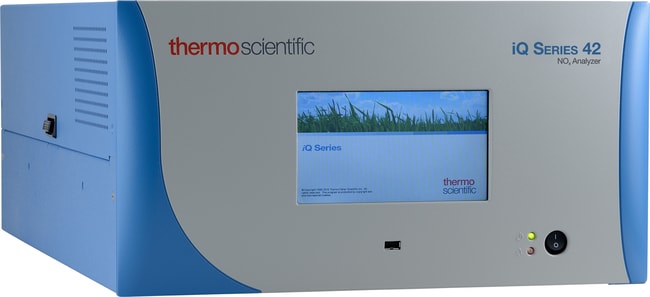
42iQD 氮氧化物分析仪
42iQD 氮氧化物分析仪
Thermo Scientific™

42iQD 氮氧化物分析仪

This product has been discontinued. We will offer technical support and service support as allowed by parts availability.
Have Questions?
货号 42IQD
价格(CNY)
-

采用 42i-LS 型 NO-NO2NOx 分析仪,利用化学发光技术测量空气中低至中等浓度的氮氧化物。Thermo Scientific™ 42i-LS 型采用单反应室单光电倍增管设计,可在 NO 和 NOx 模式间循环切换。42i-LS 具有用于 NO、NO2 和 NOx 的独立输出,可对每种气体单独进行校准。

了解 iQ,通过我们的下一代 42iQ 低浓度污染源 NO-NO2-NOx 分析仪实现智能化工作。

主要特点:

  • 标准双量程和自动量程
  • 5 秒响应时间
  • 温度和压力校正
  • 用户可选的浓度报警等级

iSeries 优势:

  • 可连接以太网实现高效远程访问
  • 具有一键编程功能的增强型用户界面和大尺寸显示屏
  • 闪存可存储更多的数据和用户可下载的软件
  • 增强的电子设计可优化产品的通用性
  • 改进布局更便于维护组件
规格
描述42iQD 氮氧化物分析仪
Unit SizeEach

常见问题解答 (FAQ)

In the iQ Series Gas Analyzer instruments, which distributed measurement and control (DMC) modules are serialized?

The serialized DMCs are unique to your analyzer and its configuration. To understand which DMCs are serialized within your instrument, navigate to the “Health Check” menu via the “Settings” button on the home screen or the health check button on the status bar. From the “Health Check” menu, click on “Status and Alarms”. The analyzer's serialized DMCs can be found by clicking on the “Serial Numbers” button.

When will the iQ Series Gas Analyzer instrument platform notify me of a maintenance requirement?

The embedded preventive maintenance schedule provides a warning when an item gets within 2 months of the replacement date. At that time, the line in the schedule will turn yellow and throw a “gear icon” notification to the status bar. The line will change from yellow to red once the item gets within 1 month of the replacement date. The “gear” icon will remain in place unless some activity is done to clear it.

Can I assign a name to the iQ Series Gas Analyzer instrument?

There are a couple of ways to uniquely identify each instrument. The “instrument ID” or Modbus device ID is a user editable, numeric string. The instrument “host name” is a user editable alpha-numeric string for mobile search functionality. The “host name” can be used to access the instrument over TCP/IP but data download file names and reports will only reference the instrument serial number.

Is there a way to obtain the configuration settings for iQ Series Gas Analyzer instruments?

The iQ Series Gas Analyzer instrument configuration settings can be downloaded from the analyzer to a USB memory device.

Do alarms prioritize in the iQ Series Gas Analyzer instruments?

There is no prioritization to the assignment of alarm or maintenance notifications by the iQ Series Gas Analyzer instruments, however, the way that those events generate email notifications is different. Upon power up, the analyzer waits 2 hrs to clear any alarms prior to sending any email notifications. Post start-up sequence, an alarm needs to be active for 5 continuous mins at which time an email notification will be generated and sent. The instrument will reflect an alarm condition on the status bar at any point that the instrument meets those alarm conditions, but an email will not be generated until any single alarm condition has existed for 5 continuous mins. Maintenance notifications generated by either predictive diagnostics or the embedded preventive maintenance schedule behave in the same manner, except that the alert must be active for 24 hrs prior to an email notification being sent.