Search

Applied Biosystems™
Custom TaqMan™ SNP 基因分型分析,人类
Applied Biosystems TaqMan SNP 基因分型分析试剂盒使用 TaqMan 5´-核酸酶化学试剂扩增纯化基因组 DNA 样品并检测这些样品中的特定多态性。每项测定可对个体进行单核苷酸多态性了解更多信息
Have Questions?
更改视图

| 货号 | 数量 |
|---|---|
| 4331349 | S (300 reactions), made to order |
| 4332072 | M (1000 reactions), made to order |
| 4332073 | L (2400 reactions), made to order |
货号 4331349
价格(CNY)
5,585.00
Each
数量:
S (300 reactions), made to order
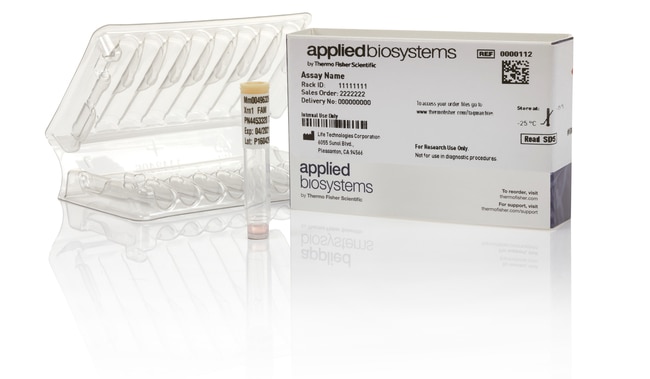
Applied Biosystems TaqMan SNP 基因分型分析试剂盒使用 TaqMan 5´-核酸酶化学试剂扩增纯化基因组 DNA 样品并检测这些样品中的特定多态性。每项测定可对个体进行单核苷酸多态性 (SNP) 基因分型,包括两个序列特异性引物和两个 TaqMan 小沟结合物 (MGB) 探针以及非荧光淬灭剂 (NFQ)。一个探针标记 VIC 染料以检测等位基因1序列;第二个探针标记 FAM 染料以检测等位基因2序列。
通过以保密方式向我们安全可靠的定制测定试剂盒设计工具提交靶序列,您可以轻松设计定制 TaqMan SNP 基因分型测定试剂盒,无需额外付费。
优势:
•经证实 — 黄金标准 TaqMan 化学和稳健的测定试剂盒设计提供了准确、可重现和可靠的结果
•简单 — 便利的单管规格和简单的工作流程提供了获得可靠结果的简易途径;无需优化
•灵活 — 使用我们安全可靠的定制测定试剂盒设计工具获得针对人类基因组中任何 SNP 的测定试剂盒设计,无需额外收费
•已检测 — 所有定制人测定试剂盒均对 20 份独特 DNA 样品进行了功能检测
大致运输时间
北美 4–6 天,欧洲 6–10 天
自由定制测定试剂盒设计工具可生成用于检测 SNP、MNP 以及多达六个碱基的 indel 的测定试剂盒。对这些定制测定试剂盒进行设计、合成、配制、优化和质量控制检测。
对于 PCR,TaqMan SNP 基因分型测定试剂盒仅需要三种反应组分:纯化基因组 DNA (1–20 ng)、测定溶液和 TaqMan 基因分型预混液(或另一种兼容预混液)(单独出售)。
所有测定试剂盒设计均是我们行业领先的生物信息学管线的成果,通过利用生产和测定试剂盒性能数据在十多年的时间内进行了优化。TaqMan 测定试剂盒已被超过 40,000 篇出版物引用,并且获得超过 350 项专利的支持。
推荐的预混液(单独出售):TaqMan 基因分型预混液
通过以保密方式向我们安全可靠的定制测定试剂盒设计工具提交靶序列,您可以轻松设计定制 TaqMan SNP 基因分型测定试剂盒,无需额外付费。
优势:
•经证实 — 黄金标准 TaqMan 化学和稳健的测定试剂盒设计提供了准确、可重现和可靠的结果
•简单 — 便利的单管规格和简单的工作流程提供了获得可靠结果的简易途径;无需优化
•灵活 — 使用我们安全可靠的定制测定试剂盒设计工具获得针对人类基因组中任何 SNP 的测定试剂盒设计,无需额外收费
•已检测 — 所有定制人测定试剂盒均对 20 份独特 DNA 样品进行了功能检测
大致运输时间
北美 4–6 天,欧洲 6–10 天
自由定制测定试剂盒设计工具可生成用于检测 SNP、MNP 以及多达六个碱基的 indel 的测定试剂盒。对这些定制测定试剂盒进行设计、合成、配制、优化和质量控制检测。
对于 PCR,TaqMan SNP 基因分型测定试剂盒仅需要三种反应组分:纯化基因组 DNA (1–20 ng)、测定溶液和 TaqMan 基因分型预混液(或另一种兼容预混液)(单独出售)。
所有测定试剂盒设计均是我们行业领先的生物信息学管线的成果,通过利用生产和测定试剂盒性能数据在十多年的时间内进行了优化。TaqMan 测定试剂盒已被超过 40,000 篇出版物引用,并且获得超过 350 项专利的支持。
推荐的预混液(单独出售):TaqMan 基因分型预混液
仅供科研使用。不可用于诊断程序。
规格
最大浓度40X
适用于(设备)7500 System, 7500 Fast System, 7900HT System, StepOne™, StepOnePlus™, ViiA™ 7 System, QuantStudio™ Absolute Q Digital PCR System, QuantStudio™ 3, QuantStudio™ 5, QuantStudio™ 6 Flex, QuantStudio™ 7 Flex, QuantStudio 6 Pro, QuantStudio 7 Pro, QuantStudio™ 12k Flex ProFlex PCR System*, VeritiPro*, SimpliAmp*, MiniAmp*, Automated Thermal Cycler** If a thermal cycler is used for PCR amplification, the optional pre-read and the post-read must be performed separately on a real-time PCR system in order to detect and record fluorescent signals.
反应次数1500(384 孔);300(96 孔)
产品线TaqMan
产品类型Custom TaqMan 基因分型
数量S (300 reactions), made to order
运输条件室温
样品类型Human
Unit SizeEach
内容与储存
1含 40X(S 和 M 规格)或 80X(L 规格)预配制Assay(2 探针和 2 引物)混合物的试管。
在 -15 至 -25°C 下储存。
在 -15 至 -25°C 下储存。