Search

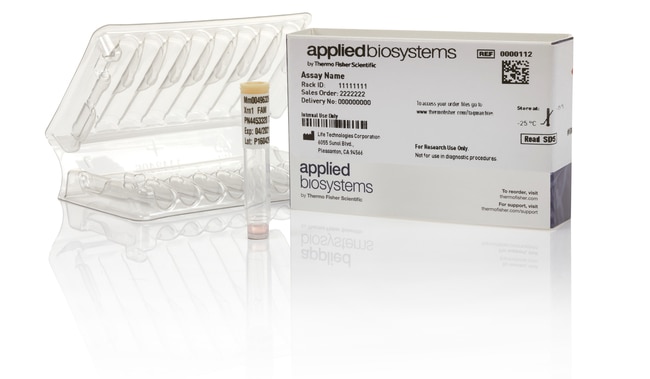
Applied Biosystems™
TaqMan™ Copy Number Assay
Applied Biosystems TaqMan 拷贝数检测试剂盒采用金标准 TaqMan MGB 探针化学试剂,使用 Applied Biosystems 实时了解更多信息
Have Questions?
更改视图

| 货号 | 数量 |
|---|---|
| 4400293 | 各 1 |
| 4400291 | 360、720 rxn |
| 4400292 | 750、1500次反应 |
货号 4400293
价格(CNY)
16,712.00
Each
数量:
各 1
Applied Biosystems TaqMan 拷贝数检测试剂盒采用金标准 TaqMan MGB 探针化学试剂,使用 Applied Biosystems 实时 PCR 仪器和软件来评估基因组 DNA 靶标的拷贝数。TaqMan 拷贝数检测试剂盒在双重 qPCR 反应中与 TaqMan 拷贝数参比检测试剂盒一起运行;拷贝数检测试剂盒检测靶标序列,而参比检测试剂盒已知存在于二倍体基因组的两个拷贝中的序列。然后使用 Applied Biosystems CopyCaller 软件通过相对定量法分析结果。
预设计的 TaqMan 拷贝数检测试剂盒集合包含用于拷贝数变异 (CNV) 分析的人类和小鼠测定库。人检测试剂盒集合包括超过160万个测定靶向基因外显子和内含子、外源区域以及来自基因组变异数据库 (DGV) 的 CNV 序列。小鼠系列包含了 18 万个靶向基因外显子区域的检测。用于常用载体标记和报告基团基因的测定也可用于转基因研究。
优势:
•特异性—金标准 TaqMan 化学检测及小沟结合物 (MGB) 探针通过使用更短的探针而增加检测的特异性
• 重现性—通过生物信息学管线开发的稳健检测设计可提供准确、可重现且可靠的结果
• 易于解读—CopyCaller 软件提供计算的拷贝数和预测的拷贝数,以及置信值和 Z 分数质量指标
• 快速而简便—从构建到获得初步分析结果只需3–4小时
大致发运时间
北美 4–6 天,欧洲 6–10 天
所有的检测设计都是我们生物信息学管线的产品,利用制造和检测性能数据经过了十多年的优化。TaqMan 检测试剂盒已被超过40,000篇出版物引用,并且已受到超过350项专利的支持。
我们所有的预设计 TaqMan 检测试剂盒均在 TaqMan 检测 qPCR 保证书的承保范围内。*
TaqMan 拷贝数参比检测试剂盒为单独出售。
推荐的预混液(单独出售):TaqMan 基因分型预混液
*适用条款和条件。有关完整详细信息,请访问 www.thermofisher.cn/taqmanguarantee。
预设计的 TaqMan 拷贝数检测试剂盒集合包含用于拷贝数变异 (CNV) 分析的人类和小鼠测定库。人检测试剂盒集合包括超过160万个测定靶向基因外显子和内含子、外源区域以及来自基因组变异数据库 (DGV) 的 CNV 序列。小鼠系列包含了 18 万个靶向基因外显子区域的检测。用于常用载体标记和报告基团基因的测定也可用于转基因研究。
优势:
•特异性—金标准 TaqMan 化学检测及小沟结合物 (MGB) 探针通过使用更短的探针而增加检测的特异性
• 重现性—通过生物信息学管线开发的稳健检测设计可提供准确、可重现且可靠的结果
• 易于解读—CopyCaller 软件提供计算的拷贝数和预测的拷贝数,以及置信值和 Z 分数质量指标
• 快速而简便—从构建到获得初步分析结果只需3–4小时
大致发运时间
北美 4–6 天,欧洲 6–10 天
所有的检测设计都是我们生物信息学管线的产品,利用制造和检测性能数据经过了十多年的优化。TaqMan 检测试剂盒已被超过40,000篇出版物引用,并且已受到超过350项专利的支持。
我们所有的预设计 TaqMan 检测试剂盒均在 TaqMan 检测 qPCR 保证书的承保范围内。*
TaqMan 拷贝数参比检测试剂盒为单独出售。
推荐的预混液(单独出售):TaqMan 基因分型预混液
*适用条款和条件。有关完整详细信息,请访问 www.thermofisher.cn/taqmanguarantee。
仅供科研使用。不可用于诊断程序。
规格
3' 引物修改无
5' 引物修改无
适用于(设备)7500 System, 7500 Fast System, 7900HT System, StepOne™, StepOnePlus™, ViiA™ 7 System, QuantStudio™ 3, QuantStudio™ 5, QuantStudio™ 6 Flex, QuantStudio™ 7 Flex, QuantStudio 6 Pro, QuantStudio 7 Pro, QuantStudio™ 12k Flex, QuantStudio™ Absolute Q Digital PCR System
内部探针修改FAM (5'),MGB(小沟结合物)(3')
反应次数2900 reactions
产品线TaqMan
产品类型拷贝数测定试剂盒
纯化方法固相萃取 (SPE)
纯度或质量等级不含 RNase 和 DNase
数量各 1
运输条件室温
种属人
最大浓度60X
检测方法引物-探针
形式冷冻
标签或染料FAM
PCR 方法qPCR
反应速度快速
Unit SizeEach
内容与储存
1 个含 20X(S 和 M 规格)或 60X(L 规格)预配制检测试剂(1 种探针和 2 种引物)混合物的管。
在 -15 至 -25°C 下储存。
在 -15 至 -25°C 下储存。