Search

Applied Biosystems™
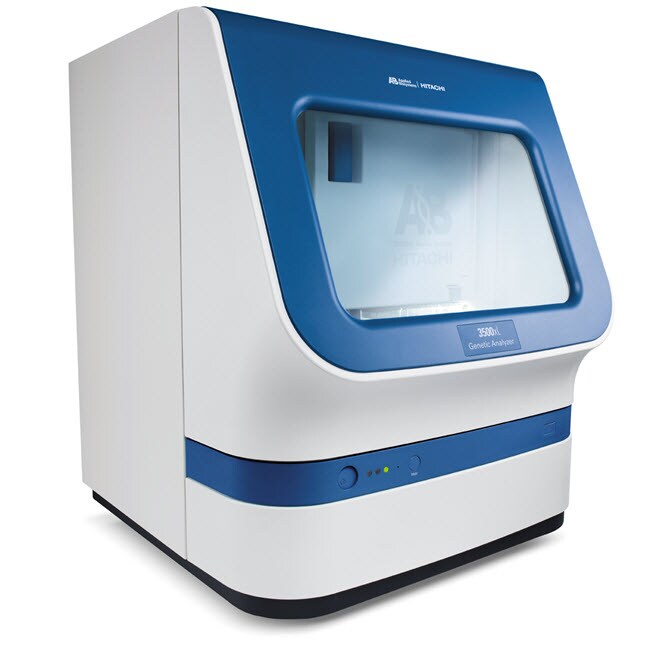
3500xL 基因分析仪
3500xL 基因分析仪是一种 24 道毛细管测序平台,适用于广泛的应用,包括从头测序和重测序(突变分析)、微卫星分析、MLPA™、LOH、MLST了解更多信息
| 货号 | 数量 |
|---|---|
| 4405633 | 1 个系统 |
货号 4405633
价格(CNY)
-
数量:
1 个系统
3500xL 基因分析仪是一种 24 道毛细管测序平台,适用于广泛的应用,包括从头测序和重测序(突变分析)、微卫星分析、MLPA™、LOH、MLST 和 SNP 验证或筛选。大多数应用可以在单个聚合物和毛细管阵列上运行。
此套件包含一个 24 道毛细管仪器、3500 系列数据收集软件以及 Dell™ 工作站和显示器。3500 系列数据收集软件支持测序和片段分析,与多个下游软件包(未包括在内)无缝集成,可用于基因数据的二次分析。
3500xL 基因分析仪的特性包括:
•单线、505 nm、固态。长寿命激光器,使用标准电源,无需排热管道
• 功能强大的集成式数据采集和主要分析软件,可对数据质量进行实时分析
• 射频识别 (RFID) 技术跟踪关键耗材数据和记录管理信息
• 高级多重分析能力,可用于 DNA 片段分析,具有多达 6 种独特染料
• 优秀的应用灵活性—一个阵列和一种聚合物可用于大多数应用
• 简单的设置、操作和维护
提供准确可靠的数据质量
3500 系列基因分析仪旨在显著提高仪器到仪器、运行到运行以及毛细管到毛细管的信号均一性。这些方法结合了智能硬件、强大的算法和试剂组合,可显著降低多个 3500 系列仪器获得的信号峰高度范围(参见图)。
提高大小精确度
热分系统设计可在苛刻的片段应用中提供更高的性能,相对于前代毛细管电泳平台,可实现更好的大小精确度。
带有 RFID 标签的即用型耗材
3500 系列提供即用型耗材,即采用预包装的聚合物袋、阴极和阳极缓冲液容器以及易于安装的毛细管阵列。所有这些耗材均与 RFID 标签集成,可对试剂和耗材等关键信息进行查看、追踪和报告,包括使用、批号、部件号、有效期、3500 系列数据采集软件中的仪器使用寿命。
即用型数据采集软件
3500 系列数据采集软件通过直观的仪表盘设计、高度可视的常用操作按钮、检测耗材状态的易于读取的图形显示以及便利的维护计划表功能实现用户友好的导航,具有突破性的成就。其功能包括简单的孔板设置和内置质控初级分析,因此您可以在仪器生成数据时判定数据质量,无需将输出文件传输到次级分析软件包。
此套件包含一个 24 道毛细管仪器、3500 系列数据收集软件以及 Dell™ 工作站和显示器。3500 系列数据收集软件支持测序和片段分析,与多个下游软件包(未包括在内)无缝集成,可用于基因数据的二次分析。
3500xL 基因分析仪的特性包括:
•单线、505 nm、固态。长寿命激光器,使用标准电源,无需排热管道
• 功能强大的集成式数据采集和主要分析软件,可对数据质量进行实时分析
• 射频识别 (RFID) 技术跟踪关键耗材数据和记录管理信息
• 高级多重分析能力,可用于 DNA 片段分析,具有多达 6 种独特染料
• 优秀的应用灵活性—一个阵列和一种聚合物可用于大多数应用
• 简单的设置、操作和维护
提供准确可靠的数据质量
3500 系列基因分析仪旨在显著提高仪器到仪器、运行到运行以及毛细管到毛细管的信号均一性。这些方法结合了智能硬件、强大的算法和试剂组合,可显著降低多个 3500 系列仪器获得的信号峰高度范围(参见图)。
提高大小精确度
热分系统设计可在苛刻的片段应用中提供更高的性能,相对于前代毛细管电泳平台,可实现更好的大小精确度。
带有 RFID 标签的即用型耗材
3500 系列提供即用型耗材,即采用预包装的聚合物袋、阴极和阳极缓冲液容器以及易于安装的毛细管阵列。所有这些耗材均与 RFID 标签集成,可对试剂和耗材等关键信息进行查看、追踪和报告,包括使用、批号、部件号、有效期、3500 系列数据采集软件中的仪器使用寿命。
即用型数据采集软件
3500 系列数据采集软件通过直观的仪表盘设计、高度可视的常用操作按钮、检测耗材状态的易于读取的图形显示以及便利的维护计划表功能实现用户友好的导航,具有突破性的成就。其功能包括简单的孔板设置和内置质控初级分析,因此您可以在仪器生成数据时判定数据质量,无需将输出文件传输到次级分析软件包。
仅供科研使用。不可用于诊断程序。
规格
安培数15 A
毛细管长度36 cm,50 cm
电气要求15 A
外部计算机硬盘驱动器:2x 500GB SATA 3.0 Gb/s 和 8 MB 数据突发高速缓存,存储器:16 GB (2x 8GB) 1600 MHz DDR3 非 ECC。第 4 代 Intel Core I7 处理器 - 3.1 GHz Turbo 处理器,操作系统:Windows 7 SP1
适用于(设备)3500xL 基因分析仪
操作系统Win 7 (Service Pack 1)
聚合物POP-4™、POP-6™、POP-7™
数量1 个系统
运输条件室温
软件兼容性测序分析软件、Variant Reporter™ 软件、GeneMapper™ 软件
通量每天最多可运行 1104 份样本(使用运行模块 ShortReadSeqPOP7)
质保期包含 1 年部件和人工、服务安装及应用培训有限质保期
重量82 kg(约)
软件类型数据采集软件
Unit SizeEach
内容与储存
该套件由 24 道毛细管仪器、3500/3500xL 数据采集软件以及 Dell 工作站和显示器组成。