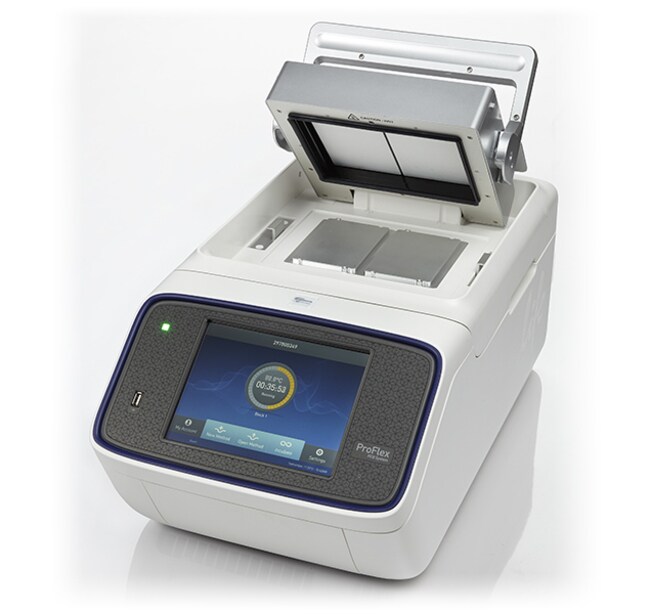
ProFlex™ PCR System, 2 x Flat
Build your own complete bundle and get personalized pricing today!
ProFlex™ PCR System, 2 x Flat
Applied Biosystems™

ProFlex™ PCR System, 2 x Flat

The Veriti 96-well fast thermal cycler delivers the proven reliability of Applied Biosystems instruments. With the added control of VeriFlex blocks, you have six independent temperature blocks that provide precise control over your PCR optimization.
Have Questions?
Catalog NumberWarranty
4484078Limited Warranty
Catalog number 4484078
Price (CNY)
-
Request A Quote
Warranty:
Limited Warranty

The Veriti 96-well fast thermal cycler delivers the proven reliability of Applied Biosystems instruments. With the added control of VeriFlex blocks, you have six independent temperature blocks that provide precise control over your PCR optimization. Additionally, the color touchscreen simplifies the setup and use of the Veriti 96-well fast thermal cycler. Optional setups for fast or standard PCR methods provide flexibility to shorten your PCR cycling times. The Veriti 96-well fast thermal cycler comes with a 0.1-mL block configuration that saves time and reagent consumption.

Features of the Veriti 96-well fast thermal cycler include:

  • Innovative VeriFlex blocks allow for precise PCR optimization or to run up to six independent assays
  • Six temperature zones for convenient PCR optimization
  • Standard- and fast-enabled cycling to address current and future PCR needs
  • Easy-to-use 6.5-inch VGA touchscreen
  • Convenient protocol transfer from one Veriti thermal cycler to another using USB
  • Reduced PCR cycling time when using faster ramp rates
  • Optional VeritiLink Remote Management Software allows remote management of more than 50 cyclers

VeriFlex blocks enhanced PCR functionality

Separate peltier blocks provide maximal versatility, flexibility, and offer two key benefits:

  1. Optimization—each block can be set with a specific temperature for precise control over PCR optimization
  2. More experiments—six peltier blocks can be used to run different annealing temperatures in the same run

Control at your fingertips

The powerful, yet simple to operate user interface on the Veriti system is driven by the 6.5-inch (16.51-cm) VGA color touchscreen. The large screen allows for easy viewing of temperature profiles, and large navigation buttons put programming at your fingertips. Setup and navigation of the Veriti Thermal Cycler does not require the use of a stylus or mouse.

Fast setup, fast results

The Veriti system has two options for method navigation. For quick setup, you may select one of the pre-programmed methods to run. If you prefer to program your own methods, simply touch the step you would like to setup and then use the keypad to enter thermal cycling steps. After completing a setup, you have the choice of saving the method to the instrument or to a USB memory stick.

Control your time, go fast when you want

With the Veriti Thermal Cycler you get two thermal cyclers in one: a standard thermal cycler with its better than gradient feature and a fast-enabled thermal cycler. So whether you have a current need to run fast PCR and shorten your PCR cycling times, or a possible future application need for fast PCR, the Veriti Thermal Cycler provides you with the flexibility to go fast when you want.

Applied Biosystems PCR plastics

Applied Biosystems PCR plastics have been designed and validated to work with our thermal cyclers for more than 25 years. Options for every format and throughput need are available to ensure consistent, precise results for any experiment. To find the best match please visit our Plastics Selection Guide.

For Research Use Only. Not for use in diagnostic procedures.
Specifications
Dimensions22 x 13 x 10.6 in. (56.5 x 33 x 27 cm)
Display Type8.4 in. Color TFT LCD Touchscreen
For Use With (Application)PCR
High-throughput CompatibilityHigh-throughput Compatible
Max. Ramp Rate3°C/sec. (Block), 1.6°C/sec. (Sample)
MemoryUSB and On-board
ProgramsAuto re-start (after Power Outages), Program Overwrite Protection
Quantity1 Instrument
Reaction SpeedFast, Standard
Thermal Accuracy±0.25°C (35°C to 99.9°C)
Thermal Range0°C to 100°C
Thermal Uniformity<0.5°C (20 sec. after reaching 95°C)
User InterfaceUSB, WiFi, Cloud, Ethernet
Voltage100/240 V
WarrantyLimited Warranty
Weight45 lb. (20.4 kg)
Block Configurations2 x Flat Blocks
Block FormatInterchangeable
Capacity8 OpenArray Plates, 24 x 20K Chips
Product TypeThermal Cycler
Unit SizeEach

Frequently asked questions (FAQs)

How do I fix issues with screen freezing on the ProFlex PCR System?

Make sure you have the most up-to-date firmware version, as this has fixed many screen-freezing issues. The latest firmware can be downloaded from here (https://www.thermofisher.com/us/en/home/technical-resources/software-downloads/proflex-pcr-system.html). If you cannot get access to the main menu, try turning off the machine, letting it sit for 1 minute, and restarting it without any block attached.

How do I get the ProFlex PCR System to connect to the Cloud and mobile app?

Please follow these directions on how to set up Cloud and mobile connectivity in the ProFlex PCR System:

1. Ensure that the instrument is Cloud-enabled

Any ProFlex PCR System can be connected to Thermo Fisher Connect as long as it is using firmware version 1.2 or higher. You can check your current firmware version by:

a) Going to the Settings menu.
b) Selecting “About Instrument”.

2. Create a Thermo Fisher Connect account

a) From your Internet browser, go to thermofisher.com/connect
b) If you already have an account with Thermo Fisher Scientific, log in using the same name and password.
c) If you do not already have an account, follow the prompts to create one.
d) Once you have logged in to thermofisher.com/connect, an email will automatically be sent to you to verify your email address.
e) Open your email and click on the link to visit the Connect page to verify your account.
f) If you have done this successfully, you will receive a confirmation email telling you that you have connected to Thermo Fisher Connect.

3. Connect your ProFlex PCR machine to the internet using a wireless or wired connection.
-Note: Please refer to Chapter 2 of the ProFlex PCR System User Guide (https://tools.thermofisher.com/content/sfs/manuals/MAN0007697.pdf) for instructions on setting up of a wireless or wired connection.

4. Connect the instrument to Thermo Fisher Cloud

a) Touch Sign In.
b) Select Administrator when asked to choose screen name.
c) Log in. (The default password for the Administrator account is “password”.)
d) You will then be redirected back to the home screen. Go to Settings.
e) Select Remote Service.
f) Turn “on” Remote Service.
g) Touch My Profile on the home screen.
h) Touch the Cloud tab and enter your Thermo Fisher Connect account login and password.
i) Select Link Account. Upon successful authentication, the Administrator is linked to Thermo Fisher Connect.

-Subsequently, any user can log in and link the instrument to their Thermo Fisher Connect account by following steps 3-9 above.
-Note: The administrator account must be activated first to connect the instrument to the Cloud. Afterward, multiple users can create unique user profiles using their own login information. Each unique profile must have a unique Thermo Fisher Connect account.

5. Set mobile connectivity in a mobile device

a) Download and install the “Instrument Connect Mobile Application” on your mobile device.

-For an iPad™ or iPhone™ mobile device, download the application from the App Store™ by searching for ““Instrument Connect”.
-For Android™ devices, download the application from Google™ Play by searching for “Instrument Connect”.

b) Log in to the Instrument Connect mobile application using your Thermo Fisher Connect login and password.

-Once logged in, any Cloud-enabled instrument that has been linked to that account can be monitored.

Further information can be found here: https://assets.thermofisher.com/TFS-Assets/LSG/manuals/remote_connectivity_with_InstrumentConnect_PI.pdf

How do I get the wireless connection for my ProFlex PCR System?

First, make sure you are running the most up to date firmware. Newer firmware versions have fixed many wireless and mobile app issues. Firmware updates can be found here: https://www.thermofisher.com/us/en/home/technical-resources/software-downloads/proflex-pcr-system.html.

To set up the wireless connection in the ProFlex PCR System, please follow the steps outlined below:
1.Power on the ProFlex Instrument, and in the Home screen, touch Settings.
2.In the Settings screen, touch Device Settings.
3.In the Device Settings screen, touch Network Connection. In the Network Connection Type screen, touch Wireless. The Search Wireless Network screen will come up and the wireless symbol will appear active. Touch Cancel to exit the screen. Note: During initial setup, if you selected the Wired option in the Network Connection Type screen, you will be required to enter your IP address if you selected the Static IP wired option. If you selected the Dynamic IP wired option, the IP address is automatically populated.
4.Once a wireless connection has been detected, a list of the available networks will be displayed in the Choose Network screen. Touch the network name of your choice or touch Join Other Network.
5.In the Find and Join a Network screen, enter the name and security type of the network. Note: When you touch in the Network Name field, a keypad will come up to facilitate making the entry.
6.From the Security type drop-down menu, touch to select the security type and enter the relevant information in the screen.
Note: Contact your IT Systems Administrator for information on security type.
You can select from the following options:
-WEP
-WPA Personal
-WPA2 Personal
-WPA Enterprise
-WPA2 Enterprise
7.Touch Join to continue or Cancel to exit from the Find and Join a Network screen.
8.Depending on the security type you have selected, enter the appropriate passwords and touch Join.
If you entered the correct information, the Network Connection Complete screen will appear. Touch OK to continue. If you entered incorrect information, the Network Connection Failed screen will come up and you will be required to go back to security type screen to resolve the issue. Touch OK to continue.

My tubes are melting. What is wrong?

This can happen if the wrong plastics are used, or if the tubes are not being used with the correct tray/retainer set. Check the manual for directions on appropriate loading of the sample. Also, you can check for compatible plastics from here (https://www.thermofisher.com/us/en/home/life-science/pcr/pcr-plastics.html).

Veriti Thermal Cycler - Loading Samples (p. 3-5 of the manual)
ProFlex PCR System - Loading Samples (p. 25 of the manual)
2720 Thermal Cycler - Loading Samples (p. 3-5 of the manual)

How do I program an infinite hold in the ProFlex PCR System?

To add an infinite hold, select the infinity symbol for program.