Search


引用和文献 (20)
Applied Biosystems™
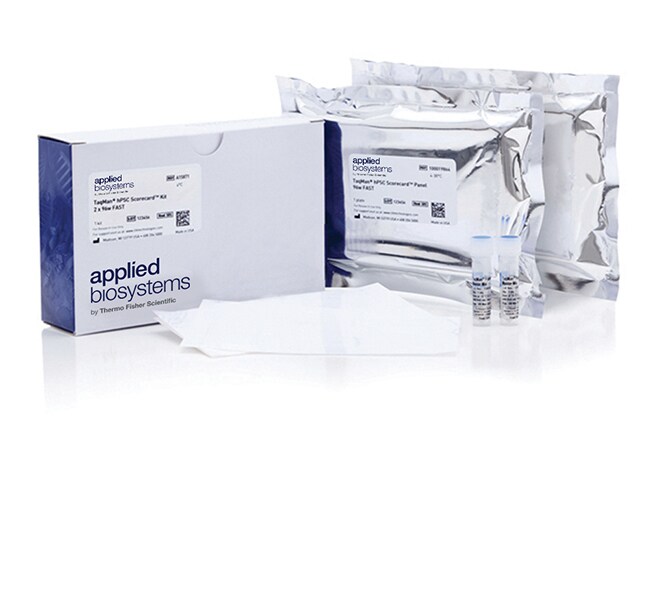
TaqMan™ hPSC Scorecard™ 试剂盒,Fast 96 孔
Applied Biosystems™ TaqMan™ hPSC Scorecard™ 试剂盒 2 x 96w FAST了解更多信息
| 货号 | 数量 |
|---|---|
| A15871 | 2 x 96-well plates |
货号 A15871
价格(CNY)
18,599.00
Each
数量:
2 x 96-well plates
价格(CNY)
18,599.00
Each
Applied Biosystems™ TaqMan™ hPSC Scorecard™ 试剂盒 2 x 96w FAST 能够确证 ES 和 iPS 细胞系的多能性以及确认谱系偏倚。两个 96 孔板各包含 94 个孔中干燥的预定 TaqMan™ 基因表达检测试剂(包括内源参照)。为方便您使用,包含了预混液。要单独购买检测组合,请参阅 TaqMan™ hPSC Scorecard™ 检测组合 2 x 96w FAST。本产品还提供 384 孔规格。
•在一次简单的实验中评估整个基因标签
• 将结果与随附的 hPSC Scorecard™ 分析软件中的参考标准进行比较
•确定具有三系分化潜能的细胞系
•评价特定于一个胚层的诱导分化
•访问经验证的内容,增加结果的可信度
在一次实验中评估整个基因标签
TaqMan™ hPSC Scorecard™ 检测组合能以稳定、便利的干燥形式提供预铺平板测定,有助于节省时间。只需将 TaqMan™ 预混液添加到您的目的 cDNA 中,并使用多通道移液器将其转移到 96 孔板中。
将结果与参考标准进行比较
TaqMan™ hPSC Scorecard™ 检测组合包括访问基于云计算的专有分析软件,使您可以查看和导出结果的图形和表格,以及生成报告。该软件与七个 Applied Biosystems™ qRT-PCR 系统兼容,无需额外收费。
鉴定具有三系分化潜能的细胞系
将随机分化的拟胚体 (EB) 样品(使用标准 EB 方法分化至少 7 天)包括在您的分析中,并确定您的细胞系是否偏向于三胚层(内胚层、中胚层、外胚层)中的一层或多层。
评价特定于一个胚层的诱导分化
检测组合包括超过用于三个胚层中每个胚层的 20 多个标志物,这些胚层都已显示对单层培养中的定向分化的响应与预期一致。利用这一检测组合快速评价目的胚层的时间过程数据、培养条件和培养基配方。
访问经验证内容
检测组合内容基于已发表的著作(Bock 等人,Cell 144,439–452,2011),并对照多个人 ES 和 iPS 细胞系进行了验证。
产品包装规格
TaqMan™ hPSC Scorecard™ 检测组合 2 x 96w FAST 包括:
•两个含 94 TaqMan™ 基因表达检测板的 96 孔板
• 两个光学板盖
• 两个 1 mL 样品瓶 TaqMan™ Fast Advanced 预混液
•在一次简单的实验中评估整个基因标签
• 将结果与随附的 hPSC Scorecard™ 分析软件中的参考标准进行比较
•确定具有三系分化潜能的细胞系
•评价特定于一个胚层的诱导分化
•访问经验证的内容,增加结果的可信度
在一次实验中评估整个基因标签
TaqMan™ hPSC Scorecard™ 检测组合能以稳定、便利的干燥形式提供预铺平板测定,有助于节省时间。只需将 TaqMan™ 预混液添加到您的目的 cDNA 中,并使用多通道移液器将其转移到 96 孔板中。
将结果与参考标准进行比较
TaqMan™ hPSC Scorecard™ 检测组合包括访问基于云计算的专有分析软件,使您可以查看和导出结果的图形和表格,以及生成报告。该软件与七个 Applied Biosystems™ qRT-PCR 系统兼容,无需额外收费。
鉴定具有三系分化潜能的细胞系
将随机分化的拟胚体 (EB) 样品(使用标准 EB 方法分化至少 7 天)包括在您的分析中,并确定您的细胞系是否偏向于三胚层(内胚层、中胚层、外胚层)中的一层或多层。
评价特定于一个胚层的诱导分化
检测组合包括超过用于三个胚层中每个胚层的 20 多个标志物,这些胚层都已显示对单层培养中的定向分化的响应与预期一致。利用这一检测组合快速评价目的胚层的时间过程数据、培养条件和培养基配方。
访问经验证内容
检测组合内容基于已发表的著作(Bock 等人,Cell 144,439–452,2011),并对照多个人 ES 和 iPS 细胞系进行了验证。
产品包装规格
TaqMan™ hPSC Scorecard™ 检测组合 2 x 96w FAST 包括:
•两个含 94 TaqMan™ 基因表达检测板的 96 孔板
• 两个光学板盖
• 两个 1 mL 样品瓶 TaqMan™ Fast Advanced 预混液
仅供科研使用。不可用于诊断程序。
规格
适用于(设备)QuantStudio™ 12k Flex、StepOnePlus™、Fast 模式、ViiA™ 7 系统
产品规格96 孔板
反应次数96 次反应
产品线TaqMan
数量2 x 96-well plates
研究类别干细胞研究
种属人
检测方法引物-探针
适用于(应用)Stem Cell Analysis
形式干燥
反应速度快速
Unit SizeEach
内容与储存
• 两个各含 96 检测组合的 96 孔板(室温)
• 两个光学板盖(室温储存)
• 两个 1 mL TaqMan™ Fast Advanced 预混液样品瓶(运输后解冻,请勿重新冷冻,2–8°C 下储存)
• 两个光学板盖(室温储存)
• 两个 1 mL TaqMan™ Fast Advanced 预混液样品瓶(运输后解冻,请勿重新冷冻,2–8°C 下储存)
常见问题解答 (FAQ)
Will I need to update my TaqMan hPSC Scorecard Analysis Software?
How do I export Ct values in the TaqMan hPSC Scorecard Analysis Software?
I'm using the TaqMan hPSC Scorecard Analysis Software. How are the scores calculated?
I'm using the TaqMan hPSC Scorecard Analysis Software. What lines were used to generate the reference standard?
I'm using the TaqMan hPSC Scorecard Analysis Software. My sample has a red flag on it, or is not showing any results. What does that mean?
引用和文献 (20)
引用和文献
Abstract
Characterizing Pluripotent Stem Cells Using the TaqMan(®) hPSC Scorecard (TM) Panel.
Journal:
PubMed ID:25138722
'Rapid technological developments for the efficient generation of footprint-free induced pluripotent stem cells (iPSC) enabled the creation of patient-specific iPSC for downstream applications in drug discovery and regenerative medicine. However, the large number of iPSCs, generated from diverse genetic backgrounds using various methods and culture conditions, created a steep challenge
Generation of iPSCs as a Pooled Culture Using Magnetic Activated Cell Sorting of Newly Reprogrammed Cells.
Journal:
PubMed ID:26281015
'Although significant advancement has been made in the induced pluripotent stem cell (iPSC) field, current methods for iPSC derivation are labor intensive and costly. These methods involve manual selection, expansion, and characterization of multiple clones for each reprogrammed cell sample and therefore significantly hampers the feasibility of studies where a
Efficient Generation of Induced Pluripotent Stem and Neural Progenitor Cells From Acutely Harvested Dura Mater Obtained During Ventriculoperitoneal Shunt Surgery.
Journal:
PubMed ID:26074438
'The dura mater can be easily biopsied during most cranial neurosurgical operations. We describe a protocol that allows for robust generation of induced pluripotent stem cells (iPSCs) and neural progenitors from acutely harvested dura mater. To generate iPSCs and neural progenitor cells from dura mater obtained during ventriculoperitoneal shunt surgery.
Integrative Analyses of Human Reprogramming Reveal Dynamic Nature of Induced Pluripotency.
Journal:
PubMed ID:26186193
'Induced pluripotency is a promising avenue for disease modeling and therapy, but the molecular principles underlying this process, particularly in human cells, remain poorly understood due to donor-to-donor variability and intercellular heterogeneity. Here, we constructed and characterized a clonal, inducible human reprogramming system that provides a reliable source of cells
Transcription factor binding dynamics during human ES cell differentiation.
Journal:
PubMed ID:25693565
'Pluripotent stem cells provide a powerful system to dissect the underlying molecular dynamics that regulate cell fate changes during mammalian development. Here we report the integrative analysis of genome-wide binding data for 38 transcription factors with extensive epigenome and transcriptional data across the differentiation of human embryonic stem cells to