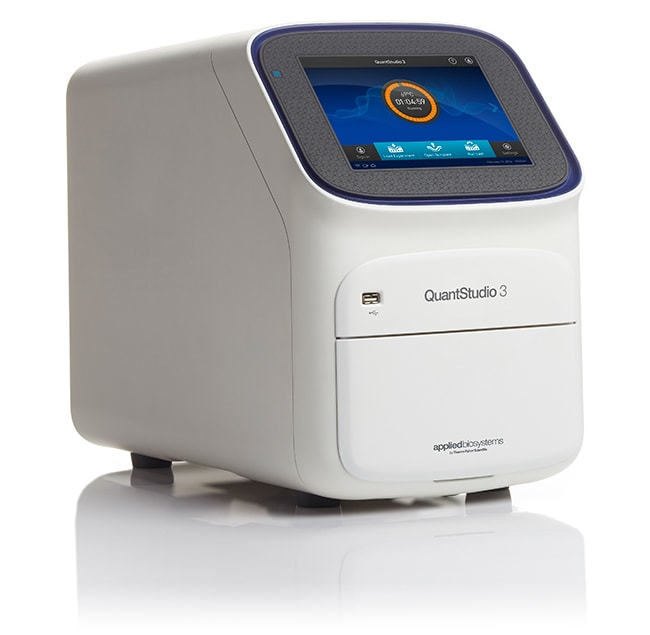
QuantStudio™ 3 实时荧光定量 PCR 系统,96 孔,0.1 mL,便携式计算机
Applied Biosystems™

QuantStudio™ 3 实时荧光定量 PCR 系统,96 孔,0.1 mL,便携式计算机

Applied Biosystems QuantStudio 3 实时荧光定量 PCR 系统设计用于需要经济实惠、易于使用且性能和质量均不受影响的实时荧光定量 PCR 系统的用户了解更多信息
Have Questions?
货号数量
A285661 system
货号 A28566
价格(CNY)
-
申请报价
数量:
1 system
Applied Biosystems QuantStudio 3 实时荧光定量 PCR 系统设计用于需要经济实惠、易于使用且性能和质量均不受影响的实时荧光定量 PCR 系统的用户。简化的设计和分析软件是首次使用和经验丰富的用户的理想选择。连接到 iConnect(Thermo Fisher 基于云的平台)后,QuantStudio 3 系统可使您随时随地访问您的数据。QuantStudio 3 系统使用经证明的 OptiFlex 技术(带有 4 个偶联通道和白光 LED),以 3 个独立的 Veriflex 温区为特色,可针对广泛的基因组应用提高数据准确性和灵敏度。

Quantstudio 3/5 固件以及设计和分析软件 >

QuantStudio 3 系统的特点包括:

•配备交互式触摸屏的简化仪器软件更加易于使用
• 经证明的 OptiFlex 技术(配备白光 LED 的 4 个偶联通道),可获得可靠的结果
• 安全、基于云的软件选项提供更高可访问性和更多存储选项
• 用户帐户管理、锁定工作流程和暂停功能可以更好地控制实验
• 96 孔 0.2 mL 规格或 96 孔 0.1 mL 规格

iConnect
iConnect 为科学家存储、分析和共享数据提供了一个安全平台。从仪器上传数据或从任何具有网络连接的地方上传您自己的文件。iConnect 中的 Applied Biosystems qPCR 分析模块是基于网络浏览器的软件工具,灵活、快速且易于使用。

易于使用
QuantStudio 3 实时荧光定量 PCR 系统结构紧凑、经工厂校准、以易用的包装形式提供,从而使安装快速简单以便立即使用。交互式触摸屏提供了现代化的可用性体验,简化的仪器软件/预优化的方案模板使任何经验水平的用户均可快速设置和启动运行。

设计和分析软件选项:

选项 1:QuantStudio 设计和分析云端软件
• 支持使用 PC 或 MAC 计算机进行基于网络浏览器的系统配置
• 简化软件以提高可用性和响应时间
• 通过云端可随时随地实现对您数据的安全访问
• 无需安装软件,无需许可证,无需版本更新

选项 2:QuantStudio 设计和分析桌面软件
• 支持对 Windows 10 OS 进行传统的同地协作计算机系统配置
• 简化了软件流程,改善了可用性并缩短了响应时间
• 无需购买许可证

值得信赖的结果
OptiFlex 技术实现了孔间和仪器间的数据准确性优化,该技术具有配备白光 LED 的 4 个偶联激发和发射滤光片通道

灵敏的数据分析
检测单重反应中低至 1.5 倍的靶标数量变化,并获得 10 个数量级倍数的线性动态范围。

高应用多功能性
可提供简单并优化的实验方案、可靠的测定和试剂以及直观的软件用于多种应用,包括基因表达、基因变异、基因调控等。
仅供科研使用。不可用于诊断程序。
规格
显示类型触摸屏
适用于(设备)QuantStudio™
产品规格96 孔板
产品线QuantStudio™
数量1 system
运输条件室温
隔热块样品量(公制)0.1 ml
模块规格不可互换
Unit SizeEach
内容与储存
包括培训

常见问题解答 (FAQ)

What is the difference between continuous melt curves and step and hold melt curves on the Applied Biosystems Real-Time PCR Instruments?

Continuous melt curve: increases the temperature by the ramp increment (degrees C/sec) so that the temperature will change at a constant rate set in the protocol.
Step and Hold melt curve: increases the temperature by the ramp increment (degrees C) and then holds at that temperature for the time specified by the user.

The amount of data collected will depend on the filter(s) selected. The more filters you use, the longer the acquisition will take and the fewer data points will be collected.

Find additional tips, troubleshooting help, and resources within our Real-Time PCR and Digital PCR Instruments Support Center.

Can I downgrade the firmware on my QuantStudio 5?

You can perform this action if you have access to an Admin account on the QuantStudio instrument and if it is compatible for the downgrade (newer instruments are not compatible with v1.3.3). If your instrument serial number is below the following, then it can be downgraded:
QuantStudio 5 96-well, 0.1 mL block - SN 272514140
QuantStudio 5 96-well, 0.2 mL block - SN 2725210507
QuantStudio 5 384 well block - SN 272533285
Please also check if the instrument is being used with any validated protocols that may require a particular firmware version to be compliant. If you need the firmware itself, you can download it here.
The instructions to downgrade the firmware are on p.4 of the Release Notes: QuantStudioTM 3 & 5 Touchscreen Instrument Operating Software Version 1.3.3. It's the same process as an upgrade.

What is the admin pin for QuantStudio 3 and 5 Real-Time PCR Systems?

If the admin PIN has not been changed, 1234 should work. If it does not work, you can also try 0000.
However, if the admin PIN has been changed and none of the above PINs work, follow the instructions in the QuantStudio 3 and 5 Real-Time PCR Systems manual, page 100.

Find additional tips, troubleshooting help, and resources within our Real-Time PCR and Digital PCR Instruments Support Center.

Can I import a standard curve for my real-time PCR data into the Design & Analysis Software (v2.x)?

It is possible to import a standard curve into the Design & Analysis Software (v2.x) if you are analyzing results from one of the following Applied Biosystems real-time PCR instruments:
• 7900HT Fast Real-Time PCR System
• 7500/7500 Fast Real-Time PCR System
• StepOne/StepOne Plus Real-Time PCR System
• ViiA 7 Real Time PCR System
• QuantStudio 1 Real-Time PCR System
• QuantStudio 3 & 5 Real-Time PCR System
• QuantStudio 6 & 7 Flex Real-Time PCR System
• QuantStudio 6 & 7 Pro Real-Time PCR Systems
• QuantStudio 12K Flex Real-Time PCR system

Follow the instructions below to import a standard curve for analysis in the Design & Analysis Software (v2.x):
1. Open the data file in the Design & Analysis Software (v2.x).
2. Click on Actions.
3. Click on "Standard Curve Analysis Setting".
4. Select "External Standard Curves" and click on "Import".
5. Browse to the proper .csv file and click "Open".
6. Click "Apply".

Can I import a standard curve for my real-time PCR data into the QuantStudio Design & Analysis Software (v1.x)?

If you are analyzing results from the QuantStudio 1 Real-Time PCR System, QuantStudio 3 Real-Time PCR System, or QuantStudio 5 Real-Time PCR System, it is possible to import a standard curve into the QuantStudio Design & Analysis Software (v1.x) following the instructions below:
1. Open the data file in the QuantStudio Design & Analysis Software (v1.x).
2. Go to Analysis Settings.
3. Click on the "Standard Curve Settings" tab.
4. Select the option to "Use a standard curve imported from another experiment" and click on "Import".
5. Browse to and highlight the proper data file and click "Select".
6. Click Apply.