Search

Applied Biosystems™
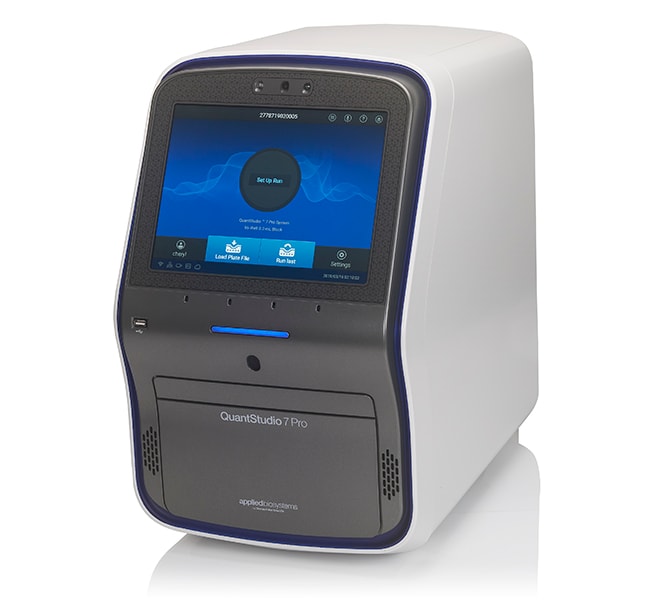
QuantStudio™ 7 Pro 实时荧光定量 PCR 系统,96 孔,0.2 mL
Applied Biosystems QuantStudio 7 Pro 实时荧光定量 PCR 系统以较小占地面积为实时荧光定量 PCR (qPCR)了解更多信息
| 货号 | 数量 |
|---|---|
| A43162 | 1 system |
货号 A43162
价格(CNY)
-
数量:
1 system
Applied Biosystems QuantStudio 7 Pro 实时荧光定量 PCR 系统以较小占地面积为实时荧光定量 PCR (qPCR) 工作流程带来创新性智能功能。QuantStudio 7 Pro 系统具备面部认证功能、语音命令功能、智能帮助功能、多通路测定功能、电动可互换模块、简化的工作流程、直观的软件、自动化功能和大电容式触摸屏界面,以较低的孔间和仪器间差异提供卓越的再现性。该系统采用极佳的易用性设计,可为希望在实验室中以更加智能方式工作的研究人员提供高质量和高通量的服务、出色的可靠性以及理想的用户体验。
QuantStudio 7 Pro 实时荧光定量 PCR 系统的特点包括:
•使用面部认证和语音命令实现轻松便捷的免手动操作
• 采用智能 qPCR 工作流程和配备 RFID 的 TaqMan 阵列板来减少错误和手动输入
• 通过较小的占地面积和真正的独立操作来节省空间;在触摸屏上直接实现设置、启动、监测和分析
• 使用智能帮助功能达到省心目的;在触摸屏上直接联系技术支持人员
• 使用智能远程支持功能减少停机时间;向技术支持人员显示问题以快速解决问题
• 使用易于更换的模块和四种不同模块类型实现应用的多功能性
• 使用针对 24/7 运行的自动化兼容性提高生产率
• 使用基于云端的 Connect 平台随时随地访问、分析和共享数据,以实现实时信息访问、安全数据存储和结果在线共享
• 使用 Instrument Connect 监测 app 实现对运行状态的远程监测
• 设计和分析软件兼容 PC 和 Mac 操作系统
•兼容用于基因表达、基因变异、基因调控或蛋白表达实验的超过8百万 TaqMan 测定
简单而便利的免手动操作功能
QuantStudio 7 Pro 系统设计用于提供简便而非凡的 qPCR 体验。无需手动操作的面部认证和语音命令使用户可以快速轻松地访问其个人配置文件和设置,甚至无需摘掉手套即可完成。
具备理想易用性的智能 qPCR
QuantStudio 7 Pro 系统配备嵌入式 RFID 读写器,能够运行配备 RFID 标签的 TaqMan 阵列板。这些 RFID 标记简化了数据追踪(嵌入式批号、有效期等),并使用预装的分析布图、染料信息和热方案减少对手动输入数据的需求。数据传输的自动化使用户只需对板进行上样即可开始运行—无需输入数据。
了解配备 RFID 的 TaqMan 阵列板的更多信息›
使用智能服务实现省心目的
QuantStudio 7 Pro 系统的优质服务会尽可能减少停机时间。智能帮助功能允许用户直接从触摸屏上联系技术支持人员,无需下载文件或花费时间电话沟通。经验丰富的技术人员将分析请求,根据用户’偏好(电话或电子邮件)进行响应,并尽快解决问题。
智能远程支持是一种沉浸式协作工具,使客户能够快速高效地向技术支持人员展示问题以寻求解决,从而有助于尽可能减少仪器停机时间(相对于现场维修)和现场访问需求。
Connect
Connect 平台为科学家存储、分析和共享数据提供了一个安全的平台。本平台中的 Applied Biosystems qPCR 分析模块是基于网络浏览器的软件工具,灵活、快速且易于使用。这些软件工具支持各种分析,包括相对定量、标准曲线、高分辨率熔解 (HRM)、基因分型和存在/缺失。它们与 Mac 或 PC 以及大多数 Applied Biosystems 仪器文件类型兼容。
规格灵活性
QuantStudio 7 Pro 系统支持96孔 (0.2 mL)、96孔 (0.1 mL)、384孔和 TaqMan 阵列卡 (TAC) 模块间的互换。系统附带一个模块类型;可单独购买其他模块类型。此外,该系统还可以使用 Orbitor 微孔板移动器,以支持高通量工作流程。对于不支持 TaqMan 阵列卡或自动化操作(但可以在后期升级以支持该操作)但更具价值的系统,请参见我们的 QuantStudio 6 Pro 实时荧光定量 PCR 系统。为实现较大的灵活性,请考虑同样可容纳 TaqMan OpenArray 板的 QuantStudio 12K Flex 实时 PCR 系统。
更快完成更多任务
使用 TaqMan 阵列384孔微流控卡轻松运行数百次实时 PCR 反应。当与 Orbitor 微孔板移动器(单独提供)集成时,QuantStudio 7 Pro 系统会尽可能增加您的通量能力。
高应用多功能性
可提供简单工作流程、可靠的测定和试剂、多种规格以及直观的软件用于多种应用,包括基因表达、基因变异和基因调控。
值得信赖的结果
使用 OptiFlex 系统可提高孔间和仪器间的数据准确性,该系统具有含21种滤光片组合的6个解耦激发和发射滤光片通道,以尽可能增加多通路和化学灵活性。
灵敏的数据分析
检测单重反应中低至1.5倍的靶标数量变化,并获得10个对数级的线性动态范围。
了解更多有关可用融资方案和计划的信息›
QuantStudio 7 Pro 实时荧光定量 PCR 系统的特点包括:
•使用面部认证和语音命令实现轻松便捷的免手动操作
• 采用智能 qPCR 工作流程和配备 RFID 的 TaqMan 阵列板来减少错误和手动输入
• 通过较小的占地面积和真正的独立操作来节省空间;在触摸屏上直接实现设置、启动、监测和分析
• 使用智能帮助功能达到省心目的;在触摸屏上直接联系技术支持人员
• 使用智能远程支持功能减少停机时间;向技术支持人员显示问题以快速解决问题
• 使用易于更换的模块和四种不同模块类型实现应用的多功能性
• 使用针对 24/7 运行的自动化兼容性提高生产率
• 使用基于云端的 Connect 平台随时随地访问、分析和共享数据,以实现实时信息访问、安全数据存储和结果在线共享
• 使用 Instrument Connect 监测 app 实现对运行状态的远程监测
• 设计和分析软件兼容 PC 和 Mac 操作系统
•兼容用于基因表达、基因变异、基因调控或蛋白表达实验的超过8百万 TaqMan 测定
简单而便利的免手动操作功能
QuantStudio 7 Pro 系统设计用于提供简便而非凡的 qPCR 体验。无需手动操作的面部认证和语音命令使用户可以快速轻松地访问其个人配置文件和设置,甚至无需摘掉手套即可完成。
具备理想易用性的智能 qPCR
QuantStudio 7 Pro 系统配备嵌入式 RFID 读写器,能够运行配备 RFID 标签的 TaqMan 阵列板。这些 RFID 标记简化了数据追踪(嵌入式批号、有效期等),并使用预装的分析布图、染料信息和热方案减少对手动输入数据的需求。数据传输的自动化使用户只需对板进行上样即可开始运行—无需输入数据。
了解配备 RFID 的 TaqMan 阵列板的更多信息›
使用智能服务实现省心目的
QuantStudio 7 Pro 系统的优质服务会尽可能减少停机时间。智能帮助功能允许用户直接从触摸屏上联系技术支持人员,无需下载文件或花费时间电话沟通。经验丰富的技术人员将分析请求,根据用户’偏好(电话或电子邮件)进行响应,并尽快解决问题。
智能远程支持是一种沉浸式协作工具,使客户能够快速高效地向技术支持人员展示问题以寻求解决,从而有助于尽可能减少仪器停机时间(相对于现场维修)和现场访问需求。
Connect
Connect 平台为科学家存储、分析和共享数据提供了一个安全的平台。本平台中的 Applied Biosystems qPCR 分析模块是基于网络浏览器的软件工具,灵活、快速且易于使用。这些软件工具支持各种分析,包括相对定量、标准曲线、高分辨率熔解 (HRM)、基因分型和存在/缺失。它们与 Mac 或 PC 以及大多数 Applied Biosystems 仪器文件类型兼容。
规格灵活性
QuantStudio 7 Pro 系统支持96孔 (0.2 mL)、96孔 (0.1 mL)、384孔和 TaqMan 阵列卡 (TAC) 模块间的互换。系统附带一个模块类型;可单独购买其他模块类型。此外,该系统还可以使用 Orbitor 微孔板移动器,以支持高通量工作流程。对于不支持 TaqMan 阵列卡或自动化操作(但可以在后期升级以支持该操作)但更具价值的系统,请参见我们的 QuantStudio 6 Pro 实时荧光定量 PCR 系统。为实现较大的灵活性,请考虑同样可容纳 TaqMan OpenArray 板的 QuantStudio 12K Flex 实时 PCR 系统。
更快完成更多任务
使用 TaqMan 阵列384孔微流控卡轻松运行数百次实时 PCR 反应。当与 Orbitor 微孔板移动器(单独提供)集成时,QuantStudio 7 Pro 系统会尽可能增加您的通量能力。
高应用多功能性
可提供简单工作流程、可靠的测定和试剂、多种规格以及直观的软件用于多种应用,包括基因表达、基因变异和基因调控。
值得信赖的结果
使用 OptiFlex 系统可提高孔间和仪器间的数据准确性,该系统具有含21种滤光片组合的6个解耦激发和发射滤光片通道,以尽可能增加多通路和化学灵活性。
灵敏的数据分析
检测单重反应中低至1.5倍的靶标数量变化,并获得10个对数级的线性动态范围。
了解更多有关可用融资方案和计划的信息›
仅供科研使用。不可用于诊断程序。
规格
描述QuantStudio 7 Pro
显示类型12英寸彩色触摸屏
产品线QuantStudio
数量1 system
运输条件室温
模块规格可互换
Unit SizeEach
内容与储存
QuantStudio 7 Pro 实时 PCR 系统,96孔,0.2 mL 模块