Search


引用和文献 (51)
Applied Biosystems™
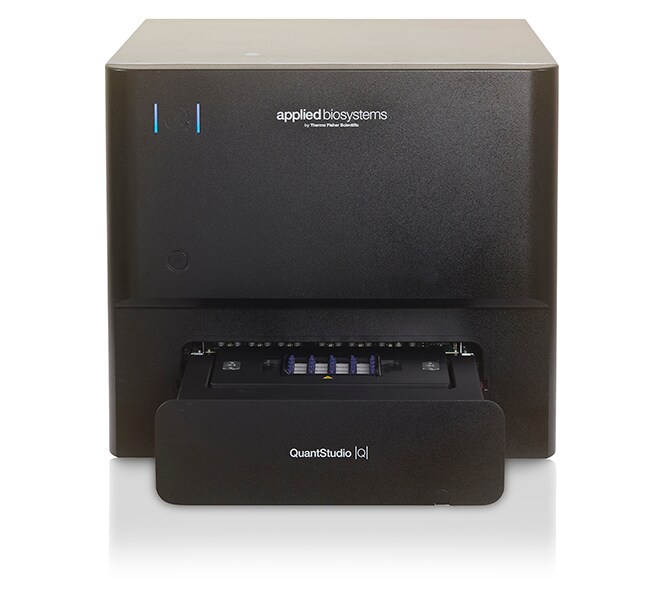
QuantStudio™ Absolute Q™ 数字 PCR 系统,台式计算机
Applied Biosystems QuantStudio Absolute Q 数字 PCR 系统结合了数字 PCR (dPCR)了解更多信息
| 货号 | 数量 |
|---|---|
| A52864 | 1 system |
货号 A52864
价格(CNY)
-
数量:
1 system
Applied Biosystems QuantStudio Absolute Q 数字 PCR 系统结合了数字 PCR (dPCR) 绝对定量的能力和 qPCR 工作流程的简单性。只需要一个手动操作步骤,而且该步骤只需5分钟,dPCR 比以往更加容易。对于想要对定量工作进行改进的研究人员,QuantStudio Absolute Q 系统提供了高质量、一致且易于使用的解决方案。
QuantStudio Absolute Q 系统的特点包括:
• 简单便捷的类似于 qPCR 的工作流程,仅需5分钟的手动操作时间
• 所有功能集成到一台仪器中,减少了错误和手动输入
• 提高了工作效率,只需90分钟即可获得结果
• 使用智能远程支持功能减少了停机时间;向技术支持人员显示问题以快速解决问题
• QuantStudio Absolute Q 数字 PCR 软件可进行直观的设置、监测和分析
- 具有符合 21CFR 第11部分要求的安全、审查和电子签名功能-合规性支持
• 兼容 Absolute Q 液体活检数字 PCR 检测,用于肿瘤学应用,并兼容我们的 TaqMan 检测产品组合,用于基因表达、基因变异、基因调控和其他定量实验
简单便捷的工作流程
QuantStudio Absolute Q 系统的设计可获得简单而强大的 dPCR 体验。dPCR 的所有必要步骤—区室化、热循环和数据采集—集成到一台仪器中。类似于 qPCR 的简便工作流程只需不到5分钟的手动操作时间即可完成。
更快完成更多任务
QuantStudio Absolute Q 系统可在不到90分钟时间内完成一次运行。
值得信赖的结果
板耗材具有获得专利的微流体阵列技术,能够在超过20,000个一致生成的微室内分析超过 95% 的样品,从而对甚至较为罕见的靶标进行理想的定量分析
应用多样性
QuantStudio Absolute Q 系统能够使用多达4个光学通道进行多通路检测,从而可在每份样品中测量更多靶标,节省了时间和试剂。对于任何需要高灵敏度、高精度和高准确度的应用,Absolute Q dPCR 平台都是理想的解决方案。
更多信息(包括应用资料)>
QuantStudio Absolute Q 测定 >
功能强大且直观的软件
Absolute Q dPCR 软件设计用于补充我们的直观工作流程,以节省时间和精力。微孔板规格、光学通道和热条件等参数可轻松修改,以快速开始生成数据。
简洁且功能强大的数据分析界面可提供一系列数据处理选项。无论是查看多通路检测数据还是计算重复样品的浓度,都可以通过点击几下鼠标导出结果用于下游分析或者编译为易于读取的报告。
所包含的安全、审核和电子签名软件功能支持 21CFR 第11部分的监管环境合规要求。
使用智能服务实现省心目的
QuantStudio Absolute Q 数字 PCR 系统的优质服务能够尽可能减少停机时间。智能远程支持是一种沉浸式协作工具,使客户能够快速高效地向技术支持人员展示问题以寻求解决,从而有助于尽可能减少仪器停机时间(相对于现场维修)和现场访问需求。
了解更多有关可用融资方案和计划的信息 ›
QuantStudio Absolute Q 系统的特点包括:
• 简单便捷的类似于 qPCR 的工作流程,仅需5分钟的手动操作时间
• 所有功能集成到一台仪器中,减少了错误和手动输入
• 提高了工作效率,只需90分钟即可获得结果
• 使用智能远程支持功能减少了停机时间;向技术支持人员显示问题以快速解决问题
• QuantStudio Absolute Q 数字 PCR 软件可进行直观的设置、监测和分析
- 具有符合 21CFR 第11部分要求的安全、审查和电子签名功能-合规性支持
• 兼容 Absolute Q 液体活检数字 PCR 检测,用于肿瘤学应用,并兼容我们的 TaqMan 检测产品组合,用于基因表达、基因变异、基因调控和其他定量实验
简单便捷的工作流程
QuantStudio Absolute Q 系统的设计可获得简单而强大的 dPCR 体验。dPCR 的所有必要步骤—区室化、热循环和数据采集—集成到一台仪器中。类似于 qPCR 的简便工作流程只需不到5分钟的手动操作时间即可完成。
更快完成更多任务
QuantStudio Absolute Q 系统可在不到90分钟时间内完成一次运行。
值得信赖的结果
板耗材具有获得专利的微流体阵列技术,能够在超过20,000个一致生成的微室内分析超过 95% 的样品,从而对甚至较为罕见的靶标进行理想的定量分析
应用多样性
QuantStudio Absolute Q 系统能够使用多达4个光学通道进行多通路检测,从而可在每份样品中测量更多靶标,节省了时间和试剂。对于任何需要高灵敏度、高精度和高准确度的应用,Absolute Q dPCR 平台都是理想的解决方案。
更多信息(包括应用资料)>
QuantStudio Absolute Q 测定 >
功能强大且直观的软件
Absolute Q dPCR 软件设计用于补充我们的直观工作流程,以节省时间和精力。微孔板规格、光学通道和热条件等参数可轻松修改,以快速开始生成数据。
简洁且功能强大的数据分析界面可提供一系列数据处理选项。无论是查看多通路检测数据还是计算重复样品的浓度,都可以通过点击几下鼠标导出结果用于下游分析或者编译为易于读取的报告。
所包含的安全、审核和电子签名软件功能支持 21CFR 第11部分的监管环境合规要求。
使用智能服务实现省心目的
QuantStudio Absolute Q 数字 PCR 系统的优质服务能够尽可能减少停机时间。智能远程支持是一种沉浸式协作工具,使客户能够快速高效地向技术支持人员展示问题以寻求解决,从而有助于尽可能减少仪器停机时间(相对于现场维修)和现场访问需求。
了解更多有关可用融资方案和计划的信息 ›
仅供科研使用。不可用于诊断性程序
规格
适用于(应用)数字PCR
适用于(设备)QuantStudio Absolute Q MAP16 板
产品线QuantStudio
数量1 system
运输条件室温
模块规格不可互换
Unit SizeEach
内容与储存
QuantStudio Absolute Q 数字 PCR 系统,台式计算机
常见问题解答 (FAQ)
What is the difference between continuous melt curves and step and hold melt curves on the Applied Biosystems Real-Time PCR Instruments?
What is the limit of detection for the QuantStudio Absolute Q Digital PCR System (Cat. No. A52864)?
What optical dyes does QuantStudio Absolute Q Digital PCR System (Cat. No. A52864) support?
I finished running my experiment on the QuantStudio Absolute Q Digital PCR instrument but just realized that I had selected the wrong dyes during setup. Can I change the dyes that were used after the run?
I ran my experiment using the QuantStudio Absolute Q Digital PCR System but did not actually use dyes in all the channels. Is there a way to only see those dye channels that were used?
引用和文献 (51)
引用和文献
Abstract
A digital PCR-based protocol to detect and quantify RNA editing events at hotspots.
Journal:STAR protocols
PubMed ID:35284835
APOBEC3A, CRISPR programmable RNA base editors, or other enzymes can edit RNA transcripts at specific locations or hotspots. Precise quantification of these RNA-editing events is crucial to determine the activity and efficiency of these enzymes in cells. We have developed a quick method to quantify RNA-editing activity using digital PCR,
Evaluation of four human-associated fecal biomarkers in wastewater in Southern Ontario.
Journal:The Science of the total environment
PubMed ID:37660819
Regulating Oral Biofilm from Cariogenic State to Non-Cariogenic State via Novel Combination of Bioactive Therapeutic Composite and Gene-Knockout.
Journal:Microorganisms
PubMed ID:32933157
The objectives were to investigate a novel combination of gene-knockout with antimicrobial dimethylaminohexadecyl methacrylate (DMAHDM) composite in regulating oral biofilm from a cariogenic state toward a non-cariogenic state. A tri-species biofilm model included cariogenic Streptococcus mutans (S. mutans), and non-cariogenic Streptococcus sanguinis (S. sanguinis) and Streptococcus gordonii (S. gordonii). Biofilm
Optimization and validation of sample preparation for metagenomic sequencing of viruses in clinical samples.
Journal:Microbiome
PubMed ID:28789678
BACKGROUND: Sequence-specific PCR is the most common approach for virus identification in diagnostic laboratories. However, as specific PCR only detects pre-defined targets, novel virus strains or viruses not included in routine test panels will be missed. Recently, advances in high-throughput sequencing allow for virus-sequence-independent identification of entire virus populations in
A combined ANXA2-NDRG1-STAT1 gene signature predicts response to chemoradiotherapy in cervical cancer.
Journal:Journal of experimental & clinical cancer research : CR
PubMed ID:31242951
BACKGROUND: A better understanding of locally advanced cervical cancer (LACC) is mandatory for further improving the rates of disease control, since a significant proportion of patients still fail to respond or undergo relapse after concurrent chemoradiation treatment (CRT), and survival for these patients has generally remained poor. METHODS: To identify