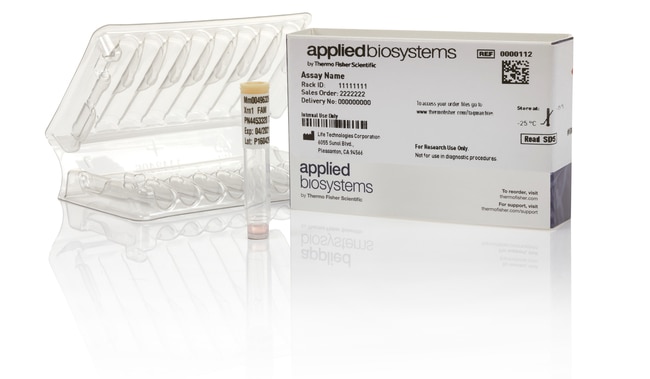
TaqMan™ 药物代谢基因分型检测试剂盒
Applied Biosystems™

TaqMan™ 药物代谢基因分型检测试剂盒

Green features
Applied Biosystems TaqMan 药物代谢基因分型检测使用金标准 TaqMan 5´-核酸酶化学法,用于扩增和检测与药物代谢相关的特定 SNP 等位基因、多核苷酸多态性 (MNP)了解更多信息
Have Questions?
货号数量
4362691150 reactions, Inventoried
货号 4362691
价格(CNY)
5,788.00
Each
立刻订购
数量:
150 reactions, Inventoried
Applied Biosystems TaqMan 药物代谢基因分型检测使用金标准 TaqMan 5´-核酸酶化学法,用于扩增和检测与药物代谢相关的特定 SNP 等位基因、多核苷酸多态性 (MNP) 和插入/缺失 (InDel) 基因。预先设计的 TaqMan 药物代谢基因分型检测集合包含超过 2,600 个Assay,针对 221 种药物代谢酶 (DME) 和相关转运蛋白基因中的高价值药物遗传学标记物。

优势:
•能够准确检测参与药物代谢和转运的重要生物学多态性
• 为药物代谢研究选择合适的Assay,具有灵活和便捷性
• 综合检测集合找到适合的内容,覆盖 95% 的 ADME 核心标记物
• 作业可靠性;工作能力;我们的生物信息学映射、设计、硅片质量控制意味着正在研究正确的 SNP
• 立即开始使用即用型检测,只需一天即可完成

大约运输时间
北美大约 1–2 天,欧洲大约 3–5 天*

所收集的每种 TaqMan 药物代谢基因分型检测试剂盒均使用代表四个不同种族组的 180 个的基因组 DNA 样品进行了功能测试。DME测定目标来自公共数据库,联合体和已发表的文章。为了便于鉴定,这些Assay已尽可能地被映射到常见的公共等位基因命名网站。

TaqMan SNP 基因分型检测仅需三种用于 PCR 的反应组分:纯化的基因组 DNA (1–20 ng)、检测溶液、TaqMan 基因分型预混液(或其他兼容预混液)(单独出售)。

所有Assay设计均为生物信息学流程的产品,通过利用生产和检测性能数据在过去十年中进行优化。TaqMan 检测试剂盒已被超过 40,000 份出版物引用,并且获得超过 350 个专利的支持。

所有关于 TaqMan 检测的预设计均包含在 TaqMan 检测 qPCR 保证书之内。**

所推荐预混液(单独出售):TaqMan 基因分型预混液

*我们较受欢迎的检测试剂盒在北美和欧洲都有库存,以尽快发货。如果某种Assay缺货,则可能需要额外的 3–5 工作日方可交付。

**适用条款和条件。有关完整详细信息,请访问 www.thermofisher.cn/taqmanguarantee。

仅供科研使用。不可用于诊断程序。
规格
最大浓度20X
标签或染料FAM、VIC
产品线TaqMan™
数量150 reactions, Inventoried
运输条件室温
种属
靶标基因可以检测 220 种药物代谢和转运蛋白基因
类型试剂
形式冰冻
Unit SizeEach
内容与储存
1 管含 20X 预先配制的测定混合物(2 探针和 2 引物)。

储存于 -15 至 -25°C 下

常见问题解答 (FAQ)

How do I set up a reference panel in the TaqMan Genotyper Software?

A reference panel is helpful in large studies to mark your reference samples. Please follow the directions here on how to set up a reference panel.

How do I enter the polymorphism sequence information (i.e., A, C, G, T) for my assays, and where is this info displayed in the TaqMan Genotyper Software?

The polymorphism sequence info can be entered into the software through Setup >Assays. You can import an assay information file (AIF) that contains this info for your assays (AIFs are shipped with assay orders), or manually enter this info for each assay using the edit assay feature. The polymorphism sequence info will be displayed in the assays table under allele1 base and allele2 base, in the results table in the calls column, in the cluster plot display in the x-axis and y-axis titles, and in the export files as genotypes. If no sequence information is entered for an assay, the default display for genotype calls will use the dye names, such as VIC/VIC, VIC/FAM or FAM/FAM dyes.

What is the bookmarking feature in the TaqMan Genotyper Software, and how would I use it?

Bookmarking is a unique feature in TaqMan Genotyper Software that allows you to tag a data point or well while reviewing results in a Study. For example, in reviewing a cluster plot for an assay, a data point is observed to be somewhat between clusters. You can set a bookmark for this data point to denote this well for further investigation. The bookmark persists between the Results workspace and Quality Control workspace, so you can easily identify the data point in a cluster plot, experiment plate view, or on the samples tab. Bookmarks are cleared upon exit from a Study or exit from the application.

I am getting the message: "An error has occurred. See the log file C:\ProgramFiles\Applied Biosystems\TaqMan Genotyper\config\eclipse\1363113099385.log." How can I fix this?

1.Go to the Start button, then Programs, then TaqMan Genotyper Software
2.Right-click on the program and choose “Run as Administrator”
3.If that does not work, go back to the same menu and choose “Properties”
4.Choose the “Compatibility” tab, and check “Run this program as administrator”
5.Click “Apply”
6.You may+C69 have to restart the computer for the settings to apply

Can I delete an assay or sample from my qPCR study?

An assay or sample may be deleted from a study only if there is no data or wells associated with it. Upon import of an experiment, the software collects all the assays and samples from the plate and lists them in the Setup > Assays or Setup > Samples workspaces. The assays and samples are stored in these workspaces as a library, and remain there even if you delete the experiment from the Study. Deleting the experiment will remove any data (wells) associated with the assays or samples, but not the assays or samples from the library. The assays and samples must then be deleted from these workspaces to remove them from the Study.