Search


引用和文献 (20)
Applied Biosystems™
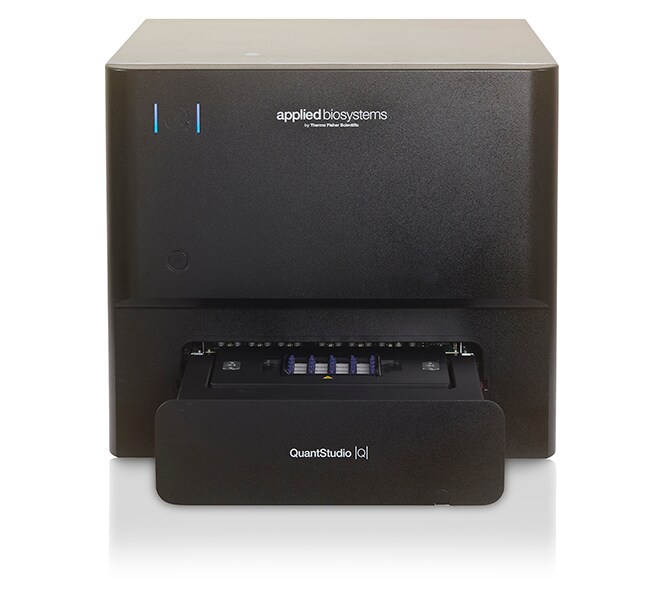
QuantStudio™ Absolute Q™ 数字 PCR 系统,台式计算机,延保,Smart Start
Applied Biosystems QuantStudio Absolute Q 数字 PCR 系统结合了数字 PCR (dPCR)了解更多信息
| 货号 | 数量 |
|---|---|
| A53267 | System + SmartStart + 1 yr ext warranty |
货号 A53267
价格(CNY)
-
数量:
System + SmartStart + 1 yr ext warranty
Applied Biosystems QuantStudio Absolute Q 数字 PCR 系统结合了数字 PCR (dPCR) 绝对定量的能力和 qPCR 工作流程的简单性。只需要一个手动操作步骤,而且该步骤只需5分钟,dPCR 比以往更加容易。对于想要对定量工作进行改进的研究人员,QuantStudio Absolute Q 系统提供了高质量、一致且易于使用的解决方案。
该系统包含有延保和 SmartStart 入门指导。
QuantStudio Absolute Q 系统的特点包括:
•简单便捷的类似于 qPCR 的工作流程,仅需5分钟的手动操作时间
• 所有功能集成到一台仪器中,减少了错误和手动输入
• 提高了工作效率,只需90分钟即可获得结果
• 使用智能远程支持功能减少了停机时间;向技术支持人员显示问题以快速解决问题
• QuantStudio Absolute Q 数字 PCR 软件可进行直观的设置、监测和分析
• 具有符合 21CFR 第11部分要求的安全、审查和电子签名功能-合规性支持
简单便捷的工作流程
QuantStudio Absolute Q 系统的设计可获得简单而强大的 dPCR 体验。dPCR 的所有必要步骤—区室化、热循环和数据采集—集成到一台仪器中。类似于 qPCR 的简单工作流程可在5分钟的手动操作时间内完成。
更快完成更多任务
QuantStudio Absolute Q 系统可在90分钟内完成运行。
更多信息(包括应用资料)›
QuantStudio Absolute Q 测定 ›
使用 SmartStart 入门指导快速启动和运行
随附的 SmartStart Orientation 由现场应用科学家 (FAS) 远程或在实验室执行,帮助您:
•快速启动和运行
• 连接至您的本地网络和云端
• 选择合适的试剂和耗材以满足您的需求
内容将有所不同,具体取决于您的知识水平和经验。
服务计划有助于保护您的投资
• 经生产商培训和认证的现场服务工程师 (FSE) 提供快速修复,尽可能延长系统正常运行时间
• 通过远程仪器诊断和解决,减少总体维修费用
• 通过年度维护服务,延长仪器使用寿命,并有助于保持仪器以出色性能运行
在年度维护期间,FSE 将更新软件(如需要);清洁、润滑和校准相关部件及光学系统;进行功能测试,同时记录任务、结果和异常。
了解更多有关可用融资方案和计划的信息›
该系统包含有延保和 SmartStart 入门指导。
QuantStudio Absolute Q 系统的特点包括:
•简单便捷的类似于 qPCR 的工作流程,仅需5分钟的手动操作时间
• 所有功能集成到一台仪器中,减少了错误和手动输入
• 提高了工作效率,只需90分钟即可获得结果
• 使用智能远程支持功能减少了停机时间;向技术支持人员显示问题以快速解决问题
• QuantStudio Absolute Q 数字 PCR 软件可进行直观的设置、监测和分析
• 具有符合 21CFR 第11部分要求的安全、审查和电子签名功能-合规性支持
简单便捷的工作流程
QuantStudio Absolute Q 系统的设计可获得简单而强大的 dPCR 体验。dPCR 的所有必要步骤—区室化、热循环和数据采集—集成到一台仪器中。类似于 qPCR 的简单工作流程可在5分钟的手动操作时间内完成。
更快完成更多任务
QuantStudio Absolute Q 系统可在90分钟内完成运行。
更多信息(包括应用资料)›
QuantStudio Absolute Q 测定 ›
使用 SmartStart 入门指导快速启动和运行
随附的 SmartStart Orientation 由现场应用科学家 (FAS) 远程或在实验室执行,帮助您:
•快速启动和运行
• 连接至您的本地网络和云端
• 选择合适的试剂和耗材以满足您的需求
内容将有所不同,具体取决于您的知识水平和经验。
服务计划有助于保护您的投资
• 经生产商培训和认证的现场服务工程师 (FSE) 提供快速修复,尽可能延长系统正常运行时间
• 通过远程仪器诊断和解决,减少总体维修费用
• 通过年度维护服务,延长仪器使用寿命,并有助于保持仪器以出色性能运行
在年度维护期间,FSE 将更新软件(如需要);清洁、润滑和校准相关部件及光学系统;进行功能测试,同时记录任务、结果和异常。
了解更多有关可用融资方案和计划的信息›
仅供科研使用。不可用于诊断程序。
规格
适用于(应用)数字PCR
适用于(设备)QuantStudio™ Absolute Q™ MAP16 板
产品线QuantStudio
数量System + SmartStart + 1 yr ext warranty
运输条件室温
模块规格不可互换
Unit SizeEach
内容与储存
QuantStudio™ Absolute Q™ 数字 PCR 系统,台式计算机
常见问题解答 (FAQ)
What is included in the QuantStudio Absolute Q Digital PCR System, desktop, extended warranty, Smart Start (Cat. No. A53267)?
I finished running my experiment on the QuantStudio Absolute Q Digital PCR instrument but just realized that I had selected the wrong dyes during setup. Can I change the dyes that were used after the run?
I ran my experiment using the QuantStudio Absolute Q Digital PCR System but did not actually use dyes in all the channels. Is there a way to only see those dye channels that were used?
I'm using the QuantStudio Absolute Q Digital PCR System and the software is saying that the concentration is NaN. What does that mean?
With the QuantStudio Absolute Q Digital PCR instrument, the run data didn't automatically transfer after the run completed. How can I get the data?
引用和文献 (20)
引用和文献
Abstract
Multidrug-resistant mutations to antiviral and antibody therapy in an immunocompromised patient infected with SARS-CoV-2.
Journal:Med (New York, N.Y.)
PubMed ID:37683636
The circular RNA Ataxia Telangiectasia Mutated regulates oxidative stress in smooth muscle cells in expanding abdominal aortic aneurysms
Journal:Molecular Therapy Nucleic Acids
PubMed ID:
Monitoring of kinetics and exhaustion markers of circulating CAR-T cells as early predictive factors in patients with B-cell malignancies.
Journal:Frontiers in immunology
PubMed ID:37122702
Precision cancer monitoring using a novel, fully integrated, microfluidic array partitioning digital PCR platform.
Journal:Scientific reports
PubMed ID:31862911
The Digital MIQE Guidelines Update: Minimum Information for Publication of Quantitative Digital PCR Experiments for 2020.
Journal:Clinical chemistry
PubMed ID:32746458