Search

Applied Biosystems™
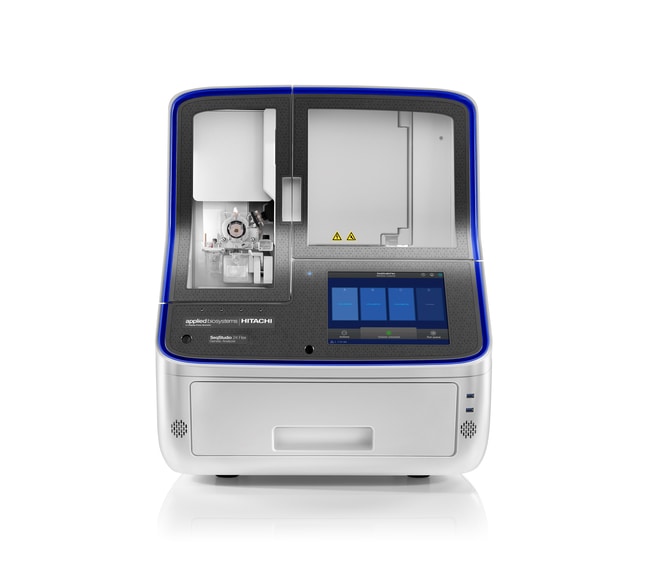
SeqStudio™ 24 Flex 基因分析仪,SmartStart 向导,1年 AB 保证(含计划性维护)
Applied Biosystems SeqStudio 24 Flex 基因分析仪为毛细管电泳 (CE) 工作流程提供了设计改进和技术进步。它提供黄金标准 Sanger了解更多信息
| 货号 | 数量 |
|---|---|
| A53792 | 1 package |
货号 A53792
价格(CNY)
-
数量:
1 package
Applied Biosystems SeqStudio 24 Flex 基因分析仪为毛细管电泳 (CE) 工作流程提供了设计改进和技术进步。它提供黄金标准 Sanger 测序和片段分析数据质量,具有较高的灵活性、较简便的操作和云连接,使研究人员能够有效管理其工作量和工作/生活平衡。该中通量系统旨在实现极佳的易用性,具有高质量、出色的可靠性,为希望在实验室中更智能地工作的研究人员提供极佳的用户体验。
该系统包包括一年的 AB 保证延长保修(含计划性维护)和 Smart Start 向导。
SeqStudio 24 Flex 基因分析仪的特点包括:
• 通过真正的独立运行来节省空间;在触摸屏上直接实现设置、启动、监测和分析
• 通过连续装板和样品重新排序改进工作量管理
• 通过远程监测实现实验室效率
• 新款改进型毛细管阵列,操作简单、方便
• 通过集成的远程故障排除工具缩短停机时间
易于使用的数据采集软件
预装在机载触摸屏计算机上的数据采集软件将用户友好性提升到新水平。它提供直观的仪表板设计、简化的板设置和内置的常见操作自助视频,以便新用户快速启动和运行。
灵活安排
四板容量、连续装板和紧急样品重新排序提供了较大的中通量容量和完全灵活的安排,使您的时间更加充裕。
远程功能
我们基于云端的 Connect 平台允许用户设置板文件、监测仪器和耗材性能及运行进度,甚至可以从任何地方执行一些关键仪器功能,使灵活性大大提升。
始终可访问您的数据
SeqStudio 24 Flex 系统提供了一个自动工作流程,以便在 Connect 上从现有的次要分析应用中获取和共享结果。这些基于网络的软件应用包括 Peak Scanner、微卫星分析、NGS 确认、质量检查和变种分析。它们与 Mac 和 PC 兼容。
智能服务让用户放心无忧
通过针对 SeqStudio 24 Flex 基因分析仪的优质服务产品尽可能缩短停机时间。智能帮助供用户直接在触摸屏上联系技术支持人员,无需下载文件或花费时间电话沟通。经验丰富的技术人员将分析请求,根据用户偏好(电话或电子邮件)进行响应,并尽快解决问题。
智能远程支持是一种沉浸式协作工具,使客户能够快速高效地向技术支持人员展示要解决的问题,从而帮助缩短仪器停机时间和尽可能减少现场访问需求。
高应用多功能性
可针对多通路 PCR 分析、新一代测序确认、物种鉴别、STR 基因分型、细胞系鉴别、dsDNA 质量控制、质粒测序和基因组编辑分析等多种应用提供简单工作流程、可靠的测定和试剂、直观的软件。
值得信赖的结果
通过经证实的 Applied Biosystems 毛细管电泳技术,可获得孔间和仪器间数据准确性。
服务计划有助于保护您的投资
• 通过经制造商培训和认证的现场服务工程师 (FSE) 提供快速修复,尽可能延长系统正常运行时间
• 延长仪器的使用寿命,并通过年度维护服务帮助其保持极佳性能
在年度维护期间,FSE 将根据需要更新软件;清洁、润滑和校准相关部件和光学系统;执行功能测试,同时记录任务、结果和发现。
该系统包包括一年的 AB 保证延长保修(含计划性维护)和 Smart Start 向导。
SeqStudio 24 Flex 基因分析仪的特点包括:
• 通过真正的独立运行来节省空间;在触摸屏上直接实现设置、启动、监测和分析
• 通过连续装板和样品重新排序改进工作量管理
• 通过远程监测实现实验室效率
• 新款改进型毛细管阵列,操作简单、方便
• 通过集成的远程故障排除工具缩短停机时间
易于使用的数据采集软件
预装在机载触摸屏计算机上的数据采集软件将用户友好性提升到新水平。它提供直观的仪表板设计、简化的板设置和内置的常见操作自助视频,以便新用户快速启动和运行。
灵活安排
四板容量、连续装板和紧急样品重新排序提供了较大的中通量容量和完全灵活的安排,使您的时间更加充裕。
远程功能
我们基于云端的 Connect 平台允许用户设置板文件、监测仪器和耗材性能及运行进度,甚至可以从任何地方执行一些关键仪器功能,使灵活性大大提升。
始终可访问您的数据
SeqStudio 24 Flex 系统提供了一个自动工作流程,以便在 Connect 上从现有的次要分析应用中获取和共享结果。这些基于网络的软件应用包括 Peak Scanner、微卫星分析、NGS 确认、质量检查和变种分析。它们与 Mac 和 PC 兼容。
智能服务让用户放心无忧
通过针对 SeqStudio 24 Flex 基因分析仪的优质服务产品尽可能缩短停机时间。智能帮助供用户直接在触摸屏上联系技术支持人员,无需下载文件或花费时间电话沟通。经验丰富的技术人员将分析请求,根据用户偏好(电话或电子邮件)进行响应,并尽快解决问题。
智能远程支持是一种沉浸式协作工具,使客户能够快速高效地向技术支持人员展示要解决的问题,从而帮助缩短仪器停机时间和尽可能减少现场访问需求。
高应用多功能性
可针对多通路 PCR 分析、新一代测序确认、物种鉴别、STR 基因分型、细胞系鉴别、dsDNA 质量控制、质粒测序和基因组编辑分析等多种应用提供简单工作流程、可靠的测定和试剂、直观的软件。
值得信赖的结果
通过经证实的 Applied Biosystems 毛细管电泳技术,可获得孔间和仪器间数据准确性。
服务计划有助于保护您的投资
• 通过经制造商培训和认证的现场服务工程师 (FSE) 提供快速修复,尽可能延长系统正常运行时间
• 延长仪器的使用寿命,并通过年度维护服务帮助其保持极佳性能
在年度维护期间,FSE 将根据需要更新软件;清洁、润滑和校准相关部件和光学系统;执行功能测试,同时记录任务、结果和发现。
规格
滤芯型带滤芯
数量1 package
无菌未灭菌
总服务范围1年制造商保修和1年 PM 现场服务
电压100/240 V
Unit SizeEach