Search



Thermo Scientific™
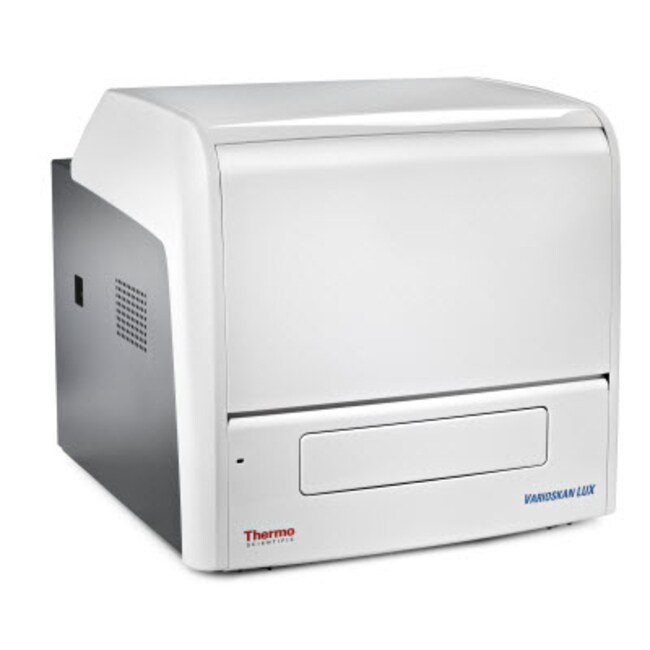
Varioskan™ LUX 多功能酶标仪
通过五种测量技术分析各种样品,包括吸光度测定(紫外可见光)、荧光强度测定、化学发光测定、AlphaScreen/AlphaLISA 测定和 TRF 测定。
Have Questions?
更改视图

| 货号 | 测量技术 | 读取方式 | 进样器数量 | 包括 |
|---|---|---|---|---|
| VL0000D0 | 吸光度、荧光强度, Fluorescence Intensity | 顶读 | 无 | SkanIt PC Software, Research Edition |
| VL0L00D0 | 吸光度、荧光强度、发光, Fluorescence Intensity, Luminescence | 顶读 | 无 | SkanIt PC Software, Research Edition |
| VL0L0TD0 | 光吸收,荧光,化学发光和时间分辨荧光, Fluorescence Intensity, Luminescence, Time-Resolved Fluorescence | 顶读 | 无 | SkanIt PC Software, Research Edition |
| VLBL00GD0 | 吸光度、荧光强度、发光, Fluorescence Intensity, Luminescence | 顶读和底读, Bottom | 无 | Gas Module, SkanIt PC Software, Research Edition |
| VLB000D0 | 吸光度、荧光强度, Fluorescence Intensity | 顶读和底读, Bottom | 无 | SkanIt PC Software, Research Edition |
| VLBL00GD2 | 吸光度、荧光强度、发光, Fluorescence Intensity, Luminescence | 顶读和底读, Bottom | 2 | Gas Module, SkanIt PC Software, Research Edition |
| VLBL00D0 | 吸光度、荧光强度、发光, Fluorescence Intensity, Luminescence | 顶读和底读, Bottom | 无 | SkanIt PC Software, Research Edition |
| VLBLATD0 | 吸光度、荧光强度、发光、时间分辨荧光、AlphaScreen, Fluorescence Intensity, Luminescence, Time-Resolved Fluorescence, AlphaScreen | 顶读和底读, Bottom | 无 | SkanIt PC Software, Research Edition |
| VLBLATGD0 | 吸光度、荧光强度、发光、时间分辨荧光、AlphaScreen, Fluorescence Intensity, Luminescence, Time-Resolved Fluorescence, AlphaScreen | 顶读和底读, Bottom | 无 | Gas Module, SkanIt PC Software, Research Edition |
| VLBLATGD2 | 吸光度、荧光强度、发光、时间分辨荧光、AlphaScreen, Fluorescence Intensity, Luminescence, Time-Resolved Fluorescence, AlphaScreen | 顶读和底读, Bottom | 2 | Gas Module, SkanIt PC Software, Research Edition |
| VLBL00D2 | 吸光度、荧光强度、发光, Fluorescence Intensity, Luminescence | 顶读和底读, Bottom | 2 | SkanIt PC Software, Research Edition |
| VLBLATD2 | 吸光度、荧光强度、发光、时间分辨荧光、AlphaScreen, Fluorescence Intensity, Luminescence, Time-Resolved Fluorescence, AlphaScreen | 顶读和底读, Bottom | 2 | SkanIt PC Software, Research Edition |
| VLBL0TD0 | 光吸收,荧光,化学发光和时间分辨荧光, Fluorescence Intensity, Luminescence, Time-Resolved Fluorescence | 顶读和底读, Bottom | 无 | SkanIt PC Software, Research Edition |
货号 VL0000D0
价格(CNY)
-
测量技术:
吸光度、荧光强度, Fluorescence Intensity
读取方式:
顶读
进样器数量:
无
包括:
SkanIt PC Software, Research Edition
Thermo Scientific™ Varioskan™ LUX 多功能酶标仪可实现多种测定,包括吸光度测定、荧光强度测定、化学发光测定、AlphaScreen 测定和时间分辨荧光测定技术,专为满足生物科学研究人员的各种需求而设计。该仪器具备智能化的自动增益条件功能,简化了测量时的设置,其智能安全控件简化了工作流程并且有助于避免实验误差。Varioskan LUX 提高了多功能酶标仪可靠性和易用性标准,最大限度的满足了研究人员的需要。Varioskan LUX 多功能读数仪已获得 Cisbio Bioassays 的 HTRF™ 认证以及 Promega Corporation 的 DLReady™ 认证。
Varioskan LUX 是一款模块化的可升级仪器,可为各种应用提供出色的可用性。
- 多达五种检测技术:吸光度测定(紫外可见光)、荧光强度测定(包括 FRET)、化学发光测定(直接测定和滤光片测定)、AlphaScreen/AlphaLISA 测定和时间分辨荧光测定(包括 TR-FRET/hTRF)
- 滤光片和光栅光路
- 光谱扫描有助于实验优化
- 五种测量模式,包括终点检测、动力学检测、光谱检测、动力学光谱检测和多点检测
- 集成式气体控制模块可为基于细胞的检测控制 CO2 和 O2 浓度
- 分液和测量同时进行,以便监测反应最开始时的信号
- 基于每个孔的信号强度,自动选择动态范围
- 智能安全控件可在潜在问题发生之前将其识别并对用户发出提醒
- 自动化仪器校准和自检功能有助于确保可靠性能
- CisBio Bioassays 认证的 可进行HTRF的读数仪
- 通过了 Promega 公司的 DLReady 认证
Varioskan LUX 与功能强大且直观的 SkanIt 软件搭配使用,可提供出色的可用性和灵活性。
- 无安装限制—每个用户均可在自己的电脑上安装该软件
- 直观 灵活的界面 适合多用户操作和检测
- 创新型虚拟移液工具使定义样品布局的操作变得简单
- 测量数据将持续不断地保存至数据库,因此不会因断电或异常终止等意外中断而发生数据丢失
- 简化了数据处理和导出
- 只需单击鼠标即可导出数据,或者在运行结束后自动以电子邮件的形式发送数据
- 有以下几种文件格式用于导出检测结果:*.xlsx、*.pdf、*.xml 和 *.txt
- 测量期间显示实时光谱和动力学曲线
- 用于数据分析(如去空白、平均数/SD/CV%、标准曲线、剂量反应、质量控制、分类、动力学和光谱分析、自定义公式等)的内置计算
- 可追踪运行时间操作和设置的综合结果报告
- 两种版本可供选择:供生命科学研究员使用的科研版,以及提供符合 FDA 21 CFR 第 11 部分所需功能的药研版。
Varioskan LUX 是一款可升级的模块化仪器,因此您可以配置成最符合您需求的系统。有关详细信息,请联系销售代表。
规格
准确度200 至 399 nm(0 至 2 吸光度)处 0.003 吸光度或 ±2%, 400 至 1000 nm(0 至 3 吸光度)处 0.003 吸光度或 ±1%
准确度(光度)在 200 - 399 nm 处,0.003 Abs 或 ± 2% (0–2 Abs);0.003 Abs 或 ± 1%(在 400–1,000 nm 处 (0–3 Abs))
兼容性自动化兼容
深度(英制)23 in.
深度(公制)58 cm
尺寸(长 x 宽 x 高)58 x 53 x 51 cm (23 x 21 x 20 in.)
动态范围荧光强度:顶读 >6 个数量级
高度(英制)20 in.
高度(公制)51 cm
赫兹50/60 Hz
包括SkanIt PC Software, Research Edition
培养箱温度高达 45°C
线性度96孔板:±2%(450 nm 处 0 至 4 吸光度), 384 孔板:±2%(450 nm 处 0 至 3 吸光度)
测量速度96孔板15秒、384孔板45秒、1536孔板135秒(最短时间)
测量类型终点法、动力学检测、光谱扫描、孔内多点扫描和动力学光谱扫描
进样器数量无
精确度450 nm(0 至 3 吸光度)处 SD <0.001 吸光度或 CV <0.5%
读出范围0 - 6 Abs
灵敏度荧光强度(顶读): <0.4 fmol 荧光素/孔(黑色 384 孔板)
软件语言版本英语、德语、法语、西班牙语、葡萄牙语、意大利语、日语、中文和俄语
软件类型SkanIt 软件
光谱扫描速度<2.2秒/孔,400 至 500 nm,1次闪光、2 nm 步进
电压100/240 V
波长范围吸光度:200 至 1000 nm, 荧光强度:激发波长:200 至 1000 nm,发射波长:270 nm 到 840 nm
重量(英制)119 lb.
重量(公制)54 kg
宽度(英制)21 in.
宽度(公制)53 cm
检测器类型光电倍增管
界面PC Software (Thermo Scientific SkanIt Software)
光源氙闪灯
测量技术吸光度、荧光强度, Fluorescence Intensity
板类型6至1536孔板(吸光度6至384孔板)
产品线Varioskan
读取方式顶读
振荡圆周式
波长选择吸光度和光谱扫描:双单色器、荧光强度:双激发和发射单色器, Quad Monochromators (FL); 2 Ex, 2 Em
Unit SizeEach
常见问题解答 (FAQ)
In the Varioskan LUX Multimode Microplate Reader, how is running a TRF spectrum by setting excitation at 335 nm and using emission range different from running a filter-based TRF assay? Why does SkanIT Software have the TRF spectrum option?
How to remove a stuck microplate from the Varioskan LUX Multimode Microplate Reader?

Power off the Varioskan LUX instrument, open the sliding door, and then press both springs outward (1) to unlock the bottom of the front panel. Tilt the bottom of the panel outwards slightly and lift up to remove.

Look inside the instrument to locate the tray (3). Gently slide the tray to the left and then towards you to access the plate. Check for jams and make sure that the correct holder is installed. When finished, push the tray back into the instrument (exact position doesn’t matter as long as it is completely inside) and reinstall the front panel.
Note: Remove the bottom front cover on the instrument, in order to access the plate carrier, and manually pull out the plate. Do not attempt to grab the plate back through the plate door, otherwise it can cause alignment issues that will require a repair.
Find additional tips, troubleshooting help, and resources within our Cell Analysis Support Center.