Search


引用和文献 (24578)
Applied Biosystems™
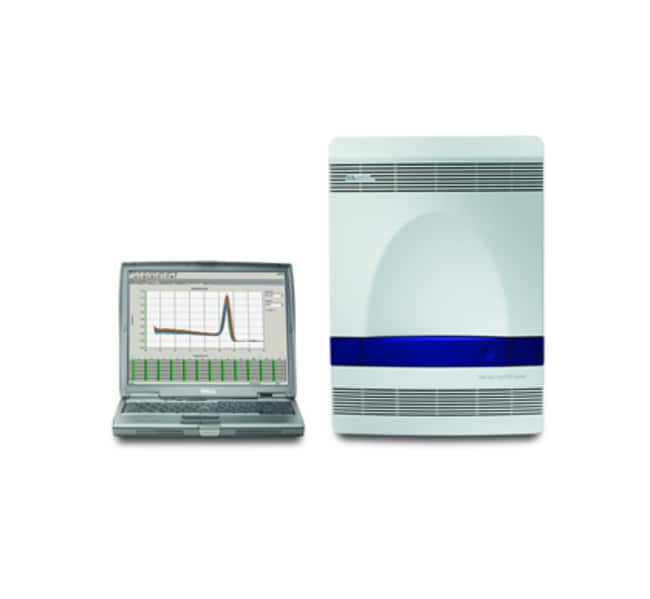
7500 Fast 实时荧光定量 PCR 系统,便携式计算机
Applied Biosystems® 7500 Fast 实时荧光定量 PCR 系统可在极短时间内提供极高性能。7500 Fast 型针对快速循环应用充分优化,能在短短了解更多信息
| 货号 | 数量 |
|---|---|
| 4351106 | 1 system |
货号 4351106
价格(CNY)
-
数量:
1 system
Applied Biosystems® 7500 Fast 实时荧光定量 PCR 系统可在极短时间内提供极高性能。7500 Fast 型针对快速循环应用充分优化,能在短短 30 分钟内获得高质量结果。我们提供一台配备 7500 Fast 系统的戴尔™ 笔记本计算机。
•专门设计的 Fast 模块可确保最高速度下的热均匀性。
•升降温速度更快,能够在保证延伸时间或测定质量的前提下,快速获得结果。
•快速光学板确保在 10-30 ul 反应体积中具有出色的精确度。
•使用 TaqMan® Fast 通用 PCR 预混液在一个板上运行多次 Fast 测定。
•每天完成更多次运行,具有与 7500 系统所提供相当的出色性能。
高分辨率熔解分析
Applied Biosystems® 高分辨率熔解 (HRM) 软件是较简单的熔解分析软件,可实现实时荧光定量 PCR 熔解曲线测定更准确地用于突变扫描和基因分型。7500 Fast 实时荧光定量 PCR 系统可提供 HRM 软件,该软件可在标准 96 孔板规格中提供精确结果。
使用 Applied Biosystems® 高分辨率熔解 (HRM) 软件,通过简单易行的工作流程和极少的主观数据分析步骤进行更复杂的熔解分析。
•通过自动调用基因型缩短分析时间并自动省去无模板对照品。
•通过自动将未知变异簇分组,将主观分析降至最低。
•无需温度变化–更轻松地区分纯合突变体和野生突变型。
•允许通过自定义的多图视图、可扩展窗口和一键式颜色分配来方便地查看数据,从而突出显示目标曲线。
•通过直接将数据和图形导出到 PowerPoint 或 JPEG 文件的选项,简化数据演示。
新 - 7500 软件 v2.0
现在,易于使用的 StepOne 软件可用于带有 7500 软件 v2.0 升级功能的 7500 和 7500 Fast 系统。7500 软件 v2.0 结合您喜欢的 StepOne 软件功能,如各种微孔板设置向导、标准曲线稀释液和预混液配方计算器、QC 标签、数据过滤器以及运行完成时电子邮件通知。7500 软件 v2.0 还包括增强的基因表达研究包,有多种新的熔解曲线协议选项,包括多个峰检测、步骤和保持温度控制以及可定制的升降温速度。
新型基因表达研究包比任何其他仪器软件包都能更好地适应广泛的研究:
•将无限数量的比较 CT(相对定量)文件导入一项研究。
•将样品进行分组,并通过技术复制组和生物学复制组查看数据。
•使用任何基因作为内源性对照,包括同时对多个对照品进行平均。
•在 RQ 结果中输入要计算的已知效率值
21 CFR Part 11 可用模块
SDS v1.4 21CFRp11 模块是协助符合 21CFRp11 要求的强大工具,同时仍然能够提供用户可定制的配置设置的灵活性。
•可为最多四个用户组添加单个用户登录,每个组都具有指定的权限设置。
•用户可定制的权限设置包括 14 种系统活动、电子签名授权、以及其他安全设置,可让您较大程度地控制合规性工作。
•可根据您的可追溯性需求启用或禁用审查跟踪。
•电子签名的选择可以简化工作流程中的电子签名。
一个系统、多种应用
应用包括基因表达分析、病原体定量测定、SNP 基因分型、等温反应以及利用内部阳性对照的 +⁄– 测定。为了促进许多应用,Applied Biosystems® 提供预先配制的即用型、经过质量检测的 TaqMan® 分析,用于与 7500 Fast 系统配合使用。现在您可以减少您的测定优化工作。
仅供研究使用。不适用于诊断用途。
•专门设计的 Fast 模块可确保最高速度下的热均匀性。
•升降温速度更快,能够在保证延伸时间或测定质量的前提下,快速获得结果。
•快速光学板确保在 10-30 ul 反应体积中具有出色的精确度。
•使用 TaqMan® Fast 通用 PCR 预混液在一个板上运行多次 Fast 测定。
•每天完成更多次运行,具有与 7500 系统所提供相当的出色性能。
高分辨率熔解分析
Applied Biosystems® 高分辨率熔解 (HRM) 软件是较简单的熔解分析软件,可实现实时荧光定量 PCR 熔解曲线测定更准确地用于突变扫描和基因分型。7500 Fast 实时荧光定量 PCR 系统可提供 HRM 软件,该软件可在标准 96 孔板规格中提供精确结果。
使用 Applied Biosystems® 高分辨率熔解 (HRM) 软件,通过简单易行的工作流程和极少的主观数据分析步骤进行更复杂的熔解分析。
•通过自动调用基因型缩短分析时间并自动省去无模板对照品。
•通过自动将未知变异簇分组,将主观分析降至最低。
•无需温度变化–更轻松地区分纯合突变体和野生突变型。
•允许通过自定义的多图视图、可扩展窗口和一键式颜色分配来方便地查看数据,从而突出显示目标曲线。
•通过直接将数据和图形导出到 PowerPoint 或 JPEG 文件的选项,简化数据演示。
新 - 7500 软件 v2.0
现在,易于使用的 StepOne 软件可用于带有 7500 软件 v2.0 升级功能的 7500 和 7500 Fast 系统。7500 软件 v2.0 结合您喜欢的 StepOne 软件功能,如各种微孔板设置向导、标准曲线稀释液和预混液配方计算器、QC 标签、数据过滤器以及运行完成时电子邮件通知。7500 软件 v2.0 还包括增强的基因表达研究包,有多种新的熔解曲线协议选项,包括多个峰检测、步骤和保持温度控制以及可定制的升降温速度。
新型基因表达研究包比任何其他仪器软件包都能更好地适应广泛的研究:
•将无限数量的比较 CT(相对定量)文件导入一项研究。
•将样品进行分组,并通过技术复制组和生物学复制组查看数据。
•使用任何基因作为内源性对照,包括同时对多个对照品进行平均。
•在 RQ 结果中输入要计算的已知效率值
21 CFR Part 11 可用模块
SDS v1.4 21CFRp11 模块是协助符合 21CFRp11 要求的强大工具,同时仍然能够提供用户可定制的配置设置的灵活性。
•可为最多四个用户组添加单个用户登录,每个组都具有指定的权限设置。
•用户可定制的权限设置包括 14 种系统活动、电子签名授权、以及其他安全设置,可让您较大程度地控制合规性工作。
•可根据您的可追溯性需求启用或禁用审查跟踪。
•电子签名的选择可以简化工作流程中的电子签名。
一个系统、多种应用
应用包括基因表达分析、病原体定量测定、SNP 基因分型、等温反应以及利用内部阳性对照的 +⁄– 测定。为了促进许多应用,Applied Biosystems® 提供预先配制的即用型、经过质量检测的 TaqMan® 分析,用于与 7500 Fast 系统配合使用。现在您可以减少您的测定优化工作。
仅供研究使用。不适用于诊断用途。
仅供科研使用。不可用于诊断程序。
规格
已校准染料TAMRA、Cy3、FAM、SYBR Green、Texas Red、JOE、ROX、Cy5、NED、VIC
尺寸34 cm (13.39 in.) (W) x 49 cm (19.29 in.) (H) x 45 cm (17.72 in.) (D)
动态范围9个对数级线性动态范围
外部计算机提供便携式计算机
适用于(设备)7500 Fast 仪器包
产品规格96孔板、8孔联排管
最大加热速率(隔热块)5.5°C
光学CCD 相机、Halogen 光源、5个激发滤光片和5个发射滤光片
参比荧光染料ROX(单独管)、其他惰性参比染料、ROX(预混合)
峰值模块变温速率5.5°C⁄s
精确度区分 5000–10,000 基因组当量(两倍拷贝数差异),置信度为 99.7%
数量1 system
反应速度快速,标准
反应体积范围10-30 µl
运行时间36 min(快速),<2 h(标准)
样品变温速率快速模式:± 2.2°C⁄s,标准模式:± 1.6°C⁄s
灵敏度低至1拷贝的人 RNAse P 基因
温度范围(公制)4.0 至 99.9°C
热量准确度±0.5°C
热循环系统基于 Peltier 的系统
热量均匀性±1°C
通量4至5块96孔板/天
重量34 kg(75 lb.)
容量12 x 8联排管、1 x 96孔板 (Fast)
Unit SizeEach
内容与储存
便携式计算机
常见问题解答 (FAQ)
Why are there no RQ values for all the samples in my study from the 7500 or 7500 Fast Real-Time PCR System software?
Why do I not see any CT or RQ values from my ddCT experiment in the software for the 7500 or 7500 Fast Real-Time PCR System?
What can I do when I get the error message "Time too short" on the 7500 or 7500 Fast Real-Time PCR System?
What can I do if I get an error message about "Block Up Switch" on the 7500 or 7500 Fast Real-Time PCR System?
On the 7500 and 7500 Fast Real-Time PCR Systems, what can I do if I get an error message about "CCD acquisition failure"?
引用和文献 (24578)
引用和文献
Abstract
Characterization of matrix metalloproteinase-2 and matrix metalloproteinase-9 and their inhibitors in equine granulosa cells in vivo and in vitro
Journal:JOURNAL OF ANIMAL SCIENCE
PubMed ID:
Matrix metalloproteinases (MMP) and tissue inhibitors of MMP (TIMP) regulate tissue remodeling events necessary for ovulation. Thus, changes in MMP and TIMP expression and protein enzyme activity were examined in vivo and in vitro during follicular development and atresia in the horse. Equine granulosa cells and follicular fluid from medium
Characterization of matrix metalloproteinase-2 and matrix metalloproteinase-9 and their inhibitors in equine granulosa cells in vivo and in vitro
Journal:JOURNAL OF ANIMAL SCIENCE
PubMed ID:
Matrix metalloproteinases (MMP) and tissue inhibitors of MMP (TIMP) regulate tissue remodeling events necessary for ovulation. Thus, changes in MMP and TIMP expression and protein enzyme activity were examined in vivo and in vitro during follicular development and atresia in the horse. Equine granulosa cells and follicular fluid from medium
Molecular cloning and characterization of porcine calcineurin-alpha subunit expression in skeletal muscle.
Journal:J Anim Sci
PubMed ID:19897633
The calmodulin/Ca(2+)-dependent serine/threonine phophatase, calcineurin (CaN), has been implicated in controlling muscle fiber phenotype. However, little information is available concerning the expression of CaN in porcine skeletal muscle. Therefore, the porcine CaN alpha (CaN-A) was cloned by reverse transcription-PCR and its expression characterized in selected porcine skeletal muscles. We successfully
Genetic analysis of hepatitis C virus with defective genome and its infectivity in vitro.
Journal:J Virol
PubMed ID:19369330
Replication and infectivity of hepatitis C virus (HCV) with a defective genome is ambiguous. We molecularly cloned 38 HCV isolates with defective genomes from 18 patient sera. The structural regions were widely deleted, with the 5' untranslated, core, and NS3-NS5B regions preserved. All of the deletions were in frame,
Cell lines as candidate reference materials for quality control of ERBB2 amplification and expression assays in breast cancer.
Journal:Clin Chem
PubMed ID:19443566
BACKGROUND: Human epidermal growth factor receptor 2 (HER2) is an important biomarker whose status plays a pivotal role in therapeutic decision-making for breast cancer patients and in determining their clinical outcomes. Ensuring the accuracy and reproducibility of HER2 assays by immunohistochemistry (IHC) and by fluorescence in situ hybridization (FISH)