Search

Ion Torrent™
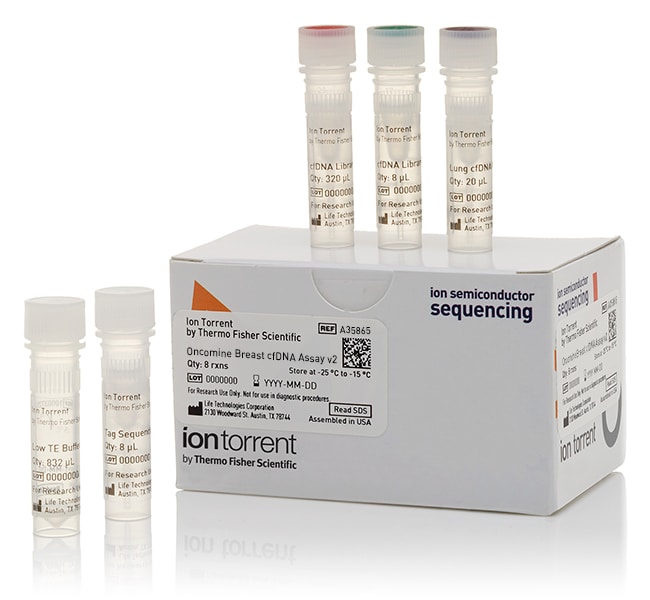
Oncomine™ Breast cfDNA 研究检测 v2
Oncomine 乳腺 cfDNA 测定试剂盒 v2 是检测无细胞 DNA (cfDNA) 内乳腺肿瘤来源 DNA了解更多信息
| 货号 | 数量 |
|---|---|
| A35865 | 8 reactions |
货号 A35865
价格(CNY)
-
数量:
8 reactions
Oncomine 乳腺 cfDNA 测定试剂盒 v2 是检测无细胞 DNA (cfDNA) 内乳腺肿瘤来源 DNA (ctDNA) 的完整解决方案的一部分。其提供了文库构建试剂,以及用于从单管 10 mL 全血的血浆组分中获得的 cfDNA 制备扩增子文库的一池多重 PCR 引物。
液体活检相对于传统实体瘤活检具有几大优势:
•采用微创,可在多个时间点采集样品以监测癌症进展
• 成本更低
• 从采样至得到结果的周转时间更短
• 更好地表示肿瘤异质性
Oncomine 乳腺 cfDNA 测定试剂盒 v2 可实现以下分析:
•热点基因:AKT1、EGFR、ERBB2、ERBB3、ESR1、FBXW7、KRAS、PIK3CA、SF3B1、TP53(∼152 个热点)
• 拷贝数基因 (CNV):CCND1、ERBB2、FGFR1
• 全长基因:TP53(∼80% 覆盖率)
已发现这些基因在乳腺癌中经常突变。通过使用标签测序技术,可以实现各种变体类型的检测下限 (LOD)*:
•对于 SNV/短插入缺失,可实现 LOD 为 0.1%、灵敏度 ∼80%、特异性 >99%
• 对于 TP53 突变检测,可实现 LOD 为 0.5%
• 对于 ERBB2 和 FGFR1 CNV 靶标,可实现检测低至 1.2 倍扩增,而对于 CCND1 CNV 靶标,可实现检测低至 1.4 倍扩增、灵敏度 >90%、特异性 >99%
使用 Ion S5 XL 测序系统可仅在 2 天内完成从使用 MagMAX 无细胞 DNA 分离试剂盒(货号 A29319)进行 cfDNA 分离到样品分析的整个工作流程(下图)。
技术
在全血血浆组分中观察到极低浓度 cfDNA (ctDNA)。由于此低发病率,所以该检测中采用了标签测序技术。该技术将独特的分子标签连接至基因特异性引物上(下图)。扩增后,将根据扩增的标签对已标记分子进行分组。在 80% 或更长的时间含有相同突变体的组将被称为阳性。使用标签技术,通过文库构建/测序过程生成的随机错误序列能够被清除。
与 LOD 为 1–5% 的其他技术不同,Oncomine 乳腺 cfDNA 测定试剂盒 v2 针对 SNV 具有低至 0.1% 的灵活检测限或在 1,000 个野生型拷贝背景中具有 1 个突变体拷贝。为了达到 0.1% LOD,需要 20 ng cfDNA 上样量。cfDNA 用量可以更低,但 LOD 将更高,这取决于起始量(下图)。
优势:
•适用于短 cfDNA 的优化扩增子设计确保了可能较高的捕获率
•优化的靶向检测设计允许进行高度多重下一代测序 (NGS),降低了每样品的测序成本
•两天内即可完成的高效工作流程
使用 Torrent Suite 软件 5.2 或更高版本,可以实现对 SNV 和短插入缺失的分析。为分析 SNV、短插入缺失和 CNV,需要 Ion Reporter 5.6(基于云端或服务器)。
标签测序技术具有简单性、快速和可扩展性
Oncomine 乳腺 cfDNA 测定试剂盒 v2 只需 1 ng cfDNA 上样量即可进行靶向文库构建从而进行癌症基因研究。cfDNA 检测使用标准 PCR 设备和 2 次简单的 PCR 反应,一次连接独特分子标签,另一次扩增文库以进行高度多重 PCR 靶标的选择。此外,Oncomine 乳腺 cfDNA 测定试剂盒 v2 与 FFPE 样品兼容,可用于可能的一致性研究。靶向文库的总时间仅为 3.5 小时。使用标签测序条形码套件 1-24(货号 A31830)或 25-48(货号 A31847)实现可扩展性和灵活性,用于在 Ion S5 芯片上倍增条形码样品。
*使用从正常健康供体中分离的人工阳性样品和 cfDNA,测定各变体类型的敏感性和特异性。
液体活检相对于传统实体瘤活检具有几大优势:
•采用微创,可在多个时间点采集样品以监测癌症进展
• 成本更低
• 从采样至得到结果的周转时间更短
• 更好地表示肿瘤异质性
Oncomine 乳腺 cfDNA 测定试剂盒 v2 可实现以下分析:
•热点基因:AKT1、EGFR、ERBB2、ERBB3、ESR1、FBXW7、KRAS、PIK3CA、SF3B1、TP53(∼152 个热点)
• 拷贝数基因 (CNV):CCND1、ERBB2、FGFR1
• 全长基因:TP53(∼80% 覆盖率)
已发现这些基因在乳腺癌中经常突变。通过使用标签测序技术,可以实现各种变体类型的检测下限 (LOD)*:
•对于 SNV/短插入缺失,可实现 LOD 为 0.1%、灵敏度 ∼80%、特异性 >99%
• 对于 TP53 突变检测,可实现 LOD 为 0.5%
• 对于 ERBB2 和 FGFR1 CNV 靶标,可实现检测低至 1.2 倍扩增,而对于 CCND1 CNV 靶标,可实现检测低至 1.4 倍扩增、灵敏度 >90%、特异性 >99%
使用 Ion S5 XL 测序系统可仅在 2 天内完成从使用 MagMAX 无细胞 DNA 分离试剂盒(货号 A29319)进行 cfDNA 分离到样品分析的整个工作流程(下图)。
技术
在全血血浆组分中观察到极低浓度 cfDNA (ctDNA)。由于此低发病率,所以该检测中采用了标签测序技术。该技术将独特的分子标签连接至基因特异性引物上(下图)。扩增后,将根据扩增的标签对已标记分子进行分组。在 80% 或更长的时间含有相同突变体的组将被称为阳性。使用标签技术,通过文库构建/测序过程生成的随机错误序列能够被清除。
与 LOD 为 1–5% 的其他技术不同,Oncomine 乳腺 cfDNA 测定试剂盒 v2 针对 SNV 具有低至 0.1% 的灵活检测限或在 1,000 个野生型拷贝背景中具有 1 个突变体拷贝。为了达到 0.1% LOD,需要 20 ng cfDNA 上样量。cfDNA 用量可以更低,但 LOD 将更高,这取决于起始量(下图)。
优势:
•适用于短 cfDNA 的优化扩增子设计确保了可能较高的捕获率
•优化的靶向检测设计允许进行高度多重下一代测序 (NGS),降低了每样品的测序成本
•两天内即可完成的高效工作流程
使用 Torrent Suite 软件 5.2 或更高版本,可以实现对 SNV 和短插入缺失的分析。为分析 SNV、短插入缺失和 CNV,需要 Ion Reporter 5.6(基于云端或服务器)。
标签测序技术具有简单性、快速和可扩展性
Oncomine 乳腺 cfDNA 测定试剂盒 v2 只需 1 ng cfDNA 上样量即可进行靶向文库构建从而进行癌症基因研究。cfDNA 检测使用标准 PCR 设备和 2 次简单的 PCR 反应,一次连接独特分子标签,另一次扩增文库以进行高度多重 PCR 靶标的选择。此外,Oncomine 乳腺 cfDNA 测定试剂盒 v2 与 FFPE 样品兼容,可用于可能的一致性研究。靶向文库的总时间仅为 3.5 小时。使用标签测序条形码套件 1-24(货号 A31830)或 25-48(货号 A31847)实现可扩展性和灵活性,用于在 Ion S5 芯片上倍增条形码样品。
*使用从正常健康供体中分离的人工阳性样品和 cfDNA,测定各变体类型的敏感性和特异性。
仅供科研使用。不可用于诊断程序。
规格
适用于(应用)测序
反应次数8
产品线Oncomine
产品类型乳腺 cfDNA 研究测定试剂盒 V2
数量8 reactions
运输条件干冰
Unit SizeEach
内容与储存
• 16 μL breast cfTNA 检测96}• 320 μL cfDNA 文库 PCR 预混液
• 832 μL 低 TE 缓冲液
• 8 μL cfDNA 文库引物 P1
• 8 μL cfDNA 文库引物 A/BC1
• 832 μL 低 TE 缓冲液
• 8 μL cfDNA 文库引物 P1
• 8 μL cfDNA 文库引物 A/BC1