Search


引用和文献 (1421)
Applied Biosystems™
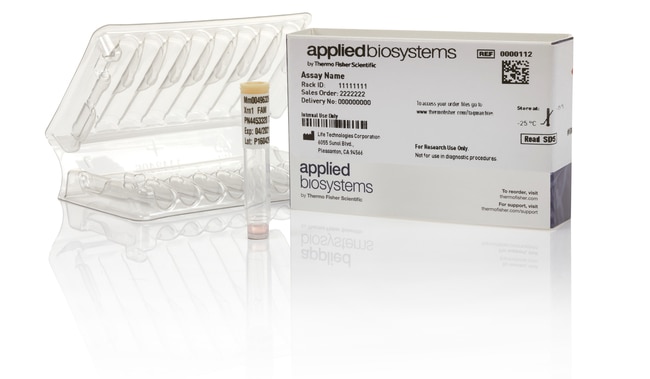
TaqMan™ SNP 基因分型试剂盒,人类
5' 核酸酶检测可以区分特定 SNP 的2个等位基因并用于基因分型研究
Have Questions?
更改视图

| 货号 | 标签或染料 | 数量 |
|---|---|---|
| 4351379 | FAM, VIC: | S (300 reactions), Made to Order |
| 4351374 | FAM, VIC: | L (2400 reactions), Made to Order |
| 4351376 | FAM, VIC: | M (1000 reactions), Made to Order |
| A80734 | ABY, Cy5 | S (300 Reactions), Made to Order |
| A80735 | ABY, Cy5 | M (1000 Reactions), Made to Order |
| A80736 | ABY, Cy5 | L (2400 Reactions), Made to Order |
货号 4351379
价格(CNY)
5,610.00
Each
标签或染料:
FAM, VIC:
数量:
S (300 reactions), Made to Order
Applied Biosystems TaqMan SNP Genotyping Assays use TaqMan 5'‐nuclease chemistry to amplify and detect specific polymorphisms in purified genomic DNA samples. Each assay enables genotyping of individuals for a single nucleotide polymorphism (SNP) and consists of two sequence-specific primers and two TaqMan minor groove binder (MGB) probes with non-fluorescent quenchers (NFQ). Assays contain one probe labeled with VIC or Cyanine 5 dye to detect the Allele 1 sequence; the second probe is labeled with FAM or ABY dye to detect the Allele 2 sequence.
Applied Biosystems TaqMan SNP 基因分型分析试剂盒使用 TaqMan 5´核酸酶化学试剂扩增和检测纯化基因组 DNA 样品中的特定多态性。每项测定可对个体进行单核苷酸多态性 (SNP) 基因分型,包括两个序列特异性引物和两个 TaqMan 小沟结合物 (MGB) 探针以及非荧光淬灭剂 (NFQ)。一个探针标记有 VIC 染料,以检测等位基因1序列;另一个探针标记有 FAM 染料来检测等位基因2序列。
我们预设计的 TaqMan SNP 基因分型人类检测试剂盒是全基因组收集的数百万种人类检测试剂盒,其中包括常见的1,000 基因组 SNP、HapMap SNP 和编码 SNP
。优势:
•技术成熟可靠—此款金标准的 TaqMan 化学试剂和耐用的检测产品设计能够提供准确、可重复且可靠的结果
•操作简单— 单管式规格方便易用,工作流程简单易懂,为得出可靠结果提供了一种简便途径
•相关—广泛收集预先设计的人类试剂盒,可直接查看与您的研究相关的内容
•经过检测—所有人类 SNP 基因分型试剂盒都经过功能测试,可以确保等位基因分型顺利完成
装运时间近似
4–北美6天;欧洲6–10天
TaqMan SNP 基因分型试剂盒仅需三个反应组分进行 PCR:纯化基因组 DNA (1–20 ng)、分析液和 TaqMan 基因分型预混液(或其他兼容的预混液)(单独出售)。
所有试剂盒的设计都是来源于生物信息学流程,在过去十年中不断通过生产和性能数据进行优化。TaqMan 检测试剂盒已被超过 40,000 份出版物引用,并且拥有超过350项专利。
我们所有的预设计 TaqMan 检测试剂盒均具备 TaqMan 试剂盒 QPCR 保证。*
推荐的预混液(单独销售):TaqMan 基因分型预混液
*适用条款和条件。有关完整详细信息,请访问 www.thermofisher.com/taqmanguarantee。
我们预设计的 TaqMan SNP 基因分型人类检测试剂盒是全基因组收集的数百万种人类检测试剂盒,其中包括常见的1,000 基因组 SNP、HapMap SNP 和编码 SNP
。优势:
•技术成熟可靠—此款金标准的 TaqMan 化学试剂和耐用的检测产品设计能够提供准确、可重复且可靠的结果
•操作简单— 单管式规格方便易用,工作流程简单易懂,为得出可靠结果提供了一种简便途径
•相关—广泛收集预先设计的人类试剂盒,可直接查看与您的研究相关的内容
•经过检测—所有人类 SNP 基因分型试剂盒都经过功能测试,可以确保等位基因分型顺利完成
装运时间近似
4–北美6天;欧洲6–10天
TaqMan SNP 基因分型试剂盒仅需三个反应组分进行 PCR:纯化基因组 DNA (1–20 ng)、分析液和 TaqMan 基因分型预混液(或其他兼容的预混液)(单独出售)。
所有试剂盒的设计都是来源于生物信息学流程,在过去十年中不断通过生产和性能数据进行优化。TaqMan 检测试剂盒已被超过 40,000 份出版物引用,并且拥有超过350项专利。
我们所有的预设计 TaqMan 检测试剂盒均具备 TaqMan 试剂盒 QPCR 保证。*
推荐的预混液(单独销售):TaqMan 基因分型预混液
*适用条款和条件。有关完整详细信息,请访问 www.thermofisher.com/taqmanguarantee。
仅供科研使用。不可用于诊断程序。
规格
3' 引物修改无
5' 引物修改无
描述VIC™ - MGB 探针检测等位基因 1、FAM - MGB 探针检测等位基因 2
适用于(设备)7500 System, 7500 Fast System, 7900HT System, StepOne™, StepOnePlus™, ViiA™ 7 System, QuantStudio™ Absolute Q Digital PCR System, QuantStudio™ 3, QuantStudio™ 5, QuantStudio™ 6 Flex, QuantStudio™ 7 Flex, QuantStudio 6 Pro, QuantStudio 7 Pro, QuantStudio™ 12k Flex ProFlex PCR System*, VeritiPro*, SimpliAmp*, MiniAmp*, Automated Thermal Cycler** If a thermal cycler is used for PCR amplification, the optional pre-read and the post-read must be performed separately on a real-time PCR system in order to detect and record fluorescent signals.
内部探针修改VIC™ (5')、FAM (5')、MGB(小沟结合物)(3')
反应次数300 次反应
产品线TaqMan
纯化方法固相萃取 (SPE)
纯度或质量等级不含 RNase 和 DNase
数量S (300 reactions), Made to Order
运输条件室温
种属人
靶标可提供超过450万种全基因组人类测定
最大浓度40X
适用于(应用)基因分型
形式冷冻
标签或染料FAM, VIC:
Unit SizeEach
内容与储存
1 管含 40X(S 和 M 规格)或 80X(L 规格)预配制测定试剂(2 探针和 2 引物)混合物的试管。
储存于 -15 到 -25°C。
储存于 -15 到 -25°C。
常见问题解答 (FAQ)
How do I set up a reference panel in the TaqMan Genotyper Software?
How do I enter the polymorphism sequence information (i.e., A, C, G, T) for my assays, and where is this info displayed in the TaqMan Genotyper Software?
What is the bookmarking feature in the TaqMan Genotyper Software, and how would I use it?
I am getting the message: "An error has occurred. See the log file C:\ProgramFiles\Applied Biosystems\TaqMan Genotyper\config\eclipse\1363113099385.log." How can I fix this?
Can I delete an assay or sample from my qPCR study?
引用和文献 (1421)
引用和文献
Abstract
Determination, mechanism and monitoring of knockdown resistance in permethrin-resistant human head lice, Pediculus humanus capitis
Journal:JOURNAL OF ASIA-PACIFIC ENTOMOLOGY
PubMed ID:
Permethrin resistance has been reported worldwide and clinical failures to commercial pediculicides containing permethrin have likewise occurred. Permethrin resistance in head lice populations from the U.S. is widespread but is not yet uniform and the level of resistance is relatively low (∼4-8 fold). Permethrin-resistant lice are cross-resistant to pyrethrins, PBO-synergized
Geographical mapping of a multifocal thyroid tumour using genetic alteration analysis & miRNA profiling
Journal:Molecular Cancer
PubMed ID:
Background: Papillary thyroid carcinoma (PTC) frequently presents as multiple tumour-foci within a single thyroid gland or pluriform, with synchronous tumours comprising different histological variants, raising questions regarding its clonality. Among the genetic aberrations described in PTC, the BRAF V600E mutation and ret/PTC activation occur most commonly. Several studies have investigated
Risk haplotype analysis for bovine paratuberculosis
Journal:JOURNAL OF NEURAL TRANSMISSION
PubMed ID:
Paratuberculosis (Johne's disease), caused by Mycobacterium avium subsp. paratuberculosis, is an important disease for bovines, although its genetic basis is poorly understood. In this study, three candidate genes were typed to study the associations between single nucleotide polymorphisms (SNPs) and paratuberculosis susceptibility (measured in a 1 or 0 form) at
Risk haplotype analysis for bovine paratuberculosis
Journal:MAMMALIAN GENOME
PubMed ID:
Paratuberculosis (Johne's disease), caused by Mycobacterium avium subsp. paratuberculosis, is an important disease for bovines, although its genetic basis is poorly understood. In this study, three candidate genes were typed to study the associations between single nucleotide polymorphisms (SNPs) and paratuberculosis susceptibility (measured in a 1 or 0 form) at
Association of Polymorphisms in Genes of the Homologous Recombination DNA Repair Pathway and Thyroid Cancer Risk
Journal:THYROID
PubMed ID:
Background: Ionizing radiation exposure has been pointed out as a risk factor for thyroid cancer. The double-strand breaks induced by this carcinogen are usually repaired by homologous recombination repair pathway, a pathway that includes several polymorphic genes. Since there is a scarcity of data about the involvement of these gene