Search


引用和文献 (43)
Invitrogen™
EVOS™ M5000 成像系统
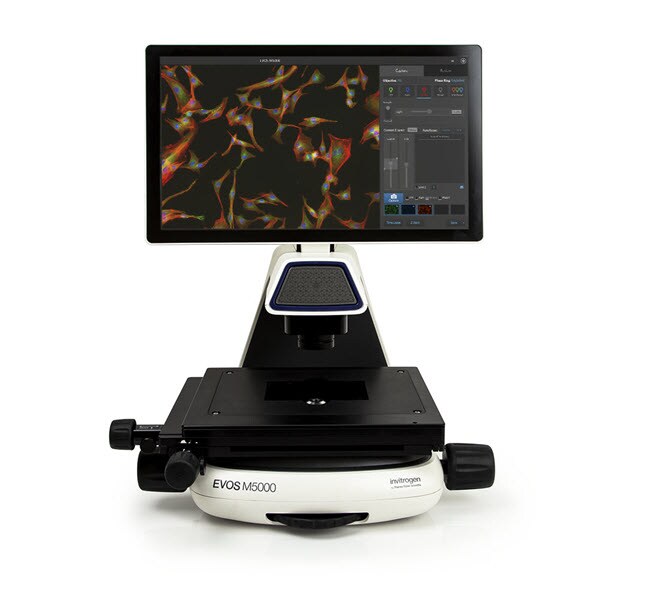
EVOS M5000 成像系统是一款完全集成的倒置数字台式显微镜,适用于四色荧光、透射光和彩色成像应用。采用可互换的可自动聚焦的光学器件,单击即可实现多通道图像采集,并设计了具有可用性的界面,您可以在几分钟内获得可供发表的高质量图像。EVOS M5000 系统是一款通用型显微镜,提供一系列捕获后工具,从亮度/对比度到注释和自动细胞计数,非常适合多种成像应用。EVOS M5000了解更多信息
| 货号 | 数量 |
|---|---|
| AMF5000 | 1 system |
货号 AMF5000
价格(CNY)
-
数量:
1 system
EVOS M5000 成像系统是一款完全集成的倒置数字台式显微镜,适用于四色荧光、透射光和彩色成像应用。采用可互换的可自动聚焦的光学器件,单击即可实现多通道图像采集,并设计了具有可用性的界面,您可以在几分钟内获得可供发表的高质量图像。EVOS M5000 系统是一款通用型显微镜,提供一系列捕获后工具,从亮度/对比度到注释和自动细胞计数,非常适合多种成像应用。
EVOS M5000 成像系统具有以下重要优点:
•安装方便 — 无需维护、组装、对齐或校准
• 用户定义的四色荧光、透射光和彩色应用
• 自动聚焦、Z 轴层扫功能、延时成像、单击实现多通道采集
• 机载软件,可用于采集、分析、自动细胞计数
完全集成式成像系统
EVOS M5000 显微镜将精密部件与独特的现代设计功能性相结合,能够以出色的灵活性随意实现高质量荧光和彩色成像。它是一个完全集成的成像系统,结合了精密光学器件、18.5” 高分辨率铰接式 LCD 显示器和高灵敏度 3.2 MP 单色 CMOS 照相机 (2048 x 1536),照相机的分辨率为 3.45 µm 像素。单色照相机可为检测微弱的荧光信号提供更佳灵敏度,并实现定量分析。同时,聚光器还包括一个基于 LED 的新型 RGB 照明方案,该方案可使用相同的单色传感器采集高质量、低噪音的彩色图像,能让颜色在透射光成像中更加保真,这有助于染色的组织样品(如 H&E 染色组织切片)成像。
多功能和灵活配置性
有一个五位物镜转盘,可通过四个荧光通道、透射光相位对比及彩色模式采集图像,可简易地配置光学系统,以满足您的检测需要。从我们的多种高质量、长工作距离和盖玻片校正物镜中进行选择,以便与塑料容器或玻璃面配合使用。有 1.25X 至 100X 放大倍数可供选择,具有消色差物镜、萤石物镜或复消色差物镜校正,同时还有超过二十个LED 光立方,样品成像选项无限制。可互换的容器支架可适应大多数容器类型和尺寸,包括玻片、多孔板、培养瓶和皮氏培养皿。
易于使用且可靠
EVOS M5000 成像系统功能强大,并具有即插即用的简易性。无需预热或冷却,您可以在几分钟内采集图像。环境安全的无汞 LED 灯标示使用寿命为 50,000 小时,并可提供出色的稳定性和耐用性—您可以在需要对样品成像时随时打开和关闭设备。与使用传统光源的仪器相比,使用寿命长且能耗低,从而显著降低了操作成本。EVOS M5000 显微镜由生物学家为生物学家而设计,具有现代化的图标界面,非常易于使用。在无缝图像采集后,您可以使用一组便捷的工具(在实时模式和保存的图像中均可用)对您的图像进行分析、编辑和注释。为了对 DAPI 染色细胞的数量进行轻松计数,我们开发了一个自动细胞计数应用。完成编辑和分析后,将图像和数据保存到嵌入式硬盘、外部 USB 设备或本地网络。
EVOS 成像系统采用崭新设计,可较大限度地提高性能并优化工作流程。您将对操作的简易程度和您在屏幕上看到的出色图像感到惊讶。
有关 EVOS M5000 成像系统的更多信息 ›
查找完整的 EVOS 系列成像系统、附件和报价 ›
EVOS M5000 成像系统具有以下重要优点:
•安装方便 — 无需维护、组装、对齐或校准
• 用户定义的四色荧光、透射光和彩色应用
• 自动聚焦、Z 轴层扫功能、延时成像、单击实现多通道采集
• 机载软件,可用于采集、分析、自动细胞计数
完全集成式成像系统
EVOS M5000 显微镜将精密部件与独特的现代设计功能性相结合,能够以出色的灵活性随意实现高质量荧光和彩色成像。它是一个完全集成的成像系统,结合了精密光学器件、18.5” 高分辨率铰接式 LCD 显示器和高灵敏度 3.2 MP 单色 CMOS 照相机 (2048 x 1536),照相机的分辨率为 3.45 µm 像素。单色照相机可为检测微弱的荧光信号提供更佳灵敏度,并实现定量分析。同时,聚光器还包括一个基于 LED 的新型 RGB 照明方案,该方案可使用相同的单色传感器采集高质量、低噪音的彩色图像,能让颜色在透射光成像中更加保真,这有助于染色的组织样品(如 H&E 染色组织切片)成像。
多功能和灵活配置性
有一个五位物镜转盘,可通过四个荧光通道、透射光相位对比及彩色模式采集图像,可简易地配置光学系统,以满足您的检测需要。从我们的多种高质量、长工作距离和盖玻片校正物镜中进行选择,以便与塑料容器或玻璃面配合使用。有 1.25X 至 100X 放大倍数可供选择,具有消色差物镜、萤石物镜或复消色差物镜校正,同时还有超过二十个LED 光立方,样品成像选项无限制。可互换的容器支架可适应大多数容器类型和尺寸,包括玻片、多孔板、培养瓶和皮氏培养皿。
易于使用且可靠
EVOS M5000 成像系统功能强大,并具有即插即用的简易性。无需预热或冷却,您可以在几分钟内采集图像。环境安全的无汞 LED 灯标示使用寿命为 50,000 小时,并可提供出色的稳定性和耐用性—您可以在需要对样品成像时随时打开和关闭设备。与使用传统光源的仪器相比,使用寿命长且能耗低,从而显著降低了操作成本。EVOS M5000 显微镜由生物学家为生物学家而设计,具有现代化的图标界面,非常易于使用。在无缝图像采集后,您可以使用一组便捷的工具(在实时模式和保存的图像中均可用)对您的图像进行分析、编辑和注释。为了对 DAPI 染色细胞的数量进行轻松计数,我们开发了一个自动细胞计数应用。完成编辑和分析后,将图像和数据保存到嵌入式硬盘、外部 USB 设备或本地网络。
EVOS 成像系统采用崭新设计,可较大限度地提高性能并优化工作流程。您将对操作的简易程度和您在屏幕上看到的出色图像感到惊讶。
有关 EVOS M5000 成像系统的更多信息 ›
查找完整的 EVOS 系列成像系统、附件和报价 ›
仅供科研使用。不可用于诊断程序。
规格
颜色混色
尺寸18 in.(宽)x 23 in.(高)x 18 in.(深)
显示器18.5 in. 铰接式 LCD
适用于(应用)成像
适用于(设备)EVOS™
光源LED
放大1.25X 至 100X
型号EVOS M5000
对象5位转盘
数量1 system
分辨率1920 x 1080 像素
运输条件室温
重量(英制)36 lb.
相机320万像素,单色,CMOS
产品线EVOS:
类型细胞成像系统
Unit SizeEach
内容与储存
EVOS M5000 成像系统
• 18.5 英寸铰接式 LCD 彩色显示器,1920 x 1080 像素分辨率
• 嵌入式计算机,具有 4 GB RAM
• EPI 轴向移动约束块
• 立方体访问工具
• 光立方体空白
• 载物台快速释放销
• EVOS 聚光器遮光罩
EVOS M5000 配件套件
• USB WiFi 加密锁
• USB 无线键盘
•容器支架(用于载玻片)(AMEPVH001)
• 通用容器支架 (AMEPVH009)
• EVOS 校准载玻片 (AMEP4720)
• 通用电源,12V,5A
• 电源线,B 型(北美)
• 紫外防护罩
•EVOS 遮光罩
• 阻挡聚光器滑块 (AMEP4688)
• 聚光器滑块,用于 4X 物镜 (AMEP4738)
• 漫射聚光器滑块,用于明场应用 (AMEPDFS1)
• EVOS 防尘罩
• 物镜箱,带可调节的隔室
• 六角驱动器,2 mm
EVOS M5000 担保品包
• EVOS M5000 快速入门指南
• EVOS M5000 智能启动模块宣传页
• 16 GB USB 3.0 驱动及手册和配件文档
• 鼠标垫
• 技术支持卡
* 请注意,在不使用 B 型(北美)电源插头的地区,必须单独订购一 (1) 根特定国家/地区的电源线:
AMEP4646 EVOS 电源线,C 型(欧洲)
AMEP4708 EVOS 电源线,D 型(印度/南非)
AMEP4645 EVOS 电源线,G 型(英国)
AMEP4649 EVOS 电源线,H 型(以色列)
AMEP4647 EVOS 电源线,I 型(澳大利亚)
AMEP4782 电源线,I 型(中国,CCC 认证)
AMEP4786 电源线,J 型(瑞士)
AMEP4648 EVOS 电源线,L 型(意大利)
• 18.5 英寸铰接式 LCD 彩色显示器,1920 x 1080 像素分辨率
• 嵌入式计算机,具有 4 GB RAM
• EPI 轴向移动约束块
• 立方体访问工具
• 光立方体空白
• 载物台快速释放销
• EVOS 聚光器遮光罩
EVOS M5000 配件套件
• USB WiFi 加密锁
• USB 无线键盘
•容器支架(用于载玻片)(AMEPVH001)
• 通用容器支架 (AMEPVH009)
• EVOS 校准载玻片 (AMEP4720)
• 通用电源,12V,5A
• 电源线,B 型(北美)
• 紫外防护罩
•EVOS 遮光罩
• 阻挡聚光器滑块 (AMEP4688)
• 聚光器滑块,用于 4X 物镜 (AMEP4738)
• 漫射聚光器滑块,用于明场应用 (AMEPDFS1)
• EVOS 防尘罩
• 物镜箱,带可调节的隔室
• 六角驱动器,2 mm
EVOS M5000 担保品包
• EVOS M5000 快速入门指南
• EVOS M5000 智能启动模块宣传页
• 16 GB USB 3.0 驱动及手册和配件文档
• 鼠标垫
• 技术支持卡
* 请注意,在不使用 B 型(北美)电源插头的地区,必须单独订购一 (1) 根特定国家/地区的电源线:
AMEP4646 EVOS 电源线,C 型(欧洲)
AMEP4708 EVOS 电源线,D 型(印度/南非)
AMEP4645 EVOS 电源线,G 型(英国)
AMEP4649 EVOS 电源线,H 型(以色列)
AMEP4647 EVOS 电源线,I 型(澳大利亚)
AMEP4782 电源线,I 型(中国,CCC 认证)
AMEP4786 电源线,J 型(瑞士)
AMEP4648 EVOS 电源线,L 型(意大利)
常见问题解答 (FAQ)
Can I visualize Alexa Fluor 488 dye using the EVOS M5000 Imaging System?
What laser should I use with the EVOS M5000 Imaging System?
Can I visualize Alexa Fluor 647 dye using the EVOS M5000 Imaging System?
Can I upgrade my EVOS M5000 Imaging System (Cat. No. AMF5000)?
I'm imaging my fluorescently stained samples on EVOS M7000/ EVOS M5000 imaging system and I can't see any color on the displayed image. How do I visualize my images in color?
引用和文献 (43)
引用和文献
Abstract
The panniculus carnosus muscle: A novel model of striated muscle regeneration that exhibits sex differences in the mdx mouse.
Journal:Sci Rep
PubMed ID:31685850
'The dermal striated muscle panniculus carnosus (PC), prevalent in lower mammals with remnants in humans, is highly regenerative, and whose function is purported to be linked to defence and shivering thermogenesis. Given the heterogeneity of responses of different muscles to disease, we set out to characterize the PC in wild-type
Negative Regulation of TLR Signaling by BCAP Requires Dimerization of Its DBB Domain.
Journal:J Immunol
PubMed ID:32198144
'The B cell adaptor protein (BCAP) is a multimodular regulator of inflammatory signaling in diverse immune system cells. BCAP couples TLR signaling to phosphoinositide metabolism and inhibits MyD88-directed signal transduction. BCAP is recruited to the TLR signalosome forming multitypic interactions with the MAL and MyD88 signaling adaptors. In this study,
Imbalanced Host Response to SARS-CoV-2 Drives Development of COVID-19.
Journal:Cell
PubMed ID:32416070
'Viral pandemics, such as the one caused by SARS-CoV-2, pose an imminent threat to humanity. Because of its recent emergence, there is a paucity of information regarding viral behavior and host response following SARS-CoV-2 infection. Here we offer an in-depth analysis of the transcriptional response to SARS-CoV-2 compared with other
Pathogenesis of SARS-CoV-2 in Transgenic Mice Expressing Human Angiotensin-Converting Enzyme 2.
Journal:Cell
PubMed ID:32516571
'COVID-19 has spread worldwide since 2019 and is now a severe threat to public health. We previously identified the causative agent as a novel SARS-related coronavirus (SARS-CoV-2) that uses human angiotensin-converting enzyme 2 (hACE2) as the entry receptor. Here, we successfully developed a SARS-CoV-2 hACE2 transgenic mouse (HFH4-hACE2 in C3B6
Sirtuin 6 deficiency induces endothelial cell senescence via downregulation of forkhead box M1 expression.
Journal:Aging (Albany NY)
PubMed ID:33171439
'Cellular senescence of endothelial cells causes vascular dysfunction, promotes atherosclerosis, and contributes to the development of age-related vascular diseases. Sirtuin 6 (SIRT6), a conserved NAD+-dependent protein deacetylase, has beneficial effects against aging, despite the fact that its functional mechanisms are largely uncharacterized. Here, we show that SIRT6 protects endothelial cells